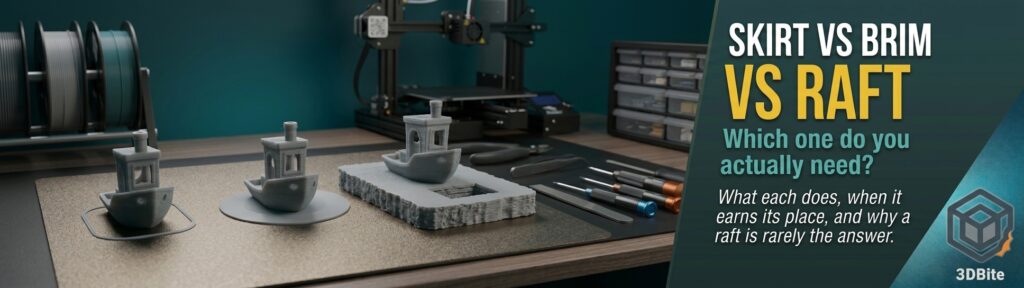
Skirt, brim and raft sit next to each other in the slicer’s settings and get lumped together as “adhesion helpers”, which is the root of most of the confusion about them. They are three different tools that do three different jobs, and only two of them have anything to do with adhesion at all. Picking the wrong one either wastes time and filament or, in the raft’s case, quietly ruins the underside of your print. This post explains what each one is for, when you genuinely need it, and where to find the settings, and it follows on naturally from the bed adhesion post and the first layer troubleshooting post.
The short version
| Skirt | Brim | Raft | |
|---|---|---|---|
| What it is | One or two loops printed near the part but not touching it | A flat ring of extra lines attached to the part’s first layer | A sacrificial platform printed under the whole part |
| Main job | Prime the nozzle and let you check the first layer | Increase grip at the edges of the part | Replace the plate as the surface the part prints on |
| Helps adhesion? | No | Yes | Yes, the most |
| Material and time cost | Negligible | Low | High |
| Effect on the finished part | None | Minor cleanup at the edge | Rough underside and a risk of damage on removal |
| Reach for it when | Almost always, as a check | Corners lift, the footprint is small or the part is tall and thin | A brim has failed, or the surface or material is genuinely difficult |
The rule most sources converge on is simple: a skirt is for priming, a brim is for adhesion, and a raft is only for when you really need it. The fixmyprint guide puts the proportions bluntly, saying a brim would solve the same problem as a raft about 95% of the time. The rest of this post is the reasoning behind that.
Skirt: it does not touch the part, and that is the point
A skirt is one or two loops of filament printed around the model with a gap between them, which is why it does nothing for adhesion. Its jobs are different. It primes the nozzle, getting plastic flowing evenly before the model itself starts. It also acts as a free diagnostic: because it prints the first layer around the part, you can see at a glance whether the plate is levelled correctly and whether extrusion looks healthy before the important geometry begins. It costs almost no time or material and is removed by simply pulling it away from the plate.
On a Bambu printer the priming job is largely done for you. The machine runs its own start routine before each print, and the A1 ships with a purge wiper for exactly that reason, so a skirt adds little on the priming side. Default skirt settings vary between profiles, so it is worth checking what yours is set to rather than assuming. What it still offers is the quick visual check of the first layer, which ties directly into the diagnostic work in the first layer post and the initial layer flow ratio post.
One trick worth knowing: if you set the skirt distance to zero it touches the part, and it effectively becomes a very thin partial brim. That can be a handy middle ground for a small part that needs a little extra grip without a full brim.
Brim: more grip exactly where parts let go
A brim is a flat ring of extra extrusion lines printed around the base of the model and attached to it, like the brim of a hat. It prints on the first layer only and is trimmed away afterwards. To see why it works, think about where prints actually fail. Warping is caused by the plastic shrinking as it cools, and that shrinkage pulls hardest at the edges and corners of a large flat footprint, so those are the places that lift first. A brim does not change the shrinkage. What it does is add more bonded surface area around the edge, so the plate’s grip is spread over a wider zone and the part has to overcome far more adhesion before a corner can peel up.
That is also why a brim is the most useful of the three. It is the one the sources call the Goldilocks option: it gives genuine extra adhesion while keeping material use and print time low, and it leaves only a small amount of cleanup at the edge.
When a brim earns its place
- Corners are lifting on large, flat parts, which is the classic warping case.
- The part has a small footprint relative to its height, such as a tall, thin figure or a slim tower.
- The part has thin features or sharp points on the first layer that tend to peel.
- You are printing a material that warps more than PLA, such as ABS, ASA or nylon, covered in the nylon post and A1 enclosure post.
- You are printing a vase-mode piece with a small base, as in the vase mode guide.
Brim types and settings
Width is the main setting. Common guidance is 5 to 10mm for ordinary cases and a wider brim of 10 to 15mm for severe warping, with larger values giving more grip and more waste. The other setting that matters is the gap between the brim and the part. A brim attached directly to the part holds best but leaves a more visible edge to clean, and a small gap makes the brim easier to remove at the cost of a little grip.
The brim type decides where the extra lines go. The common options are an outer brim, an inner brim (printed inside holes in the part), or both. Bambu Studio also offers an Auto option, which calculates the width for you, and the guides suggest Auto usually makes a sensible decision. OrcaSlicer adds further types, covered below.
Mouse ears: a brim only where you need it
If only the corners of your part lift, a full brim is overkill. Mouse ears, also called brim ears, are small disc-shaped pads placed only at the sharp corners, so you get the grip where it matters and far less cleanup. OrcaSlicer builds them automatically when the brim type is set to Mouse Ears, using an angle threshold to decide which features get one: sharper corners get ears and gentle curves do not. It also offers a Painted type where you place the ears yourself, and an option to restrict them to the outer contour so they are not placed inside holes. Bambu Studio has a brim-ears tool of its own in recent versions, though the menu names have shifted between releases, so check your version.
Raft: a platform under the whole part
A raft is a thick, sacrificial base printed first, with the actual model printed on top of it. It is the heaviest of the three adhesion tools, and understanding what it actually does explains both its strengths and its costs. The part is no longer stuck to the plate at all. It is stuck to the raft, and the raft is stuck to the plate. The raft’s much larger footprint spreads the grip across a wide area, and its thickness absorbs minor unevenness in the surface underneath, so the model’s first layer sits on a flat, forgiving base instead of directly on whatever the plate happens to offer.
The cost is substantial. A raft adds a lot of print time and a lot of filament, since it is a full extra slab under the model. It also leaves the underside of the part rough, because the model’s first layer is printed onto the raft’s top layer rather than onto a smooth plate, and removing the raft can mark the part or even damage it. That is why guides repeatedly say to use a raft only when a brim would not solve the problem.
Where a raft genuinely makes sense
- A brim has been tried and the part still lifts, which usually means a very warp-prone material or a very small contact area.
- The model has almost no flat base, so there is nothing for a brim to grip.
- The build surface has visible scratches or low spots that ruin first layers, and you cannot swap it.
- You are printing a flexible material like TPU on a surface it does not grip well.
- You are printing a warp-prone material in a setup without a good enclosure, which is why OrcaSlicer’s own tooltip suggests raft layers for ABS.
The case that used to justify a raft most often, an uneven or poorly levelled bed, has become much weaker on modern machines. The A1 and A2L level the bed and set the Z offset automatically before each print, as covered in the calibration routine post, so a raft is rarely the right fix for that on this hardware. If a raft seems necessary because of bed problems, the better question is why the first layer is failing in the first place.
Raft settings
Two settings matter. Raft layers is the number of layers in the platform, with 2 to 3 the commonly recommended range, since a single top layer gives a rougher surface for the part to print on. The contact gap, often called the air gap or contact Z distance, is the small vertical space between the top of the raft and the first layer of the part. A smaller gap bonds the part more strongly to the raft and makes it harder to separate, and a larger gap makes separation easier but weakens the bond. Adjust it in small steps rather than large ones. In both Bambu Studio and OrcaSlicer the raft settings live under the Support tab, so look for Raft layers there.
One related note. Bambu Studio’s 2.8.4 beta fixed an issue where the first-layer height could be wrong when printing with a raft in vase mode, covered in the 2.8.3 and 2.8.4 post, which is a reminder that this combination is a less common corner of the slicer.
What to use for which material
| Material | Typical choice | Why |
|---|---|---|
| PLA | Skirt or nothing; a brim for large flat parts or tiny footprints | PLA adheres well and warps little, as the PLA post explains, so adhesion aids are usually not needed |
| PETG | Skirt; a brim only if corners lift | PETG bonds aggressively to the plate, so extra adhesion is rarely the problem, see the PETG post |
| TPU | Skirt, or a brim for a small footprint | Flexible parts can peel at small contact points, and the TPU post covers its quirks |
| ABS / ASA | Brim, and a raft if warping persists | High shrinkage makes corners lift, and an enclosure matters more than any adhesion tool |
| Nylon / PC | Wide brim or raft, in an enclosure | Both warp strongly and need heat as well as grip, as the PC post and nylon post explain |
Where to find the settings
| Setting | Bambu Studio | OrcaSlicer |
|---|---|---|
| Skirt loops, distance and height | Process, Others, Skirt section | Process, Others, Skirt section |
| Brim type, width and gap | Process, Others, Brim section (Auto, outer, inner, both or none) | Process, Others, Brim section, with Auto, Mouse Ears and Painted types added |
| Raft layers and contact gap | Process, Support tab | Process, Support tab |
Menu layouts change between versions, so if you cannot find a setting, use the search box at the top of the process panel. The OrcaSlicer versus Bambu Studio post covers why the two share so many settings and where they diverge.
A brim treats a symptom, not the cause
This is the most important practical point in the post. A brim or raft makes a marginal first layer more likely to survive, but it does not make a bad first layer good. If prints keep lifting, work through the real causes first: a clean plate, the correct plate selected in the slicer, a sensible Z offset, and appropriate bed temperature, all covered in the first layer and bed adhesion posts. Using a raft to cover for a badly calibrated machine produces a print that sticks and a machine that is still wrong, and the next print without a raft will fail the same way. Treat the brim as the extra help a genuinely difficult part needs, not as a default fix.
Common mistakes
- Reaching for a raft first, when a brim would have solved the problem with far less cost.
- Using a raft on a part where the underside is visible, which is exactly where the rough finish shows.
- Setting the raft contact gap too small and then damaging the part trying to separate it.
- Using a thick full brim on a part that only lifts at a few corners, when mouse ears would do.
- Skipping the skirt entirely and losing the free first-layer check.
- Expecting a brim to fix warping in a material that really needs an enclosure.
- Adding adhesion aids to cure a Z offset or plate problem that is the actual cause.
The summary
Use a skirt as a cheap, always-on check of the first layer, remembering it does nothing for adhesion. Use a brim when corners lift or the footprint is small, starting at 5 to 10mm and using mouse ears when only a few corners need help. Keep a raft for the genuinely difficult cases, accept the rough underside that comes with it, and keep the raft layers at 2 to 3 with a carefully tuned contact gap. For most PLA and PETG printing on a calibrated Bambu machine, that means a skirt and nothing else, with a brim on the occasions a part asks for one. If you find yourself reaching for a raft often, the real problem is almost certainly further upstream.