Two beta releases in the space of two weeks — 2.8.3 Public Beta on September 8, 2026, and 2.8.4 Public Beta following close behind — continue the incremental polish cycle this site has tracked since the Assembly Guide work in 2.8.0 and the Decompose Color feature in 2.8.1. Neither release brings a single dramatic headline feature. Both bring a genuinely useful cluster of print quality refinements, interface polish, and — in 2.8.4’s case specifically — a subtle dimensional accuracy fix that anyone doing multi-colour painted work should know about. Worth covering both together properly rather than skimming the changelog for either.
2.8.3 Public Beta
Illustrated slicing parameter tips
Hovering over a process parameter’s name now shows an illustrated tip alongside the text description, helping visualise how different settings affect the printed result rather than relying on a one-line tooltip. Anyone who has worked through the support settings, retraction settings, or seam placement deep dives on this site will recognise exactly the gap this fills — a quick in-context visual reminder while actually slicing, rather than a substitute for the fuller explanation those posts go into.
Filament Manager interaction improvements and cloud sync
The interaction experience and filament entry workflow in the Filament Manager have been improved further on top of the device-page work introduced in 2.8.1, and Filament Manager data is confirmed as stored in Bambu Cloud and synchronised between Bambu Studio and Bambu Handy — a filament entry updated on one now genuinely reflects on the other.
Wipe tower placement and print quality controls
The automatic placement behaviour of the wipe tower has been optimised to reduce overlaps and interference with models or other objects on the plate — a small fix for a genuinely recurring annoyance covered in the hidden workflow cost post. On the slicing side, the engine now supports independently setting the infill line width for the first layer specifically to improve first-layer adhesion, connecting directly to the first layer troubleshooting post. A new Archimedean spiral ironing pattern has been added to further improve top surface quality, and a separate infill pattern can now be set for the second-to-top surface specifically, helping reduce the visibility of internal extrusion marks showing through on the final top layer — directly relevant to the pillowing mechanism covered in the pillowing post.
Boolean tool stability and general fixes
The release also improves boolean tool stability, optimises mouse-interaction behaviour, and fixes a series of known issues — none individually headline material, but boolean tool stability specifically has been a recurring minor pain point in community discussion, and incremental improvement there is worth noting even without a specific before-and-after example to point to.
2.8.4 Public Beta
Released by JinGangBambu, this version brings a series of user experience improvements. It focuses on optimising the UI and performance of texture import, adding prompts in model deletion scenarios to help prevent accidental operations, and improving the smoothness of both the Cut tool and Device page switching, alongside a genuinely important slicing engine fix around shrinkage compensation on painted models.
Texture import: faster, and the preview finally matches reality
Three genuine improvements land here together. Model repair speed during texture import is faster, which matters directly for any multi-part project bringing in externally sourced or scanned models — the STL Buddy post specifically flagged that photogrammetry scans tend to arrive with more surface noise and need more repair work than a purpose-designed model, so a faster repair pass is a direct win for that exact use case. UI interactions during texture import have been optimised, and the automatic filament matching logic has been improved on top of the Decompose Color work introduced in 2.8.1.
The more interesting change is the third one: the original model’s rendering has changed from texture-map rendering to high-precision facet colour rendering, so the preview now more closely matches the actual printed result. This is a genuinely important fix rather than a cosmetic tweak — a preview that renders differently from what the printer will actually produce is worse than no preview at all, since it actively misleads you about what to expect. Anyone who has imported a textured model and been surprised by how the finished colours actually looked compared to the on-screen preview should see that gap close meaningfully with this change.
Top surface monotonic line infill: fewer wasted travel moves
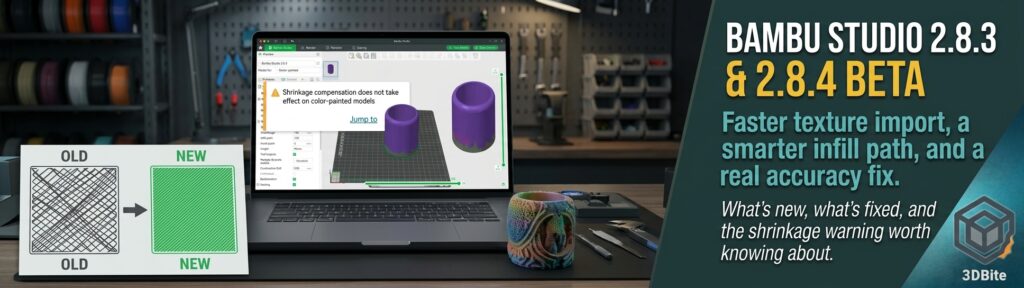
This release optimises the printing path for the top surface monotonic line infill pattern specifically, reducing travel moves during printing and improving efficiency — with the improvement described as more noticeable on models with more detailed, complex top surfaces. The before-and-after diagram in the release notes shows exactly what this means in practice: the “before” toolpath crosses back and forth with visible redundant travel between print segments, while the “after” path is considerably more direct. This connects to the same underlying efficiency logic covered in the infill patterns post — a cleaner toolpath is not just faster, it also means less time for stray oozing or heat-related artefacts to accumulate during otherwise-unnecessary nozzle movement.
Shrinkage compensation now correctly disabled on painted models
This is the change most worth understanding properly, because it fixes a genuinely subtle dimensional accuracy problem in multi-colour work. Different filaments shrink by different amounts as they cool — this is the same principle covered in the filament drying post‘s discussion of material behaviour, and it is why the slicer has a shrinkage compensation setting in the first place, scaling the model slightly to counteract a specific filament’s known contraction. The problem 2.8.4 addresses: on a painted, multi-colour model using several different filaments simultaneously, each material has its own shrinkage rate, and applying one filament’s compensation factor uniformly across a part printed in several materials would distort the model’s actual dimensions unpredictably rather than correcting them.
The fix is sensible: when slicing painted models, the engine no longer applies filament shrinkage compensation by default, since doing so with mismatched per-filament settings risked making dimensions worse rather than better. Critically, Bambu Studio now surfaces this as an informational prompt whenever the shrinkage factor in the material settings is not the default 100% and the current plate contains painted models — a direct “Jump to [object]” link in the warning takes you straight to the affected part. This is exactly the kind of quiet dimensional accuracy trap that would previously have produced a confusing undersized or oversized print with no obvious cause, and having the software flag it explicitly rather than silently applying a compensation that was never going to help is a genuine improvement for anyone doing serious multi-material colour work.
Interface and workflow polish
A cluster of smaller but genuinely useful changes rounds out this release. The Device page now loads faster, reducing the wait after entering it, with improved UI interactions and visual design specifically in the AMS settings area. The Cut tool’s performance has been optimised, making dovetail cutting operations smoother — relevant for anyone using the multi-part splitting techniques covered in the multi-part printing post to prepare models for separate-colour printing.
Two changes specifically target accidental data loss, and both are worth knowing about. Deleting a filament that is already in use by a model now triggers a prompt first, preventing the accidental deletion and unexpected filament reset that could previously happen silently. And a warning message now appears when only non-printable objects are left on the plate — catching the situation where every remaining item on a plate is something the slicer cannot actually produce, before you waste time trying to slice it.
A few further quality-of-life fixes: sending a model imported from MakerWorld to print now uses your current project name rather than the original configuration name, avoiding the confusing job history that could previously build up on the printer’s own screen. The Text tool now supports line breaks with Enter and line spacing control, thanks to community contributor @jeremykenedy.
Bug fixes worth flagging
One genuine security fix stands out: a stack buffer overflow in ADMesh’s STL reading code has been patched, reported by @MAVProxyUser — worth knowing about specifically because it touches the exact file-import pathway that every downloaded, scanned, or shared model passes through. Beyond that, a first-layer height error when printing with a raft enabled in Vase Mode has been fixed — directly relevant to the vase mode printing covered in the Christmas tree vase mode post — alongside fixes for crashes when painting colours, importing OBJ files on macOS, and during slicing generally, plus a fix for X2D Bowden extruder retraction length not applying correctly in custom profiles.
The usual beta caveats
As with every beta covered on this site, both releases are feature-complete builds intended for testing ahead of a wider stable rollout rather than unstable experiments, and they install alongside the existing stable version rather than replacing it. 3MF files saved in either beta are, as usual, not currently supported for upload to MakerWorld — use the official stable release for anything that needs to go there.
The overall verdict
Neither release is a must-update on its own merits alone, but together they represent genuinely sensible incremental progress — better print quality tooling in 2.8.3, and in 2.8.4 specifically, a real fix for a dimensional accuracy trap that anyone doing serious multi-colour painted work would otherwise hit without any obvious explanation. The shrinkage compensation warning and the corrected texture preview rendering are the two changes most worth updating for if multi-colour and textured model work is a regular part of your workflow; the illustrated parameter tips from 2.8.3 are the change most people will simply notice day to day, purely because they show up every time you hover over a setting.