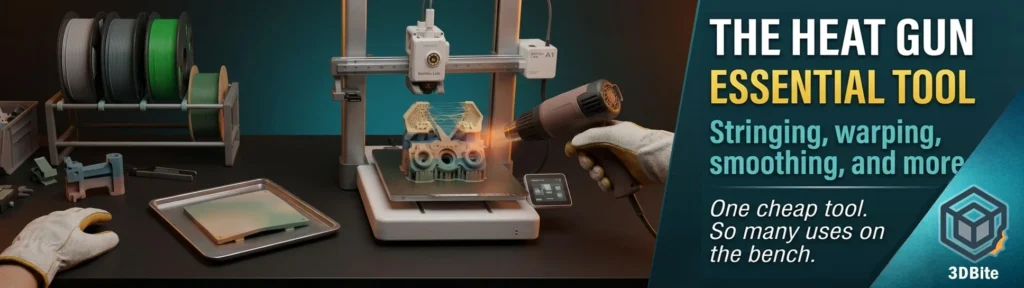
If you asked me to name the single most useful non-printer tool on my bench, it would not be a calibration gauge, a set of precision screwdrivers, or anything specific to FDM at all. It would be a heat gun — the kind of thing that lives in most workshops for paint stripping and shrink-wrapping and gets borrowed occasionally for 3D printing duties. Once you start using it as part of your printing workflow, it becomes one of those tools you reach for constantly and wonder how you managed without.
My own habit, and the one that started this post, is simple: before I remove a print from the bed, I give it a quick blast with the heat gun, particularly around any areas where stringing is visible. This one habit alone has improved the finish of more prints than almost any slicer setting change I have made. But that is just the starting point. The heat gun has half a dozen other genuinely useful jobs around the print station, and this post covers all of them.
The pre-removal stringing blast
Stringing — those thin wisps of filament that appear between features where the nozzle has travelled across a gap — is one of the most common cosmetic defects in FDM printing. It happens because molten filament oozes out as the print head moves between different parts of the object, leaving thin strands that compromise the overall quality of the print. Retraction settings, temperature tuning, and dry filament all reduce stringing at source, and getting those right matters. But even a well-tuned profile produces the occasional string on a complex model, and the standard advice is to pick them off with tweezers or trim them with a filament cutter.
The heat gun does this better. Instead of tediously trimming away the stringing with filament cutters, a heat gun provides a quicker and cleaner solution — by gently applying heat to the affected areas, the excess filament strands can be easily removed. The string melts and either retracts into the surface or can be wiped away cleanly, leaving no trace of where it was. Heat guns work quickly to remove stringing without the need for manual cutting, saving time and effort, and with the right temperature settings and technique, you can precisely target and eliminate stringing without damaging the print itself.
The reason I do this before removing the print rather than after is twofold. First, the print is still warm from the bed at this point, which means the surface filament is already closer to its softening point — less heat input is needed to finish the job, which reduces the risk of over-softening surrounding detail. Second, the print is still fixed in position on the plate, which gives you a stable working surface rather than holding a loose part in one hand while wielding a heat gun in the other. A quick pass over any visible strings, moving the gun continuously rather than holding it in one spot, clears the majority of stringing before the part ever comes off the bed.
The technique that matters most: keep the gun moving, use a low or medium heat setting, and hold it a reasonable distance from the print. A few inches away, moving continuously, is the standard guidance — and it is correct. The goal is to soften the thin strings just enough that they retract or wipe away, not to soften the surface of the model itself. Stationary heat on one spot for more than a second or two on PLA risks leaving a visible shiny patch or a slight deformation. Moving heat does the job without that risk.
Fixing warped corners and lifted edges
This is the use case that turns a heat gun from a nice-to-have into something closer to essential, especially if you print PETG regularly. A print that has lifted at the corners — a common warping symptom on larger flat prints, particularly on PETG and ABS — does not have to be a write-off. If you spot warping, use a heat gun to reshape the print, gently applying heat and pressing the lifted area back down by hand.
The technique: heat the warped area until the plastic becomes pliable — warm, not molten — then press it back into the correct shape and hold it there while it cools. Some makers have successfully flattened the bottom of a curled print by placing it on a flat metal surface, blowing hot air on the print, and pressing the softened plastic onto the hard surface. A flat metal surface — a baking tray, an offcut of aluminium, anything flat and heat-tolerant — gives you a reference plane to press against, which produces a much cleaner result than trying to flatten by eye and feel alone.
This is particularly effective for PLA, which has a comparatively low glass transition temperature and softens at temperatures that are easy to control with a domestic heat gun without scorching or discolouring the material. PETG and ABS can also be reshaped this way but require more care — they soften over a wider temperature range and the margin between “pliable” and “starting to bubble or discolour” is narrower. The honest caveat from the wider literature: this method is particularly effective for small deformations and for parts that do not require tight tolerances or good dimensional accuracy. A warped corner on a decorative piece — fix it and move on. A warped corner on a precision functional part with tight fits — better to reprint with the warping addressed at source, because a reshaped corner will not have the same dimensional precision as one that printed flat.
Surface smoothing on ABS and PETG
Heat smoothing — using controlled heat to soften the print surface enough that adjacent layer lines meld together — is a recognised post-processing technique for ABS and PETG specifically. The method: hold the heat gun a few inches away and move it back and forth across the surface, watching closely as the layer lines begin to soften and blend. The result, done well, is a noticeably smoother surface than the as-printed finish without any sanding or chemical treatment.
PETG is more sensitive to heat than ABS and can deform more easily, so the heat setting needs to be lower and the gun needs to keep moving — the margin for error is smaller. PLA is generally not recommended for heat smoothing because its lower melting point makes it far more prone to deforming before the layer lines have meaningfully softened — the result is often a part that has lost its shape before the surface has improved. If you want smoother PLA, sanding and filler priming are the recommended routes; heat smoothing is not.
I use this sparingly and mostly on functional PETG parts where a slightly glossier, less ridged surface is useful — handle grips, parts that will be touched regularly, anything where the layer line texture is more noticeable than it needs to be. For display pieces with fine detail, heat smoothing is risky enough that I would test on a sacrificial print first. The detail that makes a figure recognisable can soften along with the layer lines if the heat is not controlled tightly.
Stubborn part removal from the build plate
Most prints release cleanly from a PEI plate once the bed cools, particularly with the magnetic flexible plates that ship with Bambu machines — flex the plate and the part pops off. But occasionally — usually with PETG on a textured plate, or with a large flat first layer that has bonded more aggressively than expected — a part refuses to budge even with the plate flexed and a scraper applied carefully.
A brief, gentle pass of the heat gun around the edges of the stuck area, followed by another attempt to flex the plate, often does the trick. The slight reheating relaxes the bond between the part and the plate surface enough for the flex-and-release method to work without resorting to aggressive scraping that risks damaging the PEI coating. This is a much gentler approach than continuing to force a scraper under a part that does not want to move — scraper damage to the plate surface is one of the consumable costs covered in the long-term ownership post, and a few seconds with the heat gun is a cheap way to avoid adding to it.
Removing supports and cleaning up support marks
Support material that has bonded more firmly to the model than intended — particularly fine support structures in tight or detailed areas where mechanical removal with pliers or a scalpel risks damaging the model surface — can sometimes be softened with a brief, targeted application of heat before removal. The support material softens slightly before the model surface does (assuming similar materials, this window is narrow, but it exists), making it peel away more easily without taking surface detail with it.
This is a technique to use with caution and on a small scale — it is not a substitute for good support settings in the first place, as covered in the support interface guide. But for the occasional stubborn support remnant on an otherwise clean print, a few seconds of heat applied precisely can save a surface that would otherwise be damaged by force.
Bending and reshaping printed parts
Beyond fixing defects, a heat gun lets you intentionally reshape a printed part after the fact. A flat printed sheet can be heated and curved around a former to create a shape that would have been difficult to print directly — useful for things like curved name plates, conforming covers, or parts that need to follow the contour of another object. A bracket printed flat can be heated at a specific point and bent to a new angle, effectively adding a hinge point to a design that did not originally have one.
This works particularly well with PETG, which has more flexibility before fracture than PLA — as covered in the PCTG materials post, the glycol-modified copolyesters are more forgiving of post-print bending than PLA’s more brittle character. A heated PETG part can often be bent, held in the new shape while it cools, and will retain that shape permanently. PLA can be bent the same way but is more prone to stress-whitening or cracking at the bend line if the heat is insufficient before bending force is applied.
Welding and joining printed parts
A heat gun can be used to fuse two printed parts together by softening both mating surfaces simultaneously and pressing them into contact while still warm — a crude but genuinely effective form of plastic welding for same-material joints. This is not a substitute for the glues covered in the glue guide for most assembly work — it is harder to control, harder to get a clean cosmetic result, and not appropriate for detailed or precision joints. But for larger structural parts where the join does not need to be invisible — a base plate, a structural support, anything where strength matters more than appearance — a heat-welded joint between two pieces of the same material can be genuinely stronger than an adhesive bond, because the materials fuse into a single continuous mass rather than being held together by a separate adhesive layer.
Drying small parts and accelerating curing
A heat gun on a low setting is a quick way to accelerate the curing of CA glue or epoxy on a joint where you do not want to wait for ambient cure time. CA glue activator already speeds this up considerably, as covered in the glue guide, but a gentle warm air pass over an epoxy joint can shorten the working cure time meaningfully — useful when assembling a multi-part model and you want to move on to the next join without waiting the full cure period.
It is also genuinely useful for drying small wet items quickly — a freshly washed build plate, a part that has been through an IPA cleaning step and needs to be bone dry before gluing, or a small painted part where you want the paint layer to set faster between coats. None of this is specific to 3D printing, but it is the kind of small workflow convenience that adds up when you are doing a lot of assembly and finishing work.
What to avoid
A few materials and situations where the heat gun is the wrong tool, worth knowing before reaching for it on autopilot.
Resin prints should never be heat-gunned. Heat can cause the resin to degrade, resulting in a loss of detail and an overall decrease in print quality. Resin’s chemistry is fundamentally different from FDM thermoplastics and heat does not produce the same controllable softening — it produces degradation. If you print resin alongside FDM, keep the heat gun away from resin parts entirely.
TPU and other flexible filaments respond unpredictably to heat guns — the material can become tacky and distort in ways that are hard to control or reverse. For flexible parts, mechanical removal of stringing with a sharp blade is more predictable than heat.
Anything with tight dimensional tolerances should not be heat-treated casually. Heat softening, even briefly, changes the geometry slightly. For functional parts that need to fit precisely with other components, reprinting with the underlying issue (warping, stringing) addressed at source is more reliable than reshaping after the fact. The heat gun is a finishing and rescue tool, not a substitute for getting the print right in the first place.
Safety and practical notes
A basic heat gun runs considerably hotter than anything else on a print desk and the obvious precautions apply: heat-resistant gloves when handling warm parts, good ventilation (heated plastic, particularly ABS and PETG, produces fumes that you do not want to be breathing in concentration), and a stable surface to work on rather than holding a warm, soft part in one hand while operating the gun with the other. A heat-resistant mat or an old baking tray gives you a dedicated working surface that does not mind the occasional drip of softened plastic.
The gun itself does not need to be anything special. A standard DIY heat gun with a low and high setting — the kind sold for paint stripping and shrink-wrap — is entirely adequate. The low setting is the one you will use for almost everything described in this post. The high setting exists mostly for jobs that have nothing to do with 3D printing.
Summary
The pre-removal stringing pass has become such a routine part of my workflow that I barely think of it as a separate step any more — print finishes, heat gun comes out, quick pass over any visible strings while the part is still on the plate, then removal. But the heat gun’s usefulness extends well beyond that single habit: rescuing warped corners, smoothing PETG and ABS surfaces, freeing stuck parts from the plate, easing stubborn supports off detailed surfaces, reshaping and bending finished parts, and speeding up adhesive cures during assembly.
None of this requires anything specialist. A basic heat gun from any hardware shop, used with a light touch and constant movement, covers every use case in this post. If you do not have one on the print bench yet, it is one of the cheapest tools that will make a visible difference to the finish of your prints — and the difference shows up on almost every print, not just the occasional problem case.