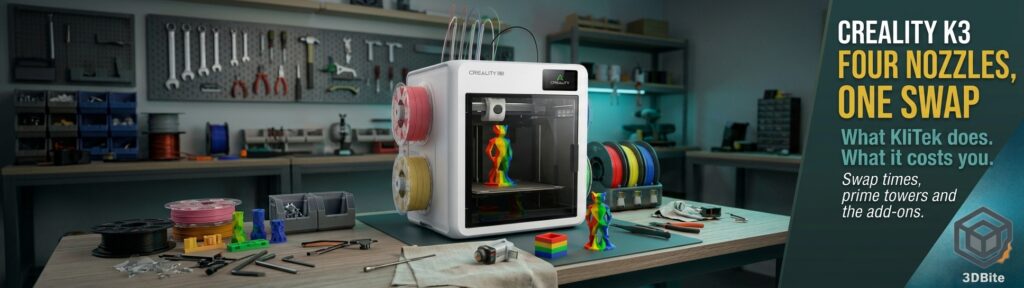
We haven’t covered the K3 on 3DBite before, so this is a ground-up look: what it is, how its nozzle-swapping system works, what the first reviews found, and what’s still missing. The short version is that it’s Creality’s first tool changer. It holds four filaments in four separate nozzle assemblies and swaps between them in about five seconds, instead of flushing one nozzle every time the colour changes. It’s on sale in the US at $849, shipping since 2 November. Europe is due on 8 December. There’s no UK price yet.
I own a Bambu A1 and an A2L, both single-nozzle machines that purge on every colour change, so this is a shift I’m watching closely. Over the past year Snapmaker, Prusa, Bambu and now Creality have all built printers around keeping each filament in its own nozzle. We wrote about that shift in The Industry Is Quietly Moving Toward Tool Changers. The K3 is the cheapest of the big-brand versions so far.
What the K3 is
Under the multi-colour system, the K3 is a fairly conventional Creality CoreXY machine. It has a 260 mm cube build volume, a linear rail on X and rods on Y, a textured PEI spring-steel bed that reaches 100 °C, and a hotend rated to 300 °C. Creality quotes up to 500 mm/s and 20,000 mm/s². Tom’s Hardware says the rest of the machine shares its design with the K2: a metal frame in white plastic panels, and a glass door on damped hinges.
The white shell is new for the K series. When All3DP’s Matthew Mensley saw it at IFA Berlin in September, he noted that it moves away from the darker, metal-look K1 and K2 towards Creality’s friendlier SparkX range, and wasn’t sure that helped. Tom’s Hardware went further, saying it “looks suspiciously like a Snapmaker U1 clone”. Look past the shell, though, and the mechanism works quite differently.
| Item | Figure |
|---|---|
| Build volume | 260 × 260 × 260 mm |
| Motion | CoreXY; 500 mm/s, 20,000 mm/s² (Creality) |
| Tools | Four KliTek nozzle assemblies, about 5 s per swap |
| Nozzles | Four 0.4 mm included; 0.2, 0.6, 0.8 mm sold separately |
| Hotend / bed | 300 °C / 100 °C |
| Filament feed | CFS Nano, four spools, mounted on the back |
| Sensors | 37 in total, 12 for nozzle changes |
| Camera / screen | 720p with AI detection; roughly 4-inch touchscreen |
| Footprint / weight | 482 × 420 × 536 mm; 22 kg |
| Firmware / slicer | Klipper-based with root access; Creality Print 7, OrcaSlicer compatible |
| Price | $849 (US); Europe from 8 December, price not announced |
How KliTek works
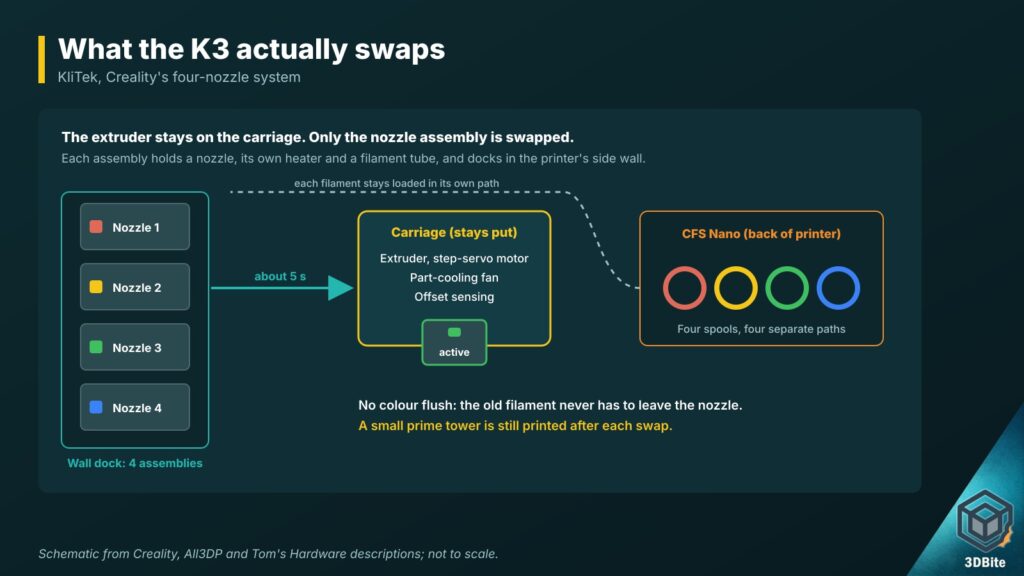
KliTek is Creality’s name for the nozzle-swapping system, and the detail that matters is what moves. A tool changer like the Snapmaker U1 swaps the whole toolhead: extruder, fan, hotend and all. The K3 keeps the extruder (Creality uses a step-servo motor with hardened steel gears) and the part-cooling fan on the carriage, and only swaps a nozzle assembly. That assembly holds the nozzle, its own heater and a filament tube, and Creality says it weighs about a fifth of a full toolhead.
The four assemblies park in a dock built into the side wall of the printer. All3DP thought this was closer to Prusa and Bondtech’s INDX than to the U1, and called it a neat way to save space. Each assembly connects over USB-C. Makers101 reports that each one has a PTC heater and idles at around 140 °C, so it doesn’t need induction heating to get back up to temperature quickly. That’s one reason a spare assembly is cheap: estimates range from about $14 to $20, against roughly $67 for rival parts.
Filament comes from a CFS Nano on the back of the machine. It’s the same compact four-spool unit used on the SparkX i7, and it keeps each spool on its own path to its own nozzle. The old colour therefore never has to be pushed out. You still get a small prime tower after each swap, to settle the pressure in the nozzle that has just been picked up.
Creality says it has packed 37 sensors into the printer, 12 of them for the swap. It claims alignment drifts by less than 25 µm over 800,000 nozzle changes in its lab. That’s a big number, and it’s worth knowing that a figure of 80,000 was going around in June. Nobody outside Creality has tested either.
Creality’s own numbers, and what they actually show
Creality’s headline claims are “up to 80%” less print time (“up to 5x faster”) and “up to 85%” less waste, compared with a single-nozzle multi-colour printer. It publishes the test prints behind them, which I appreciate, so I worked out the percentages myself:
| Creality test model | K3 time | Single-nozzle time | K3 waste | Single-nozzle waste |
|---|---|---|---|---|
| Chivalry Thirst Quencher | 24 h 53 min | 90 h | 125 g | 1,608 g |
| Titan Dragon Trophy | 42 h 26 min | 168 h 39 min | 240 g | 2,417 g |
| Wolf Bust (0.4 + 0.8 mm nozzles) | 49 h 29 min | 149 h 8 min | 231 g | 2,645 g |
| Naja Incense Holder | 14 h 56 min | 34 h 25 min | 53 g | 167 g |
| Gargoyle’s Roost Dice Tower | 72 h 23 min | 104 h 47 min | 92 g | 502 g |
By my arithmetic, the time saved ranges from 31% on the dice tower to 75% on the trophy. None of Creality’s own models reaches 80%. The waste saving is stronger, between 68% and 92%, and three of the five beat the 85% claim. The Wolf Bust also used a 0.8 mm nozzle for part of the print, so its time saving comes partly from the wider nozzle, not just from skipping the purge. Domechy reached the same ranges independently.
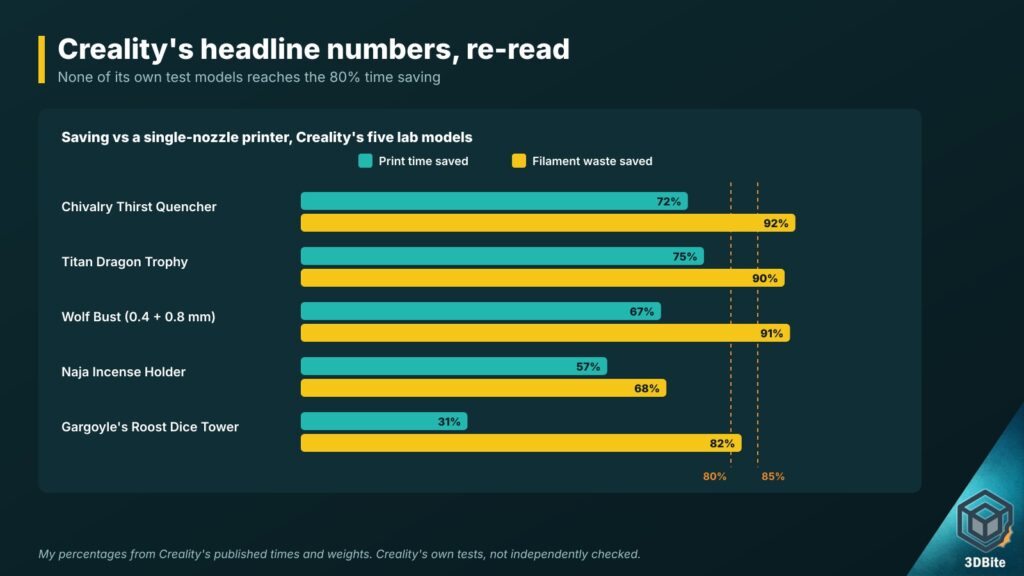
None of that is a criticism of the machine. Saving 70% of the time on a heavily multi-coloured print is still a big deal. But “up to” is carrying a lot of weight in that headline, and how much you save depends on the model’s shape and how often the colour changes.
What the first hands-on reviews found
Two hands-on reviews give the most useful picture so far. Both used printers sent by Creality.
Tom’s Hardware
Denise Bertacchi’s review went up on 2 November, the day US shipping began. The good news first: the tool changer never dropped or misplaced a tool, and she didn’t get a single bad print, even at higher speeds. A three-colour PLA fidget pumpkin and a set of PETG flexi geckos came out clean, and the geckos had no stringing. Tom’s Hardware also found the AI camera’s spaghetti and foreign-object detection gave no false alarms. Fluidd is reachable on port 4408, which tells you there’s Klipper underneath.
The complaints are practical ones. Four colours is the limit. The printer is loud, partly because there’s no lid. The spool holders are oversized: they caught on the rims of several cardboard spools and wouldn’t take Prusa, Cookiecad or Ambrosia reels, though Polymaker and Bambu spools fitted. At the time of review, Creality Print 7.3 lacked the filament-mapping button that earlier K-series printers have.
TPU was mixed. The stock setup handled firmer TPU and 95A, with a little stringing on a set of omni wheels, but a softer Bambu 90A didn’t work. That fits Creality’s own position, which is that softer grades need the TPU Kit.
Her verdict was that the K3 is a solid entry in a crowded field, but that Creality hasn’t brought anything new to the table. That kept it off Tom’s Hardware’s list of the best printers. She saw it as a good fit for people already invested in Creality’s ecosystem who mainly print PLA and PETG.
3D Print Land
3D Print Land is a UK shop that sells printed products, and its reviewer runs several printers for the business. They had a pre-release K3 for about a week and published real filament weights, which is what I wanted. An Eevee took 10 h 20 min with 969 nozzle changes, used about 291 g of filament, and put 85.6 g of that into the prime tower. A multi-colour rooster with around 1,000 changes used 203 g in total, 78 g of it in the prime tower. They also tried mixing a 0.4 mm and a 0.8 mm nozzle on a storage bowl. The slicer estimated about 20% less time but about 56 g more filament, and the print showed visible creases.
They liked the build quality, the easy access underneath for cleaning, and the multi-colour results. Their complaints were noise (unloading filament makes a harsh sound, which Creality says it will improve in firmware), colour mixing that took some trial and error, and the lid being an extra. They said they’d buy more K3s, but also advised comparing it with the alternatives before buying.
The prime tower is the part the marketing skips
Creality’s product page promises “waste-free multicolor printing”. Going by 3D Print Land’s figures, the prime tower took 29% of the filament on the Eevee and 39% on the rooster. Those are my percentages from their weights.
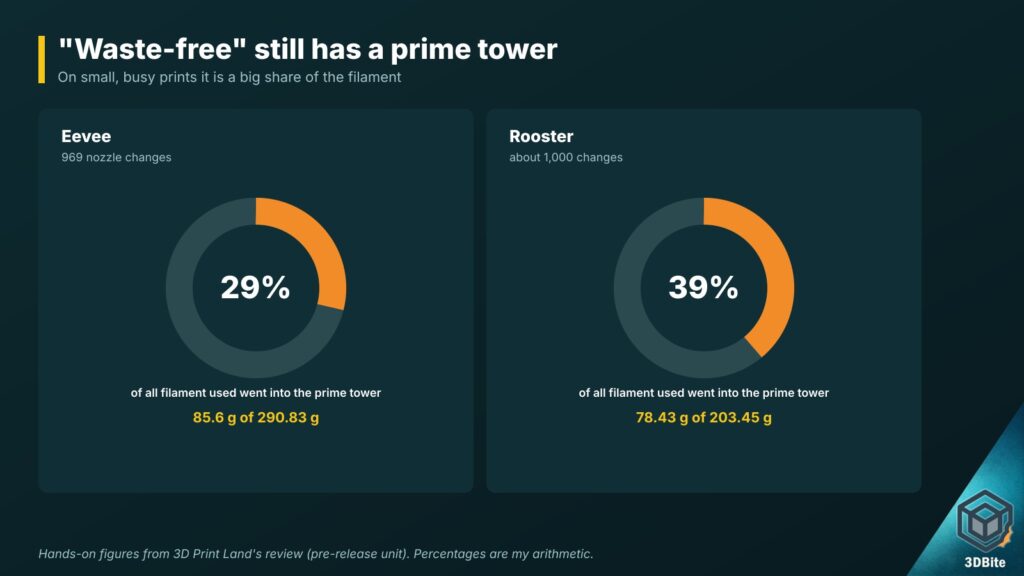
To be fair, that’s still far less than a purge-based printer would throw away on the same models, and on large prints the prime tower becomes a small slice of the total. But if most of what you print is small, busy multi-colour figures, expect roughly a quarter to a third of each spool to end up as a tower. “Far less waste” is accurate. “Waste-free” isn’t.
Swap time adds up as well. At Creality’s 4.8 s per nozzle change, the Eevee’s 969 changes come to about 78 minutes of its 10 h 20 min print. Creality also quotes a separate “material change” of up to 15 s. If that’s the real cost of a colour change, including the prime, the same print would spend about four hours on changes. Creality hasn’t explained when each figure applies. Either way, it’s a lot better than a single nozzle, but it isn’t free.
What’s in the box, and what isn’t
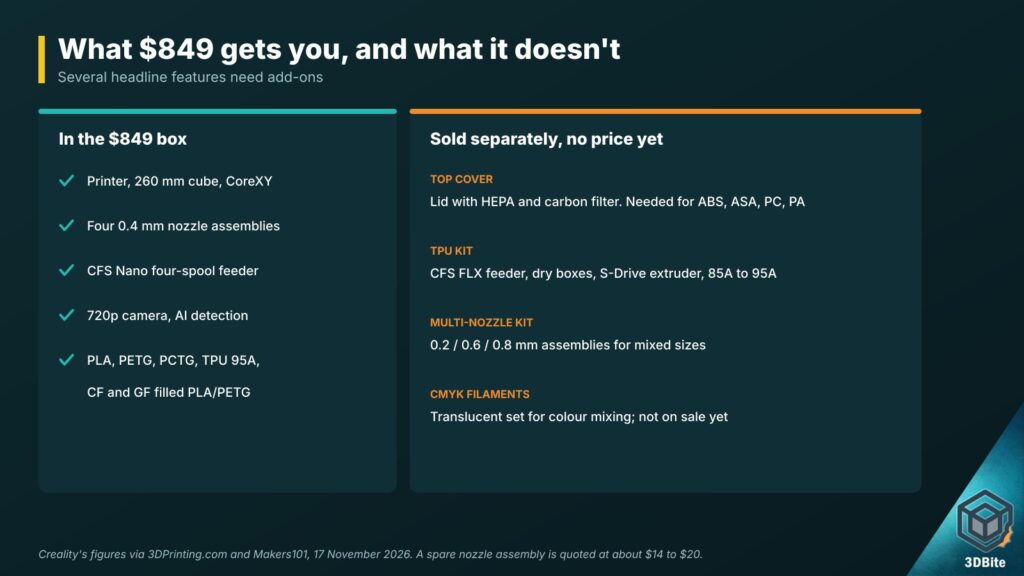
This is the part I’d want UK buyers to read twice. Several features in the K3’s marketing need hardware that doesn’t come in the box, and none of it had a price when I checked.
- The Top Cover, a lid with a HEPA and activated-carbon filter. Creality lists ABS, ASA, PC, PA and other engineering filaments as needing it. Without it the K3 is open-topped, so treat it as a PLA, PETG and PCTG machine until the lid arrives.
- The TPU Kit, which replaces the CFS Nano with a CFS FLX feeder and adds four dry boxes, high-flow nozzles and the S-Drive dual-drive extruder. That’s what gets you 85A to 90A TPU, plus PVA, BVOH and TPE. Creality claims up to seven times the flow of a conventional printer on soft materials.
- The multi-nozzle kit, with 0.2, 0.6 and 0.8 mm assemblies for mixed-size printing. Creality quotes up to 30% higher efficiency with 0.4 and 0.8 mm together, but the 0.2 mm and 0.8 mm can’t be used in the same print.
- Calibrated translucent CMYK filaments for colour mixing, which aren’t on sale yet.
Mixed nozzle sizes on a sub-£1,000 machine would be a real point in its favour. Bambu is only now bringing the same thing to its H-series, as we covered in The Bambu Lab H3C Has Launched. For now, though, you pay $849 for the base K3 and the extras that make it stand out are still to come. If you print ABS or ASA indoors, our piece on whether enclosed printers are becoming the default explains why the lid matters.
Software
The K3 runs Klipper-based firmware with root access. Makers101 reports that Creality plans to open-source it in stages. It slices in Creality Print 7, an OrcaSlicer derivative, and Creality says it’s compatible with OrcaSlicer too. Creality’s RFID spools load and identify themselves automatically. Other brands prompt you to enter the type and colour. Remote monitoring goes through Creality Cloud.
Both reviewers found the software usable. Tom’s Hardware noted the AI assistant is still marked beta and the missing filament-mapping button. Creality’s firmware record is mixed, though. K2 owners on Creality’s forum have reported crashes into the frame and slow support, alongside plenty of trouble-free owners. A new mechanism plus new firmware is where early problems usually show up, so I’d keep an eye on the forum through the first few months of real owners.
Where it sits against the competition
The obvious comparison is the Snapmaker U1. Both have four tools and similar build volumes (the U1 is 270 mm), and they’re similar in price, though the U1’s price has moved a lot with promotions. The U1 has been shipping for months. Makers101 owns one and still called it the lower-risk buy for plain four-colour printing at the same price. The K3’s case rests on mixed nozzle sizes, soft TPU and cheap replacement nozzles, all of which depend on kits that aren’t priced yet.
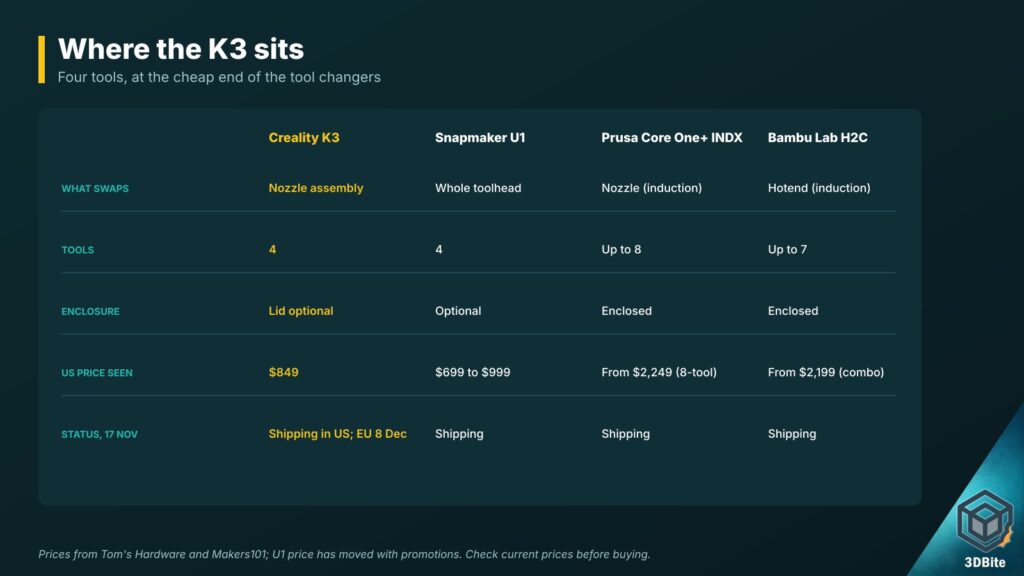
Higher up, Prusa’s Core One+ INDX (from $2,249 with eight tools) and Bambu’s H2C (from $2,199 as an AMS combo) both use induction-heated nozzle swaps in enclosed machines with more tools. They’re in a different price bracket. If you’re weighing Prusa against Bambu at that level, Is Prusa Still Worth It in 2026? covers it. At the more experimental end, InfiMech’s MX Pro offers eight heads and a crowdfunding risk.
Within Creality’s own range, the SparkX i8 takes a different low-waste approach at a lower price, and the K2 series is still the choice for CFS-based colour on larger, enclosed machines. Tom’s Hardware also predicts a six- or eight-colour K3 or a “Pro” version within about four months, based on how quickly Creality usually follows up. That’s a guess, not an announcement, but it’s a reasonable one given Creality’s history.
Where the evidence is thin
- Every figure for speed, waste and durability comes from Creality’s lab. No outside test of the 800,000-swap claim exists.
- Both hands-on reviews used units supplied by Creality, and one was a pre-release machine tested for about a week.
- Nobody has tested high-temperature filaments, because the Top Cover isn’t out.
- The TPU Kit, multi-nozzle kit, Top Cover and CMYK filaments have no prices or dates.
- Sources disagree on whether the stock nozzles are brass-tipped or hardened steel, and whether the assemblies are held by screws or magnets.
- There’s no UK or EU price, and no UK date beyond Creality’s European launch on 8 December.
My take
The K3 looks like a sensible design, sold harder than it needs to be. Swapping only a light nozzle assembly is clever: it keeps the moving mass down, makes spares cheap, and lets four filaments stay loaded without any flushing. The early reviews say it works reliably, at least on PLA and PETG. Coming from Creality, with its reach and its habit of pricing aggressively, it could do a lot to make tool changers normal.
But the features that would set it apart (mixed nozzles, soft TPU, engineering materials, CMYK mixing) all depend on add-ons you can’t buy yet, and the “waste-free” line doesn’t survive a look at the prime tower. For a UK buyer the sensible move is to wait for the European price on 8 December, see what the Top Cover and kits cost, and give the first retail owners a few weeks on the forums. If the bundled price lands well under a comparable U1 and the kits follow quickly, it becomes a much easier recommendation.
Sources and further reading
- Creality: K3 product page (EU)
- Tom’s Hardware: Creality K3 review (Denise Bertacchi, 2 November 2026)
- 3D Print Land: Creality K3 hands-on review
- All3DP: Closer look at the Creality K3 at IFA (Matthew Mensley)
- Makers101: Creality K3 and KliTek
- Domechy: KliTek specs and test models
- 3DPrinting.com: K3 launch specifications (sponsored)
- 3DPrint.com: K3 opens for pre-order (sponsored)
- 3DBite: The Industry Is Quietly Moving Toward Tool Changers
- 3DBite: Snapmaker U1 Tool Changer 3D Printer