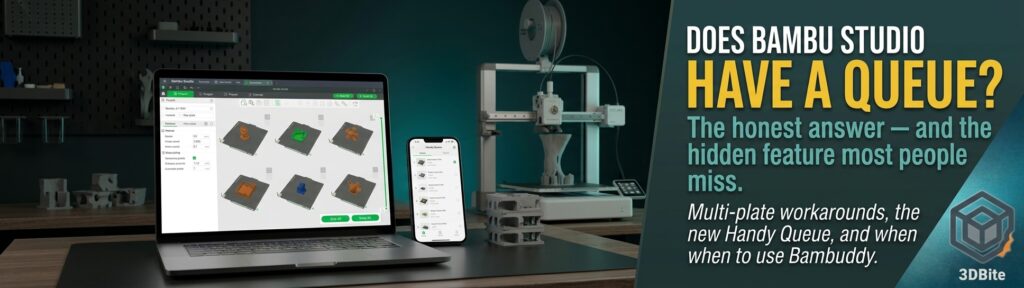
This is a question that comes up constantly and the honest answer is more nuanced than a simple yes or no: can you slice and queue multiple print jobs on a Bambu printer, so you can just work through a stack of unrelated models without going back to the slicer every time? The short version is that a genuine, proper queue — Job A, then Job B, then Job C, automatically, with no manual re-slicing in between — has been a long-standing missing feature in Bambu Studio, and there is still an open feature request asking for exactly this. But there are several real workarounds worth knowing about, one of which has quietly improved during 2026, and this post walks through all of them properly.
First, the important distinction: multiple plates is not the same as a queue
This is the bit worth clarifying before anything else, because it is easy to think you already have a queue when what you actually have is something slightly different. Bambu Studio genuinely does let you put several plates into a single project — six different parts, each on its own plate, all in the same project file. That is a real and useful capability. It is not, strictly speaking, a queue in the sense of separate, unrelated jobs lining up one after another. It is one project containing multiple plates, and the printer works through those plates sequentially within that single project. Understanding that distinction is the key to understanding why the “obvious” answer to this question is not quite the full picture.
Option 1: multiple plates in one Bambu Studio project — the simplest workaround
If you have several different parts you want printed one after another, the straightforward approach is to put each one on its own plate within the same project. Create Plate 1, add your first model, then create Plate 2 for the next model, and so on until every job you want to run is sitting on its own plate. Once everything is arranged, use Slice All rather than slicing plates individually, and then Send All rather than sending one plate at a time.
Bambu Studio sends every plate to the printer together as a single multi-plate job. From there, the printer and the Bambu Handy app let you select which plate to print next once the current one finishes — so in practice you get a workable, manual version of a queue. You clear the bed, tap the next plate on the printer’s screen or in the app, and it starts. It is a genuinely useful workflow for an evening or a weekend where you know exactly what you want to print and can queue it all up in one sitting. What it is not is a true, hands-off queue — you still need to physically clear the plate and manually advance to the next job each time, and everything has to be planned and sliced together as part of the same project rather than being added to over time as new ideas come up.
Option 2: separate, unrelated jobs — historically no, but check the Bambu Handy Queue
A proper queue — genuinely separate jobs, sliced independently, added to a list over time, with “start the next one” as a simple action once the bed is clear — has been a gap in Bambu Studio for a long time, and it remains an open, unresolved feature request in Bambu’s own feedback channels at time of writing. If you have been searching for this and coming away thinking it simply does not exist, that has historically been the correct conclusion.
The genuinely new piece of information worth knowing, and the reason this post is worth writing now rather than a year ago: Bambu Handy appears to have gained a Queue feature during 2026. It is still rolling out and reports suggest it is somewhat limited in scope rather than a complete production-style queue system, but the core functionality is there — you can add subsequent prints to a queue directly from the Handy app, and start the next print once the current one has finished, without needing to go back to Bambu Studio on a computer at all. If you are running a reasonably recent version of Bambu Handy, checking for the Queue option in the app is genuinely worth doing before assuming this capability does not exist — it is exactly the kind of feature that arrives quietly in an app update without much fanfare, and plenty of people have likely missed it entirely.
Option 3: Bambu Farm Manager and Bambuddy — for when you genuinely want production-style workflow
If what you are actually trying to do is closer to “I have ten different jobs, I want to slice them all now, put them in a proper list, and work through them without touching the slicer again,” that is a different and more ambitious ask than either of the two options above, and there are tools built specifically for it.
Bambu’s own Farm Manager is aimed at exactly this kind of workflow, though it is worth being honest that it is really built with multiple printers and genuine production runs in mind rather than a single home printer working through a personal print list. For a lone A1 or A2L sitting on a desk, jumping straight to Farm Manager is probably more infrastructure than the job actually needs.
This is where the third-party tools covered in depth elsewhere on this site genuinely earn their place. The Bambuddy deep dive covers this exact capability properly — Bambuddy has a real queue system with drag-and-drop job ordering, batch printing, and scheduled start times, and critically, it can take a multi-plate job straight out of Bambu Studio and turn each individual plate into its own separate queue entry. That is precisely the gap between Option 1 above and a genuine queue: Bambuddy adds the queue management layer that Bambu Studio itself does not have, without needing Farm Manager’s production-scale infrastructure. The Bambuddy vs Spoolman vs Manyfold comparison is worth a read too if you are weighing up which self-hosted tool actually solves the specific problem you have, since queue management is squarely Bambuddy’s job rather than something either of the other two tools attempts.
Which option actually makes sense for you
For a single home printer and a genuinely simple need — slice five or ten different models, send them all to the printer, change the plate as each one finishes, start the next — the sensible order to try things in is straightforward. Simplest option: put each model on its own plate in one Bambu Studio project, Slice All, Send All, and work through the plates manually as each finishes. Better, if it is available to you: check whether the Bambu Handy Queue feature has reached your app version, since it removes the need to have pre-planned everything as part of a single sliced project. Best, if you want something genuinely closer to a hands-off production workflow: Bambuddy, which is free, self-hosted, and specifically designed to turn a pile of individual jobs — including multi-plate projects exported straight from Bambu Studio — into an actual manageable queue.
None of these are mutually exclusive, and which one is right depends entirely on how far ahead you like to plan and how much infrastructure you are willing to set up for the convenience. For the occasional evening of queuing up a handful of known prints, the multi-plate Bambu Studio workaround remains genuinely fine. For anyone who finds themselves wanting to add “one more thing” to the list after everything is already sliced, or who wants a queue that persists and grows over days rather than being planned in one sitting, the Handy Queue or Bambuddy are where the real answer to this question actually lives.