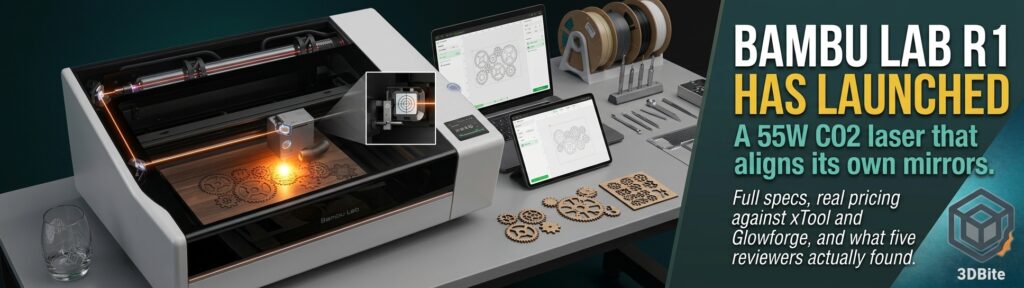
The R1 teaser post from last month was written against a genuinely bare landing page — a name, a tagline, and a September date. That gap has now closed completely. Bambu Lab officially launched the R1 on September 22, 2026, and unlike the vague pre-launch teaser, this is a fully specified, fully reviewed product — five independent outlets had hands-on units before launch day, which is a serious commitment of review units for a company’s first product outside 3D printing entirely. This is the proper deep dive the teaser post promised, built from the actual launch materials and the reviews that landed alongside them.
The basics: a real CO2 laser, not a scaled-up diode
The R1 runs a 55W CO2 laser — a meaningfully different technology from the 10W and 40W blue diode lasers on the H2D covered in the H2D laser module post. The distinction matters more than the wattage number alone suggests. A diode laser beam passes straight through clear acrylic and glass without doing meaningful work on them; a CO2 laser beam is absorbed by both materials instead, which is precisely why the R1 can cut acrylic and engrave glass in ways a diode laser simply cannot. CO2 also cuts thicker wood than a diode can manage, doing so faster and with less edge charring. In practice this means the R1 handles up to 18mm black walnut plywood and 20mm acrylic in a single pass, across a 600 × 300mm working area, at speeds up to 1,000mm/s.
The material list beyond wood and acrylic is genuinely broad: leather, paper, and fabric for cutting; glass, stone, and coated metals for engraving. That range — specifically the glass and stone engraving — is squarely the territory this site’s Mimaki and Roland post discussed in the context of established large-format print-and-cut manufacturers watching adjacent categories closely. A CO2 laser at this price point genuinely opens material categories that a diode-only machine, however capable, cannot touch.
The headline feature: it aligns its own mirrors
This is the detail every single review led with, and it is worth understanding why it is such a big deal to anyone who has actually owned a CO2 laser before. A CO2 laser tube does not fire directly at the material — the beam bounces off a series of mirrors before reaching the cutting head, and if those mirrors drift even slightly out of alignment, cut quality degrades or the machine stops cutting cleanly altogether. Manually realigning a CO2 laser’s mirror path is widely regarded as one of the most tedious, fiddly maintenance tasks in the entire hobby, and it is a genuinely common reason people abandon CO2 laser ownership after the novelty wears off.
The R1 automates this entirely. HowToGeek’s review describes watching it happen directly: a small alignment tool mounts on the laser head, the touchscreen displays a bullseye target, and a red dot shows exactly where the beam is actually hitting relative to centre. When it is not aligned, the machine corrects itself automatically — no manual mirror adjustment, no trial and error. The reviewer’s own words capture it well: “In typical Bambu Lab fashion, though, Bambu Lab took one of the most annoying parts of owning a CO2 laser and made it simple.” TechRadar’s review independently confirms the same finding, crediting the R1’s camera, laser, and encoder combination for handling focusing, material positioning, and optical alignment together as one integrated system, with the specific accuracy claim of engraving alignment to printed artwork within 0.2mm for designers and personalisation work.
Pricing, and how it actually stacks up
The R1 launches at $2,499 in the US (excluding tax, including shipping) and €2,499 in the EU (tax included, shipping excluded), with UK pricing at £2,249. Pre-orders opened September 22, with shipping beginning in October. That short-focus lens is included in the base price; the Riser Base, Conveyor, Rotary attachment, medium and long-focus lenses, Vision Encoder, E1 Pro air purifier, and Auto Fire Extinguishing System are all sold separately — a genuinely long accessory list that Gadgetbridge’s coverage flags directly, noting that “a fully kitted-out bench setup will cost meaningfully more” than the headline figure suggests.
Set against the established competition, the pricing is genuinely aggressive. xTool’s P2S sits in a similar power class and typically lists north of $2,700. Glowforge’s comparable CO2 machines start around $2,999 before its newer HD tiers climb well past that. Hackster.io’s review makes the specific comparison most relevant to this site’s regular coverage: at $2,499, the R1 undercuts Bambu’s own P2S 3D printer, which retails at $2,999 (currently on sale at $2,799) — a striking data point about how Bambu is pricing its first non-printing product relative to its own existing lineup.
The safety classification detail worth knowing before buying accessories
This is a genuinely important technical detail buried in Bambu’s own specification notes, and it deserves more prominence than a footnote. The R1 in its standard, fully enclosed configuration is a Class 1 laser device — the safest classification, meaning the enclosure itself contains the beam and no special eyewear or training is required for normal home use. The moment you attach the Riser Base or the auto-feed Conveyor accessory, the enclosure is no longer complete, and the machine’s classification changes to Class 4 — a considerably more serious safety category requiring CO2 laser-safety eyewear, and explicitly described by Bambu as intended for professional use by trained personnel only.
This is worth taking seriously precisely because those two accessories — the Riser Base and Conveyor — are also the ones that unlock the R1’s most genuinely exciting capability: the Conveyor extends the working length to 3,000mm, described in coverage as bringing furniture-scale work within reach of a desktop machine. Anyone tempted by that expanded capability needs to understand they are simultaneously opting into a meaningfully higher safety tier that demands real protective equipment and, per Bambu’s own guidance, professional-level caution rather than casual home use.
Where reviewers found genuine weaknesses
Every review is consistent on one specific point, and it is worth taking seriously rather than glossing over given how much this site has praised Bambu’s software polish elsewhere. Hackster.io’s reviewer states it plainly: “xTool Studio is better than Bambu Suite… xTool is well-established in that market now and Bambu Lab is a newcomer.” HowToGeek’s review reaches the identical conclusion independently, hoping that “now that Bambu Lab has a dedicated laser out, they’ll start working to make the software more aligned with other industry-standard software out there, like LightBurn and xTool Studio,” while noting that Bambu Suite currently “resembles other cutting software like Cricut Design Space” rather than the more powerful, established laser-specific tools.
This is a genuinely notable inversion of the pattern this site has traced through Bambu’s 3D printing history. Bambu Studio’s polish relative to competing slicers has been a recurring theme across the OrcaSlicer versus Bambu Studio post and elsewhere — Bambu built its printing reputation partly on software that felt more considered than the competition from day one. In lasers, the company is starting from behind rather than ahead, entering a market where xTool and LightBurn have had years to mature their own dedicated tools. 3D Printing Journal’s coverage frames this as the actual stakes of the whole launch: “the CO2 laser itself is a technology that has been around for decades, so the R1’s position will ultimately be determined primarily by its software, material and model libraries, and its price — the same elements Bambu used to build its advantage in FFF 3D printing.” Whether Bambu can repeat that playbook in a category where it is the newcomer rather than the disruptor is the genuinely open question this launch raises.
What comes in the box, and what does not
Tom’s Hardware’s review details the standard accessory pack, which arrives fully assembled with the accessory pack bundled inside the laser enclosure itself: a tool kit, exhaust hose, ventilation fan, antifreeze, funnel, laser alignment sensor, calibration board, and a starter material pack of basswood plywood and clear acrylic. One practical detail worth flagging directly: you will need to supply 1,500ml of distilled water yourself to dilute the included antifreeze, which the CO2 laser tube needs for cooling — not something every buyer will anticipate needing to source separately on unboxing day.
Where this sits in Bambu’s broader strategy
This connects directly to the pattern this site has been tracking since the original teaser — the R1 is officially Bambu Lab’s first product line that is not a 3D printer, following the H2D’s laser module as a stepping stone rather than a standalone product. It also lands in the same broader context as the reported UV printer development covered in the UV printer post, and it is the clearest confirmation yet that Bambu’s “personal manufacturing hub” ambition is real rather than marketing language — the R1 uses the same account system as Bambu’s 3D printers, connects to MakerWorld, and runs through the shared Bambu Suite application, exactly the ecosystem-first strategy this site’s editorial on Bambu’s competitive playbook has described repeatedly.
TechRadar’s framing is worth closing on, because it captures the honest state of play better than a simple verdict would: the laser cutting technology and market are not new, and xTool, LaserPecker, Glowforge and Creality have already demonstrated how far enclosed desktop laser cutters have progressed in recent years. What Bambu brings is not a new category — it is the same automation-first approach that won the 3D printing market applied to a category where the competition is already mature and, in the case of the software specifically, currently ahead. Whether that is enough to repeat the disruption this site has documented across the Prusa versus Bambu editorial and the broader market share story is the question the next twelve months of R1 sales and firmware updates will actually answer.
The verdict, in the reviewers’ own words
HowToGeek’s closing line is the one worth remembering: “If you’re looking for the easiest-to-use CO2 laser on the market, then the Bambu Lab R1 is definitely the best one I’ve ever used.” Tom’s Hardware calls it “a steal compared to other CO2 lasers of the same size and caliber.” Neither review is uncritical — the software gap against xTool Studio and LightBurn is real and repeatedly flagged — but on the hardware, the automatic alignment specifically, and the price relative to genuinely comparable machines, the consensus across five independent outlets is unusually consistent for a first-generation product in an unfamiliar category. This is not the tentative, feature-thin launch a “coming soon” teaser sometimes turns out to be. It is a fully realised, seriously reviewed product that has already made established laser manufacturers a genuine talking point rather than an afterthought.