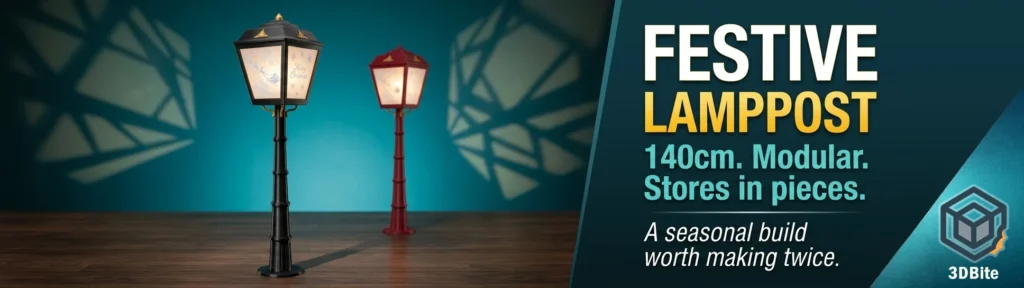
Some prints are useful. Some are impressive. And some you make once, put up in December, and immediately get asked to make again for someone else. The Festive Lamppost by ENIQUE3D falls firmly into that third category. I printed mine last year in dark red, it went up in the hallway, and before the season was out my mother had already asked for one in black for the following year. That request got fulfilled this month.
This is a proper display piece. Approximately 140 cm tall when assembled, modular construction that screws together section by section, and fully disassemblable for storage when the season is over. No permanent structure, no wasted shelf space in January. It is one of the more thoughtfully designed decorative prints I have come across on MakerWorld, and ENIQUE3D has clearly put real effort into making the tolerances work and the assembly straightforward.
The model
The Festive Lamppost is free to download from MakerWorld. The free version gives you the base, four threaded post sections that screw together, and the lamp head with interchangeable decorative panes. At the default scale it sits at approximately 140 cm tall — a meaningful height that reads as a proper lamppost rather than a table ornament. The whole thing is designed around a 256 × 256 × 256 mm build plate, so it works directly on the A1, P1S, and X1C without scaling adjustments.
One thing to flag if you are on a P1S or X1C: there is a non-printable corner on those build plates that causes a boundary error on some of the larger parts. The designer notes you will need to scale the model down slightly to fit — the tolerances are forgiving enough to survive a small reduction without affecting assembly. On the A1, no adjustment needed.
ENIQUE3D also runs a Patreon where subscribers get access to extended post sections to push the height to around 165 cm, additional pane designs, a plain blank pane for custom text, and other extras including a cylinder sized for a 1-metre LED strip light. The free version is a complete, standalone build. The Patreon content adds to it without requiring you to reprint anything already completed. If you enjoy the model it is worth supporting — the designer has built a solid catalogue of seasonal pieces and is actively adding to it.
Structure and assembly
The construction is the standout feature of this design. The four post sections are threaded and screw directly into each other — no glue, no fasteners, no fiddling. Each section locates cleanly and the assembled post is rigid. The lamp head screws onto the top post section. The decorative gold trim piece around the post-to-lamp join clips in place with the flat edge against the lamp body. Most of the assembly is hands-only and takes minutes once all parts are printed.
The only place glue is needed is the small gold decorative accents on the front face of the lamp head. These are small parts and clip-fitting them would not be practical at that scale, so a dot of superglue is the right call. Everything else is mechanical.
Disassembly at the end of the season is just as straightforward. Unscrew in reverse, stack the post sections, box the parts. It genuinely stores flat and compact, which is more than can be said for most seasonal decorations. This was one of the things that made my mother want one — the fact that it is not another item that lives in the loft for eleven months in a bag you cannot close properly.
The lamp head has slots for interchangeable panes — the translucent panels that face outward and diffuse the internal light. The default set includes a Merry Christmas pane and a plain frosted option. ENIQUE3D has since released a free set of five additional panes and a further set of ten, covering snowman, reindeer, Santa, Noel, presents, and more. One thing to note: make sure you download the pane set that matches your printer profile. The A1 and P1S profiles are scaled slightly differently, and panes from the wrong profile will not fit correctly.
Lighting
The post sections have a central cable channel running the full height. A USB-powered LED light source fits inside the lamp head, with the cable dropping straight down through the post to exit at the base. The weight of the cable hanging through the post is enough to keep it centred without any additional retention. A warm white bulb or LED module suits the aesthetic better than cool white — the panes diffuse the light well and a warm tone reads as more traditional lamppost, less clinical.
The Patreon version includes a cylinder sized precisely for a 1-metre LED strip light, which is a useful addition for anyone who wants more even illumination across all four panes rather than a single central point source. For the basic build, a USB fairy light cluster or a small warm LED module does the job cleanly.
Print settings
The designer’s recommended settings are 0.2 mm layer height with 10% infill, and that is broadly what I used. The provided Bambu Studio profiles handle the setup correctly — load the profile matching your printer, check the plate layout, and print. There is not a lot of settings work to do here, which is part of what makes this an accessible build.
On nozzle size: the post sections are large, structurally straightforward parts with no fine surface detail. A 0.6 mm nozzle would reduce print time considerably on those sections without affecting the result. I stuck with the 0.4 mm and was not bothered by the time — the finish was clean and I was printing the black version alongside other jobs. If you want to push through the build faster and have a larger nozzle available, the post parts are the obvious place to use it. Keep the 0.4 mm for the lamp head and panes where the detail matters.
| Setting | Value used | Notes |
|---|---|---|
| Filament | eSun PLA+ (dark red year one / black year two) | Both colours printed without issues on standard profile |
| Nozzle | 0.4 mm | 0.6 mm viable for post sections if print speed is a priority |
| Layer height | 0.2 mm | Designer recommended. No reason to deviate |
| Infill | 10% | Designer recommended. Adequate for display use |
| Walls | 2 | Per designer profile |
| Supports | None | Model is designed to print without supports |
| Bed | Textured PEI | Standard for PLA on A1 |
| Profile | A1 profile from MakerWorld | Use the profile that matches your printer — A1 and P1S are scaled differently |
Colour choices
The dark red version I printed first reads as deep burgundy under normal light and glows a warm copper-red when lit from inside. It suits a traditional Christmas aesthetic well and photographs nicely. The black version I printed for my mother has a different character entirely — more contemporary, slightly more Narnia lamppost than festive decoration, and the gold accent clips stand out more sharply against the black body. Both work. Black also hides any minor layer line variation more effectively than red, which is a small practical bonus.
Community prints on MakerWorld show white as the most popular colour choice — the panes glow very cleanly in white and the whole effect is closer to an illuminated ice lantern. Completely valid. I went darker on both my builds because I wanted something that looked intentional and substantial rather than decorative-by-default, and the dark colours deliver that.
Filament usage
At 10% infill across all parts, filament consumption is reasonable for the size of the build. Community reports on MakerWorld suggest approximately one full spool per lamppost for single-colour builds. The post sections are the bulk of the material — the lamp head and base are relatively compact by comparison. If you are printing the extended Patreon version with the additional post section, budget slightly over a spool. The panes themselves use very little material and are typically printed in white or a contrasting colour regardless of the post colour, so they come off a separate spool.
Worth making?
Yes, unambiguously. This is the kind of print that justifies owning a 3D printer to people who do not yet own one. You show them a 140 cm lamppost standing in your hallway, glowing through decorative frosted panes, and they ask how much it cost. The answer — a spool of filament and a few evenings of print time — lands differently than any specification discussion about layer resolution or print speed.
The modular design is genuinely practical. The threading is well-executed. The pane system works. And the fact that ENIQUE3D has kept the core model free while building a Patreon extension layer that adds to rather than replaces the free version is the right way to handle this kind of project. It is worth supporting.
I have now printed two of these — one for myself, one for my mother — and the only regret is not printing a third. There is something satisfying about a seasonal decoration that comes down as easily as it goes up, stores in a box rather than a bin bag, and improves every time a new pane design drops.
Model and designer
- Festive Lamppost — Free download on MakerWorld
- Additional panes pack — Free on MakerWorld
- ENIQUE3D on Patreon — extended post sections, more pane designs, subscriber extras
If you print this, leave ENIQUE3D a boost on MakerWorld and consider the Patreon. The catalogue is growing and the quality of the design work is consistently high.