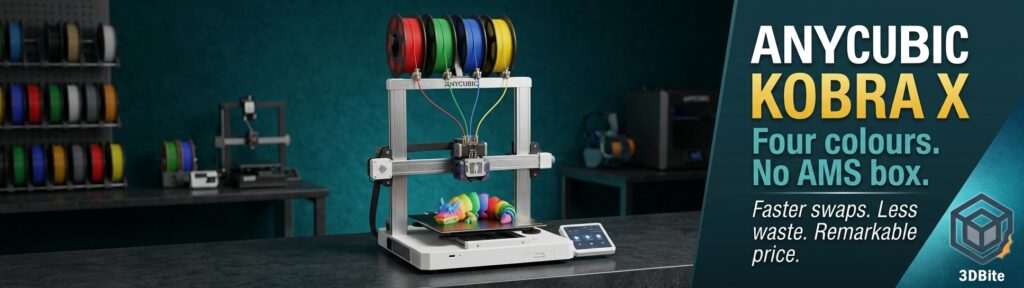
I do not own the Anycubic Kobra X. I want to be clear about that from the start — this is not a hands-on review. But I have been watching it closely since it launched, and the more I read about it, the more seriously I am considering it as a second machine alongside the A1. The headline claim — four-colour printing without an external AMS box, faster colour swaps, and significantly less purge waste than the Bambu equivalent — is the kind of specification that deserves a proper look rather than a dismissal. This post is that look, built from a close reading of independent reviews from Tom’s Hardware, TechRadar, Creative Bloq, and community testing, combined with my own perspective as a Bambu user evaluating whether there is a case for adding this machine to the workshop.
The short version: the Kobra X is a genuinely impressive machine at a price that should not be possible, with a clever multi-colour mechanism that solves a real problem better than the Bambu AMS does. The slicer and ecosystem are improving but are not yet at Bambu’s level. And there is one thing that is keeping me from purchasing it immediately — the build volume. But we will get to that.
What the Kobra X is
The Anycubic Kobra X is an open-frame bed-slinger with a 260 × 260 × 260 mm build volume, four-colour printing capability built directly into the toolhead, and a launch price of $279 / £259 for early adopters. It is positioned as Anycubic’s most direct challenge to the Bambu Lab A1 — the machine that has dominated the accessible multi-colour market since it launched. At first glance, the Anycubic Kobra X looks a lot like the Bambu Lab A1, with the same brushed aluminum gantry with both the Z-axis screws and Y-axis linear rods tucked out of sight, a similar build volume, and a nozzle that can be swapped without tools.
Under the hood, the two machines are quite different — and that difference is the reason the Kobra X is worth paying attention to.
The ACE Gen 2: four colours with no external box
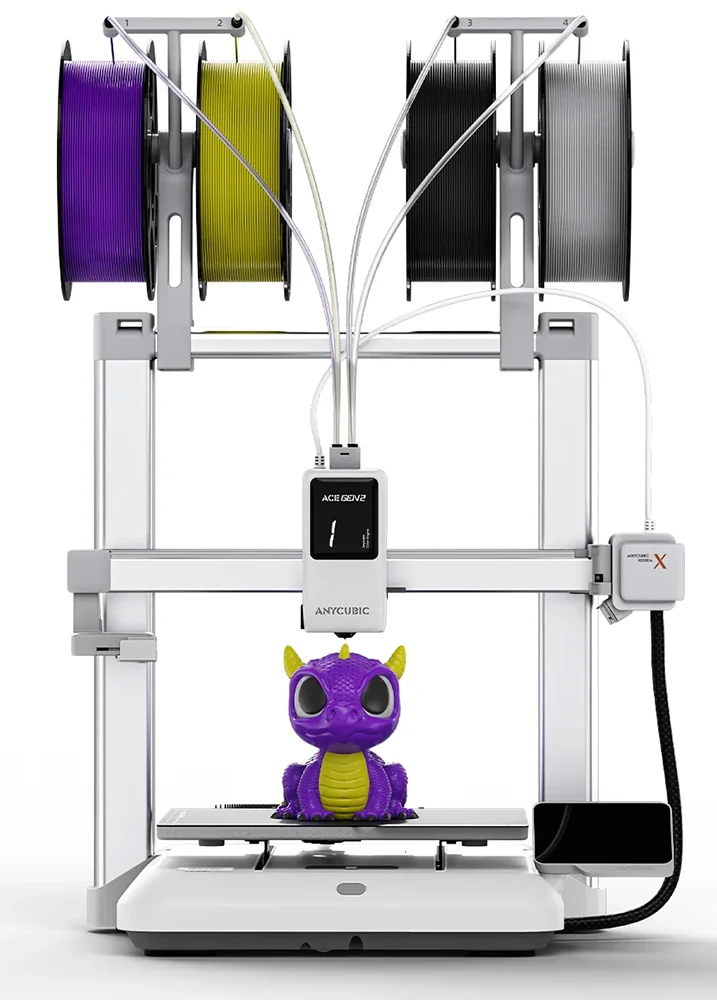
The defining feature of the Kobra X is the ACE Gen 2 system — ACE stands for Anycubic Color Engine. Unlike the Bambu AMS, which is an external unit that sits beside or above the printer and feeds filament through tubes to the toolhead, the ACE Gen 2 is integrated directly into the toolhead itself. The ACE Gen 2 has been miniaturized and stuffed right into the toolhead. The active filament is chosen by a motor-driven camshaft, which allows the feed gears to only grip the correct filament. A large display on the front of the toolhead shows which filament is active.
Four spools mount on top of the machine and feed straight down into the toolhead. There is no external hub, no long Bowden run from a separate unit across the desk, and no risk of filament tangling between the AMS box and the printer. The whole multi-colour system sits compactly on the machine itself. This is a fundamentally cleaner architecture than the AMS approach, and it has a direct consequence that matters considerably to anyone who prints a lot of multi-colour work.
The waste and speed numbers: this is where it gets interesting
Anyone who has printed complex multi-colour models on a Bambu AMS machine knows about purge waste. Every colour change requires the nozzle to flush the previous filament before the new colour can print cleanly. The longer the filament path from the cutter to the nozzle, the more material needs to be flushed. The Bambu AMS has a relatively long filament path — the cutter is some distance from the nozzle, and each colour change requires retracting filament all the way back through that path before loading the next colour.
Anycubic was able to decrease this waste on the Kobra X by reducing the distance between the cutter and the nozzle to 10 mm, which greatly reduces how much filament needs to be retracted or flushed when you change colours or materials. Reducing the purge amount also reduces the time required to change colours.
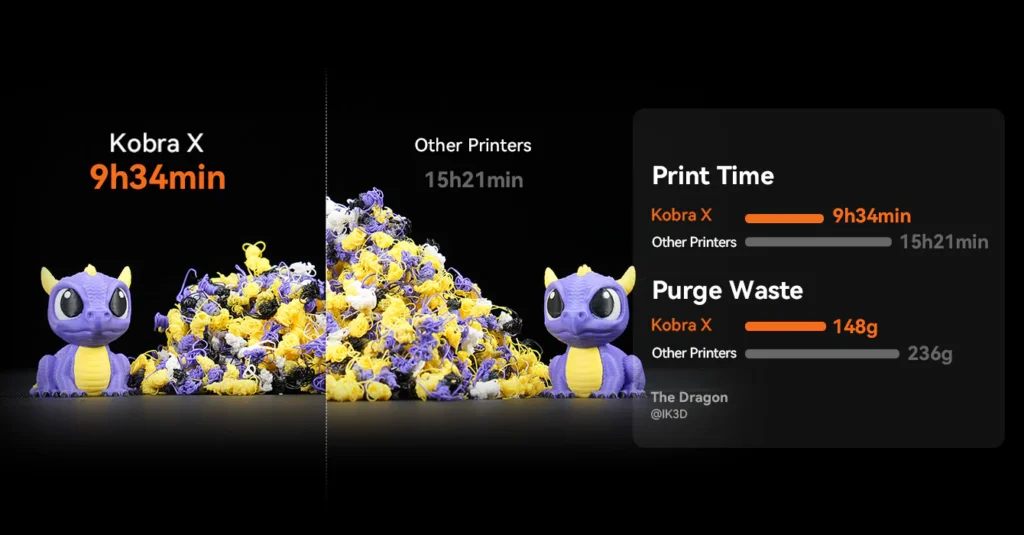
Tom’s Hardware tested this directly, head-to-head with the Bambu Lab A1 on the same model with the same default settings. The Kobra X averages 35 seconds to swap colours from cut to purge, while the Bambu Lab A1 takes 90 seconds or more. These minutes add up. On a four-colour print with 776 colour swaps, the Kobra X was a shocking 10 hours faster. The Kobra X was nearly twice as fast as its rival and wasted much less filament when using equal settings. For the Clearance Castle test print, the Kobra X took 13 hours and 10 minutes and purged 150 grams of filament with a 42 gram purge tower. The Bambu Lab A1 ran the same print in 23 hours and 8 minutes and created 229 grams of purge poop with a 34 gram purge tower.
Ten hours faster. 79 grams less purge waste. On a single print, with default settings on both machines. Those numbers are not marginal. They represent a genuine, meaningful advantage in the Kobra X’s architecture over the AMS approach. Anycubic’s stated 81.25% reduction in purge length compared to conventional systems is the headline, but the independent test data is more persuasive than any marketing claim.
Full specifications
| Specification | Anycubic Kobra X |
|---|---|
| Build volume | 260 × 260 × 260 mm |
| Motion system | Cartesian bed-slinger |
| Multi-colour system | ACE Gen 2 — integrated into toolhead (no external box) |
| Native colours | 4 |
| Max colours (with ACE 2 Pro expansion) | Up to 19 |
| Colour swap time | ~35 seconds (vs 90+ seconds on Bambu A1) |
| Cutter-to-nozzle distance | 10 mm (vs ~160 mm retraction on previous Anycubic systems) |
| Purge reduction vs conventional | 81.25% claimed / independently validated as significantly lower |
| Max print speed | 600 mm/s |
| Recommended print speed | 300 mm/s |
| Max acceleration | 20,000 mm/s² |
| Nozzle temperature | Up to 300°C |
| Bed temperature | Up to 100°C (110°C on some spec sheets) |
| Nozzle (included) | 0.4mm hardened steel |
| Optional nozzles | 0.25mm brass, 0.6mm and 0.8mm hardened steel |
| Supported materials | PLA, PETG, TPU (95A and 85A tested), PVA |
| ABS / ASA | Not recommended — open frame, no enclosure |
| Camera | 720p — AI spaghetti detection, foreign object detection, timelapse |
| Enclosure | Open frame — no enclosure included or available |
| Noise | Silent mode below 45 dB |
| Slicer | Anycubic Slicer Next (Prusa/Orca-based) + OrcaSlicer compatible |
| Connectivity | Wi-Fi, LAN, Anycubic App |
| Dimensions | 455.4 × 445.3 × 461.3 mm |
| Price (launch) | $279 / £259 early bird. Standard retail ~$299 / £299 |
Print quality: what the reviewers found
The Kobra X marks a major update to the Anycubic range, offering faster printing and a boost in aesthetics and product design quality. Getting started with the Kobra X instantly showed that the design and quality were on a par with the competition, and once a few updates and the calibration had run its course, the machine was up and running, with the first few prints highlighting that the Kobra X was more than capable of standing its ground against the Creality and Bambu Lab machines.
Tom’s Hardware found the ACE Gen 2 system worked flawlessly across a range of materials. I tried everything from PLA to PETG to 95A and 85A TPU. The only jam I had was running an old spool of extremely brittle lightweight PLA. Removing the hub on top of the toolhead was all that was required to clear it. The ability to run 85A TPU through the integrated system — softer than most multi-material systems can manage without the filament tangling or buckling — is a meaningful practical advantage for anyone printing flexible and rigid materials in a single job.
The hardened steel nozzle included as standard is worth calling out specifically. Most printers at this price ship with a brass nozzle and require a separate hardened steel purchase before printing abrasive materials like PLA-CF. The Kobra X includes hardened steel as the default — a sensible choice that removes an early upgrade step from the workflow and signals that Anycubic designed this machine for a range of materials from day one.
Expandability: four to nineteen colours
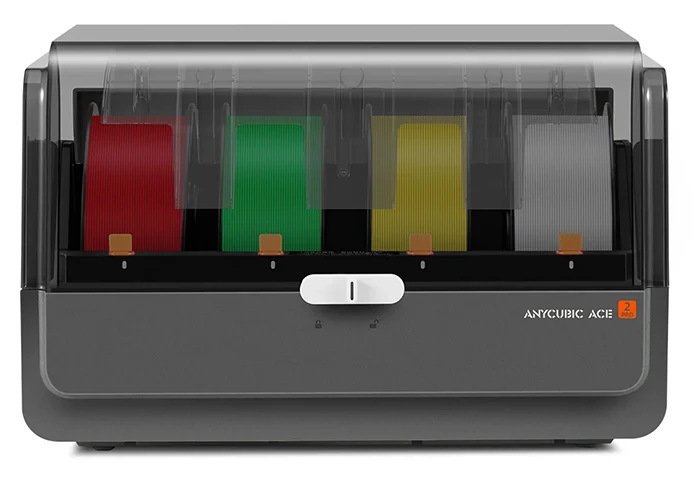
The base Kobra X ships with four-colour capability built in. For most hobbyist use, four colours covers the majority of multi-colour printing. When that is not enough, the system can be expanded up to 19 colours by adding up to four ACE 2 Pro units. This supports full colour visual work as well as use cases where different materials are combined in a single job. The system is designed for both soft and hard materials.
The ACE 2 Pro expansion units also add active filament drying at 65°C while printing, temperature and humidity detection, sealed storage, and an electromagnetic valve that actively removes moisture — a genuinely useful feature that the integrated ACE Gen 2 in the base machine does not include. If you are printing hygroscopic materials like nylon or PETG regularly, the ACE 2 Pro expansion adds filament management capability that goes beyond what the base system provides.
The slicer and ecosystem: the honest picture
This is the area where the Kobra X — and Anycubic machines generally — have historically trailed Bambu, and it is the area that matters most to me as a daily Bambu user evaluating whether to add this machine to the workflow.
The slicer situation has improved substantially from where it was with earlier Kobra machines. The Kobra 3 launched with a slicer that could not tune purge volumes — a significant problem that made controlling waste impossible from the software side. The Anycubic Slicer Next that ships with the Kobra X has addressed this. The improved Anycubic Slicer gives greater control to the printer’s filament purge, allowing the user to significantly reduce waste. OrcaSlicer is also compatible, which matters — anyone already running OrcaSlicer for a Bambu machine can use it with the Kobra X with minimal additional learning.
The slicer interface itself closely mirrors what Bambu users will recognise. Anycubic’s Slicer Next software is strikingly similar to Bambu Lab’s suite of software, with nearly all of the same features and tools nested in the exact same places. This is extremely handy if you’re used to Bambu Lab’s ecosystem. That familiarity reduces the friction of adding a second machine with a different slicer considerably.
The app and remote monitoring picture is more nuanced. The Anycubic app allows monitoring, print control, and camera access — the functional basics are there. But the ecosystem depth is not at Bambu’s level. If you want to primarily send prints from an app or your phone, give it a big miss. The Anycubic ecosystem does not have the equivalent of MakerWorld — the integrated model library accessible directly from the app that makes the Bambu workflow particularly seamless. For cloud-sceptical users, the Kobra X does offer LAN-only connectivity without requiring a cloud account, which is a genuine advantage over Bambu’s more cloud-dependent workflow.
The 720p camera provides AI monitoring for spaghetti detection and foreign object detection. It is functional. The timelapse quality at 720p is not spectacular — the quality of the timelapse function is not great due to the camera being only 720p, and it’s pretty jerky from the moving bed. Bambu’s cameras are higher resolution and better positioned for clean timelapse capture.
The open-frame limitation
The Kobra X is open frame. There is no enclosure option. This is a genuine constraint that directly mirrors the Bambu A1’s own limitation — both machines are open-frame bed-slingers, both restricted to PLA, PETG, and TPU as their reliable material set. ABS and ASA are theoretically possible in a very warm, draught-free environment but not officially supported and not reliable for larger parts. If engineering materials are in your requirement, neither the Kobra X nor the Bambu A1 is the right answer — both need to step up to an enclosed machine.
For PLA multi-colour work, which is the primary use case for both machines, the open frame is not a meaningful limitation. But it is worth being explicit that the Kobra X is a PLA-first machine, and anyone buying it expecting ABS capability will be disappointed.
How it compares to the Bambu A1
| Feature | Anycubic Kobra X | Bambu Lab A1 Combo |
|---|---|---|
| Price | ~$299 / £259 (base, 4-colour integrated) | ~$399 / £350 (Combo with AMS Lite) |
| Multi-colour system | ACE Gen 2 — toolhead-integrated, no external box | AMS Lite — external unit, long filament path |
| Native colours | 4 | 4 |
| Colour swap time | ~35 seconds | ~90 seconds+ |
| Purge waste | Significantly less — 10mm cutter-to-nozzle | More — longer filament path |
| Build volume | 260 × 260 × 260 mm | 256 × 256 × 256 mm |
| Max print speed | 600 mm/s | 500 mm/s |
| Enclosure | Open frame — no option | Open frame — no option |
| Hardened nozzle (included) | Yes — standard | No — stainless steel standard, hardened optional |
| TPU through multi-colour system | Yes — tested at 85A and 95A | Limited — AMS Lite cannot feed flexible filament |
| Slicer | Anycubic Slicer Next + OrcaSlicer compatible | Bambu Studio + OrcaSlicer compatible |
| App / ecosystem | Anycubic App — functional but limited | Bambu Handy + MakerWorld — mature, deeply integrated |
| Remote monitoring camera | 720p | 1080p |
| Expandability | Up to 19 colours with ACE 2 Pro units | Up to 4 colours (AMS Lite) — AMS chaining requires separate unit |
| Filament drying during print | Via ACE 2 Pro expansion (not in base) | No built-in drying |
What I genuinely like about this machine
The ACE Gen 2 architecture is elegant. Integrating the multi-colour system into the toolhead rather than adding an external box eliminates the desk footprint problem, the long Bowden path problem, and the filament-tangling-between-box-and-printer problem simultaneously. It is a cleaner solution to the same engineering challenge that the AMS solves with more hardware and more points of failure.
The purge waste reduction is real and independently verified. Printing multi-colour on the Bambu A1 generates a meaningful amount of purge waste, particularly on prints with many colour changes. I have used the Bambu Studio settings covered in our prime tower waste guide to reduce this, but the Kobra X addresses the problem at the hardware level in a way that no slicer setting can replicate on the A1. Seventy-nine grams less waste on a single print is a hundred grams less waste over the next ten prints.
The price is simply remarkable. At the $279 early bird price, this printer is an absolute no-brainer if multicolor capability is on your wishlist. Four-colour printing at that price point, with the ACE Gen 2 integrated rather than as a costly add-on, represents a genuine shift in what the entry price for multi-colour printing looks like. The Bambu A1 Combo is a better-polished product with a more mature ecosystem, but at a meaningfully higher price for the same four-colour native capability.
The hardened steel nozzle included as standard is a detail I appreciate. It means you can print PLA-CF on day one without a separate nozzle purchase. That is the right default for a machine positioned at an audience that is likely to want to explore material types.
The one thing that is holding me back
Build volume. The Kobra X ships with a 260 × 260 × 260 mm build plate — essentially identical to the Bambu A1. I already have the A1. Adding a second machine with the same build volume makes sense if the second machine does something the first one cannot do well, and the Kobra X’s superior purge efficiency and colour swap speed are genuinely compelling reasons. But if there were a version of the Kobra X with a larger build plate — something in the 350 × 350 × 350 mm range — I would have ordered it already. Without hesitation.
Large-format multi-colour printing with the ACE Gen 2’s purge efficiency would be a genuinely different proposition from anything currently in my setup. The Bambu H series machines offer larger build volumes with their own dual-nozzle systems, but at considerably higher prices. An Anycubic Kobra X with a larger bed, at the same kind of price premium over the base model, would be a difficult machine to argue against.
Anycubic has a Kobra S1 Max with a larger build volume, but that machine uses the external ACE Pro rather than the integrated ACE Gen 2, and at a higher price point the value equation changes. The specific combination of integrated ACE Gen 2 efficiency and large-format build volume does not exist yet. When it does, Anycubic will have my attention immediately.
The verdict from the independent press
Tom’s Hardware described the Kobra X as an excellent entry-level four-colour printer and gave it a strong recommendation for anyone who wants affordable, reliable multi-colour printing without a complicated external AMS or premium price tag. The innovative ACE Gen 2 is entirely contained in the toolhead and works really well. If you want affordable, reliable multicolor printing without jumping to a pricier CoreXY machine, the Kobra X is an easy recommendation.
TechRadar concluded that the machine is a solid choice for general use on a budget , stamping Anycubic as a serious manufacturer in the FDM arena. The caveat about the open design limiting engineering materials appears in multiple reviews and is consistent — this is a PLA and PETG machine, and users who need ABS should look elsewhere.
The one consistent criticism across reviews is the ecosystem and app maturity relative to Bambu. Creative Bloq was blunt on the point from their experience with the predecessor Kobra 3 V2: if you want to primarily send prints from your phone, look elsewhere. The Anycubic ecosystem is functional and improving, but it is not yet at the level of seamless integration that Bambu Handy and MakerWorld provide.
Is this the right second printer?
For a Bambu A1 owner specifically, the Kobra X occupies an interesting position. It does not replace anything the A1 does — both are open-frame PLA-first bed-slingers with similar build volumes. What it adds is a fundamentally more efficient multi-colour workflow for prints with many colour changes. If you regularly print complex multi-colour models where the Bambu purge waste and swap time are genuine frustrations, the Kobra X addresses those problems at the hardware level in a way that Bambu’s architecture cannot match.
If your multi-colour printing is relatively simple — a few colour zones, modest swap counts — the Bambu A1 does it well enough with tuned slicer settings, and the ecosystem advantage is worth keeping. If you are printing complex figurines, large multi-part models with many colour changes, or anything where a 10-hour time saving on a single print is meaningful, the Kobra X is worth the money as a specialist multi-colour machine alongside the A1 rather than instead of it.
My position: if Anycubic release a Kobra X with a larger build volume, I will buy it. At the current 260 mm, I am watching and waiting rather than ordering. But it is on the shortlist, and the case for it gets stronger every time I clear a Bambu purge pile from the waste chute.
The Kobra X is available from store.anycubic.com and will reach Amazon in due course. Current standard pricing is $299 / £259 / €299.