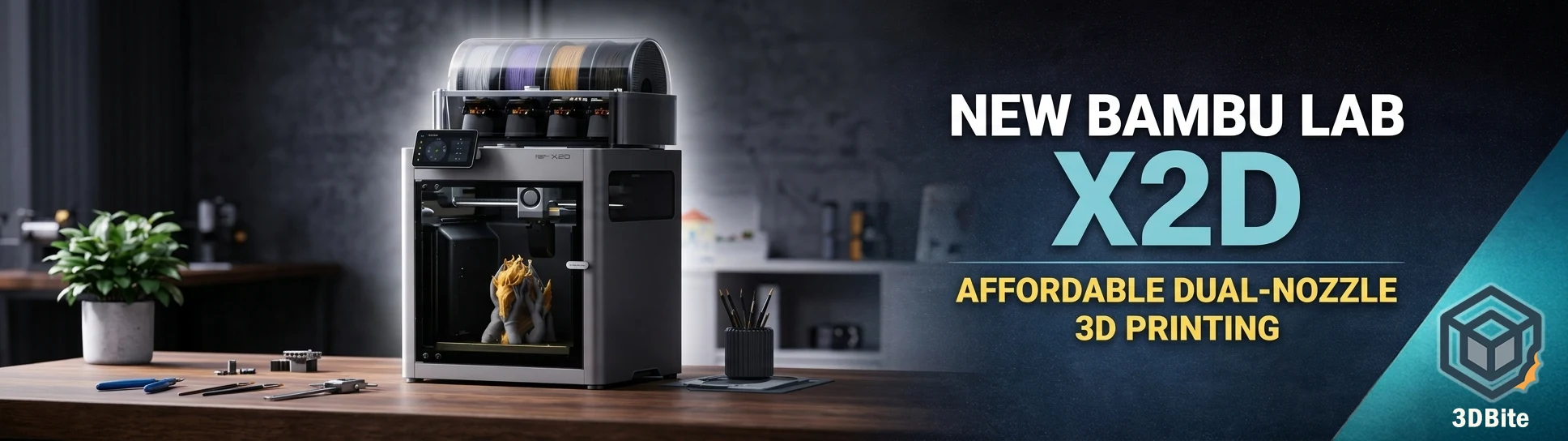
The X1 Carbon was the benchmark for serious desktop 3D printing for three years. Fast, enclosed, capable of demanding materials, and reliable enough that the answer to “what should I buy if I mean it?” was almost always the same machine. Bambu Lab discontinued it on 31 March 2026, and within two weeks replaced it with something that does considerably more: the X2D.
The X2D brings dual-nozzle extrusion to Bambu’s compact X-series form factor for the first time. It sits between the single-nozzle P2S and the large-format H2D, and it launched at a price point that caught most of the community off guard. Base price is £569 in the UK (£769 Combo with AMS 2 Pro), $649 in the US ($899 Combo). That is meaningfully less than the H2D’s entry point, in a body the same size as the machine it replaces.
This post covers how the dual-nozzle system actually works, what the real-world trade-offs are, how it compares to the rest of the Bambu lineup, and who it makes sense for.
Why this machine exists
When Bambu retired the X1C, the lineup had a structural gap. The P2S covered the mid-range well, but it is single-nozzle. The H2D brought dual extrusion and optional laser cutting, but at a large footprint and a price starting at $1,899. Neither machine answered the specific question: dual extrusion, compact body, under £800 with AMS.
That is the X2D. It is not trying to replace the H2D. It is trying to give the majority of users who wanted multi-material capability — primarily clean support removal and basic dual-material work — a way to get there without committing to a machine that dominates a bench.
The dual-nozzle system: how it actually works
The X2D does not use IDEX. Both nozzles sit on a single shared toolhead. This is a fundamental architectural choice and the thing most worth understanding before you evaluate the machine.
The left nozzle uses direct drive extrusion: the motor is mounted directly on the toolhead, the filament path is short, and response to extrusion commands is immediate. This is the main nozzle. It handles the primary model material, including flexible filaments like TPU. It is driven by Bambu’s proprietary PMSM servo motor, which samples torque and position 20,000 times per second and can detect filament jams before they become failures.
The right nozzle uses Bowden extrusion: the motor is mounted on the rear panel of the printer, and filament is fed through a PTFE tube to the hotend. This is the auxiliary nozzle. It is designed for support material and secondary rigid materials — not flexible filaments. The longer filament path means it cannot handle TPU reliably.
Switching between nozzles is handled by a purely mechanical gear-and-trigger mechanism with no additional motor on the toolhead. The nozzle-change lever taps a trigger arm, driving an internal gear train that raises or lowers the inactive nozzle clear of the print. No electronics. No servos. Bambu reports the mechanism completed over one million switching cycles in durability testing. The result is a lighter toolhead than you would get with two direct-drive systems, which maintains the speed and motion stability the X-series has always been known for.
The Bowden trade-off
The auxiliary Bowden nozzle is capped at 200mm/s, compared to 1,000mm/s for the direct-drive left nozzle. In practice this matters less than it sounds. TechRadar ran 250 hours of testing on the machine and found that on a typical two-hour print using dual-nozzle support material, the real-world slowdown was around ten minutes. For support printing, which is the primary use case, the speed difference is not a meaningful factor.
There is also a print quality difference between nozzles. Bambu acknowledge this openly: the auxiliary nozzle produces slightly lower wall quality than the main nozzle, and they recommend using official Bambu filaments on the right nozzle for best results. Tom’s Hardware observed a subtle waviness on side walls printed by the aux nozzle under magnification — not visible in normal use, and entirely irrelevant for support material. For decorative dual-colour work where the auxiliary nozzle contributes to visible surfaces, it is worth being aware of.
Full specifications
| Specification | X2D |
|---|---|
| Build volume (single nozzle) | 256 × 256 × 260 mm |
| Build volume (dual nozzle) | 235.5 × 256 × 256 mm |
| Left extruder | Direct drive — PMSM servo motor, 8.5 kg max force |
| Right extruder | Bowden — standard stepper, rear-mounted |
| Nozzle switching | Mechanical gear-and-trigger, no motor |
| Max nozzle temperature | 300°C |
| Chamber heating | 65°C active |
| Build plate temperature | 120°C max |
| Toolhead speed (main) | 1,000 mm/s |
| Toolhead speed (aux) | 200 mm/s |
| Sensors | 31 total |
| LiDAR | No |
| Cameras | 1080p Liveview + Toolhead Camera |
| Max colours (with AMS) | 25 |
| Filtration | 3-stage: G3 pre-filter + H12 HEPA + activated carbon |
| Noise | Below 50 dB |
| Machine weight | 16.25 kg |
| Dimensions | 392 × 406 × 478 mm |
| Price (UK) | £569 base / £769 Combo |
| Price (US) | $649 base / $899 Combo |
| Price (EU) | €629 base / €849 Combo |
What the dual-nozzle system is genuinely good at
Support interface material
This is the headline use case and the most compelling reason to consider the X2D over a single-nozzle machine. With a dedicated auxiliary nozzle loaded with a support interface material — PETG running supports for a PLA model, or a soluble like PVA for complex geometries — supports release cleanly. No scarring, no digging at the surface with a screwdriver, no compromised finish on steep overhangs or internal channels. The support material is chosen specifically because it does not bond to the model material, and the dual-nozzle system means this works on every print without manual setup beyond the initial material assignment in Bambu Studio.
If you regularly print functional parts with overhangs, hinges, or complex internal geometry and you find support removal is destroying the surface, this alone justifies the machine.
TPU and rigid material in a single print
The direct-drive left nozzle handles TPU reliably. Combined with a rigid material on the right, you can produce parts with integrated flexible elements — grips, bumpers, hinges, gaskets — straight off the plate. No bonding, no assembly. This is a genuinely useful capability for functional printing and one that single-nozzle machines simply cannot replicate without pausing mid-print for a manual swap.
Multi-colour with less waste
With two nozzles each capable of being fed from an AMS unit, the X2D supports up to 25 colours in a single print — 24 slots across multiple AMS 2 Pro units plus one external spool. More practically, having two nozzles at different temperatures means colour transitions between nozzles do not require a full purge of the melt zone. For dual-colour work this translates directly to less waste material per transition. Bambu Studio manages the colour and nozzle assignment automatically once you have set up the material configuration.
Engineering materials: the chamber heating story
The X2D has an actively heated chamber that reaches 65°C, with nozzles capable of 300°C. This combination opens up printing in ABS, ASA, and Nylon reliably — materials that warp badly in unheated enclosures or fail to produce strong layer adhesion without consistent ambient temperature. The chamber distributes heat evenly across the build volume, which is what actually matters for large engineering prints. Spot heating is not enough; you need consistent temperature from edge to edge to prevent differential cooling that causes warping on large flat surfaces.
The X1C had a passive enclosure. The X2D has active chamber heating. For anyone who pushed the X1C into ABS or ASA territory and found the results inconsistent, this is a meaningful step forward.
Calibration and sensors
The X2D carries over Bambu’s Dynamic Flow Calibration system from the H series. Rather than calculating a single K factor and applying it to all print conditions, Dynamic Flow Calibration builds a time-varying model of the entire extrusion system — accounting for nozzle wear, filament moisture, residue in the melt zone, and gradual drift in hardware characteristics. This runs automatically before each print. You do not calibrate it manually and you do not need to re-run it when you change filament. The system identifies current conditions and compensates in real time.
Thirty-one sensors monitor filament path, thermal environment, and machine safety throughout every print. The PMSM servo motor on the main extruder detects filament jams by monitoring torque changes at 20,000 samples per second, catching problems before they propagate into a failed print. The machine also has AI-assisted camera monitoring for spaghetti detection, nozzle clumping, and purge chute jams — pausing automatically when it detects a developing failure rather than running for hours into a waste print.
One thing the X2D does not have: LiDAR. The X1C used it for first-layer calibration and flow rate measurement. The X2D replaces this with Dynamic Flow Calibration and its camera-based systems. In practice, early reviewers found the absence of LiDAR was not noticeable in results — the dynamic calibration system compensates effectively — but it is a notable omission for anyone coming from the X1C who relied on it.
Build volume: what you actually get
Single-nozzle mode gives you 256 × 256 × 260 mm — effectively the same footprint as the X1C. In dual-nozzle mode, the usable area reduces to 235.5 × 256 × 256 mm because the nozzle switching mechanism requires clearance on one axis. For most prints this reduction is inconsequential. For large flat parts that push the full X dimension, it is worth checking your model dimensions before committing to a dual-nozzle job.
How it compares to the rest of the Bambu lineup
| Machine | Build volume | Extrusion | Chamber heating | Price (UK Combo) |
|---|---|---|---|---|
| A1 Combo | 256 × 256 × 256 mm | Single direct drive | No | ~£350 |
| P2S Combo | 256 × 256 × 256 mm | Single direct drive | No | ~£649 |
| X2D Combo | 256 × 256 × 260 mm | Dual (direct + Bowden) | Yes — 65°C active | £769 |
| H2S Combo | 350 × 320 × 325 mm | Dual direct drive | Yes — 65°C active | ~£1,299 |
| H2D Combo | 350 × 320 × 325 mm | Dual direct drive + laser | Yes — 65°C active | ~£1,699 |
The X2D sits in a position that previously did not exist in Bambu’s range: dual extrusion in a compact, X-series body at a price point accessible to serious hobbyists rather than just studios. The P2S undercuts it significantly but gives up the second nozzle and chamber heating. The H2S matches it on extrusion capability and beats it on build volume with two proper direct-drive extruders, but costs considerably more and is a much larger machine. The X2D is the right answer for the specific question: dual material, compact footprint, under £800.
The Vision Encoder: optional, but worth knowing about
Bambu offers an optional Vision Encoder accessory for the X2D that maintains 50-micron positional accuracy across the full build volume by detecting and compensating for belt stretch and mechanical drift over time. This is not included in the base or Combo price — it is sold separately. For standard hobbyist use and most engineering work, the machine’s default calibration systems produce accurate enough results without it. For precision functional parts where dimensional accuracy across the full plate matters, the Vision Encoder is a meaningful upgrade rather than a marketing feature.
Who this machine is and isn’t for
The X2D makes sense if you are currently running a single-nozzle Bambu machine and support removal is a recurring frustration. The jump from fighting supports off functional prints to having them release cleanly is transformative for workflow, and the X2D is the most accessible way to get there within the Bambu ecosystem. It also makes sense if you want to combine rigid and flexible materials in a single print — grips, bumpers, and integrated TPU elements — without manual mid-print filament changes.
It is not the right machine if your primary goal is large-format printing. The 256 mm build volume is the same as the A1 and P2S. It is also not ideal if you need the auxiliary nozzle to run high-speed or complex flexible materials — the Bowden setup on the right is limited in both speed and material compatibility, and TPU should always run through the left nozzle. And if you are coming from a P2S and only occasionally need dual material capability, the price difference is substantial enough to think carefully about frequency of use.
If you were holding out for a direct X1C replacement with meaningful additional capability and did not want to go to H-series scale, the X2D is it. The pricing came in well below expectations, the real-world performance from TechRadar and Tom’s Hardware backs up the spec sheet, and the dual-nozzle support workflow addresses the single most common frustration in functional FDM printing.
Final thoughts
The X2D does something specific and does it well: it makes dual-extrusion printing practical at a compact scale and a price that does not require a studio budget. The dual direct-plus-Bowden architecture is an intelligent compromise. It keeps the toolhead light, the switching mechanism simple and durable, and the machine’s footprint the same as its single-nozzle predecessor. The Bowden auxiliary nozzle’s 200mm/s cap and slightly lower wall quality are real limitations — but for support material printing, which is the primary use case, neither matters in practice.
What the X2D offers that no previous Bambu machine at this price point did: a second nozzle loaded with a non-bonding support material, active chamber heating for engineering filaments, and the same 256 mm build volume that makes the X-series practical for everyday use. For anyone who has been waiting for the X1C to get a genuine successor rather than just a repackage, this is it.