Published 12 November 2026. I have not run these three tools side by side for this post. It is built from each tool’s own pages (pricing, FAQ, changelog, privacy policy and tool pages), read on 12 November, plus my earlier posts on each. I found no independent hands-on review of any of them, and I say where that leaves gaps. Prices will change, and the cost arithmetic is mine.
I have now written about all three of these separately: SolidVents in August, PlainMesh’s Fill & Split in July, and STL Buddy twice, once for the app and image tools and once for life-size prints. Read together, those posts make the three sound like rivals. They mostly are not. “Runs in a browser tab” is about all they share, and two of the three have changed their prices or their free allowance since I covered them. So this is the same exercise I did for Bambuddy, Spoolman and Manyfold: what each one is for, where they really do overlap, and which one deserves your money.
First, which STL Buddy?
There are two sites with this name, and in October I said I could not confirm whether they were connected. I can now get a bit further. The privacy policy on stlbuddy.com, updated on 11 November, names its operator as Nikko Industries of Roseville, California. The iPhone scanning app I covered in September, which goes with stlbuddy.co, is published by Generation Aaya LLC. Neither site mentions the other. I could not load stlbuddy.co’s own privacy page to check its side, so treat this as strong evidence of two separate businesses, not proof.
For this comparison, “STL Buddy” means stlbuddy.com, the big toolbox, because that is the one that competes with PlainMesh. The stlbuddy.co tools get their own short section further down. Check the address bar before you sign up for either.
The one-line version of each
| SolidVents | PlainMesh | STL Buddy (stlbuddy.com) | |
|---|---|---|---|
| What it is | A parametric pattern generator for grilles, vents and halftones | A set of mesh tools and generators for printing and laser work | A large catalogue of form-based generators, plus some model-editing tools |
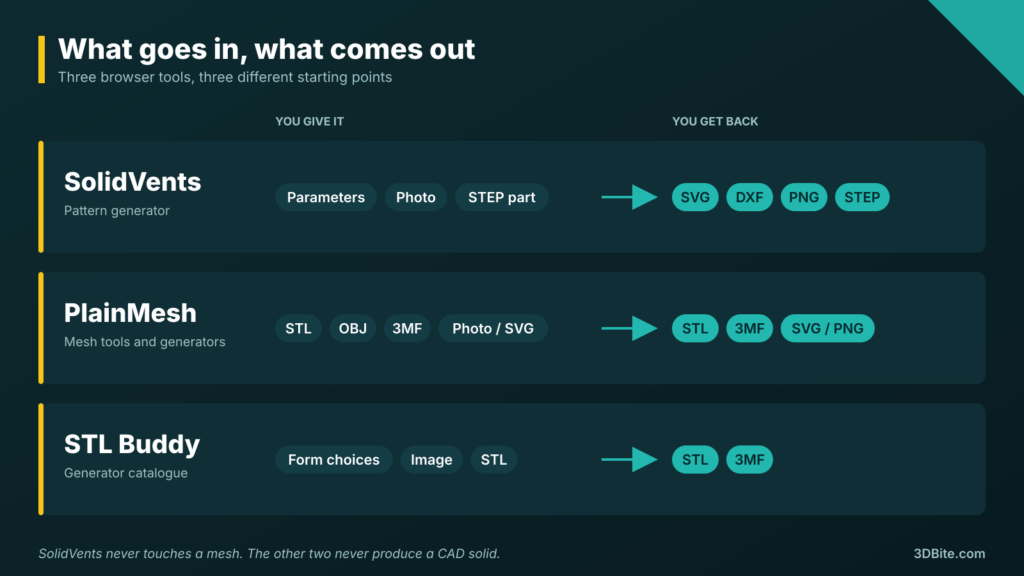
| You give it | Parameters, an optional image, an optional STEP part | An STL, OBJ or 3MF, or a photo or SVG | Choices in a form, an image, or an STL |
| You get back | SVG, DXF, PNG or STEP | STL or 3MF (SVG and PNG from the laser tools) | STL or 3MF |
| Who is behind it | Yoshi Chen, working alone in Taiwan with a frontend developer | One maker, funded through Patreon | Nikko Industries, California |
| Size | One tool, nine layout modes | 31 tools and 763 parametric models, by its About page | 92 tools in the top tier, 24 of them free |
| Cost to export | Free for three exports a day; Pro from $9 a month | €10 a month through Patreon; free exports are paused | Free, $10, $20 or $32 a month, or credits per download |
SolidVents: it makes patterns, not models
SolidVents is the odd one out, and the easiest to place. You drop a point, line or curve on a canvas, and hole size, spacing, angle and rotation follow it. There are nine layout modes, including Voronoi “stone cracks” and Flow Lines, and you can use a photo’s brightness to drive the pattern. What comes out is a vector file or a STEP solid. It never touches a mesh, and its changelog has no STL export in it anywhere.
That means it only pays off if you already use CAD. The site’s own advice for printing is to export STEP, add thickness and combine it with your part in Fusion 360 or SolidWorks, then make the STL there. One detail I missed in August: since June, STEP exports are “shapes only”. You get the hole shapes as solids to subtract from your own body, not a ready-made plate with holes in it.
It has also moved on a lot since my post. Wrap, in beta since 17 October, takes a curved face from your own STEP part, lays the pattern on it and wraps it back as raised, recessed or cut-through shapes. PNG export and iPad support arrived on 1 October. Pro users get an MCP and API connection for AI assistants. The last release was 7 November, which for a spare-time project is a healthy pace.
The price has changed too. My August post quoted $49 a year. The FAQ now lists $9 a month, $90 a year, or one-off passes at $27 for three months and $99 for a year. The free plan still includes every layout mode and every export format, capped at three exports a day, resetting at midnight UTC. Pro removes the cap and adds STP Split, shape-morph export, draft angle on STEP solids, the advanced gradient options and the cloud library. Some of those were free when I first wrote about it: the advanced gradient options went Pro on 6 September.
PlainMesh: the mesh workshop
PlainMesh is the one to look at if your starting point is somebody else’s STL. My July post only covered Fill & Split, which separates a model by colour and can add an alignment pin or a tapered plug and socket at the cut. Around it sit a 3D Splitter with bed presets and an assembly guide, a texture tool with 29 displacement patterns you paint on in up to eight zones, a Mesh Fixer, a Hollow Model tool and a lithophane generator that can wrap a photo round an existing model. There are six laser tools as well, and a library of parametric models that has grown fast. The About page says 763 today; an older cached copy of the same page said 274.
Two things make it attractive. The tool pages say processing happens in the browser and your files are never uploaded, which matters if the model is not yours to share. And the pricing is simple: one plan, €10 a month through Patreon, with unlimited exports and a commercial licence to sell what you print.
The catch is the free tier, and here PlainMesh’s own pages disagree. The pricing page says free exports are temporarily paused while the developer works on keeping costs sustainable. Several tool pages still say a free Patreon account gets three exports a day. I would go by the pricing page and assume that, today, you can paint, cut and preview for nothing but need to pay to download. PlainMesh’s own blog is also candid about the limits: a browser tab only has the memory it is given, so a multi-million-triangle scan belongs in desktop software, and you can cut a shape but not remodel it.
STL Buddy: the catalogue
STL Buddy is mostly generators. You fill in a form and get a name sign, a storage tray, a bolt, a dice set or a cosplay helmet. The catalogue keeps growing: SkipTheCAD counted 56 tools in late September, I counted 67 in October, and the pricing page now lists 92 in the top tier.
| Tier | Monthly price | Tools included | Cost per download without a membership |
|---|---|---|---|
| Free | $0 | 24 | Nothing |
| Tinkerer | $10 | 43 | 5 credits |
| Maker | $20 | 85 | 7 credits |
| Inventor | $32 | 92 | 10 credits |
Credits come in one-off packs, 40 for $10 or 100 for $20. On my arithmetic an Inventor-tier download costs $2.50 from the small pack and $2.00 from the large one. There are also separate monthly credit plans from $10 to $99, which do not include unlimited downloads, so read the checkout page carefully. The 14-day trial I mentioned in October is not on the pricing or terms pages I read this week; the terms say billing starts when you confirm checkout.
The free list is better than I expected. It includes a Lithophane Maker, SVG to STL, an STL Customizer, Bolt Factory, MyFit and a Color Splitter. The tools that compete most directly with PlainMesh cost more: Texture Studio is a Maker tool, and Model Splitter, Make It Wearable and Make It Life Size all sit in Inventor.
Privacy is mixed, and the policy is clear about it. Some tools process files entirely in your browser. Hosted features, including image-to-3D, send your input images to outside providers, and the policy names OpenAI, RunPod and Hitem3D. Image to STL also runs on its own credits, from 1 for a fast model to 10 for the top quality, with 5 more for a coloured 3MF.
Where they overlap, and where they do not
| The job | SolidVents | PlainMesh | STL Buddy |
|---|---|---|---|
| Vent, grille or halftone pattern with a gradient | Yes, this is all it does | No dedicated tool | No dedicated tool |
| Output a CAD solid (STEP) | Yes | No, meshes only | No, meshes only |
| Split a big model to fit the bed | No | 3D Splitter, with tabs and an assembly guide | Model Splitter, Inventor or 10 credits |
| Split a model by colour | No | Fill & Split, with pin or plug-and-socket joints | Color Splitter, free during beta |
| Add surface texture to an existing mesh | No. Wrap works on STEP faces, not meshes | Textures, 29 patterns | Texture Studio, Maker tier |
| Lithophane | No (halftone is a different thing) | Yes, flat or wrapped on a model | Lithophane Maker, free |
| SVG to a printable model | No | SVG to 3D | SVG to STL, free |
| Personalised gifts and ready-made generators | No | 763 parametric models | Most of the catalogue |
| Laser cutting and engraving | SVG and DXF export | Six laser tools | No |
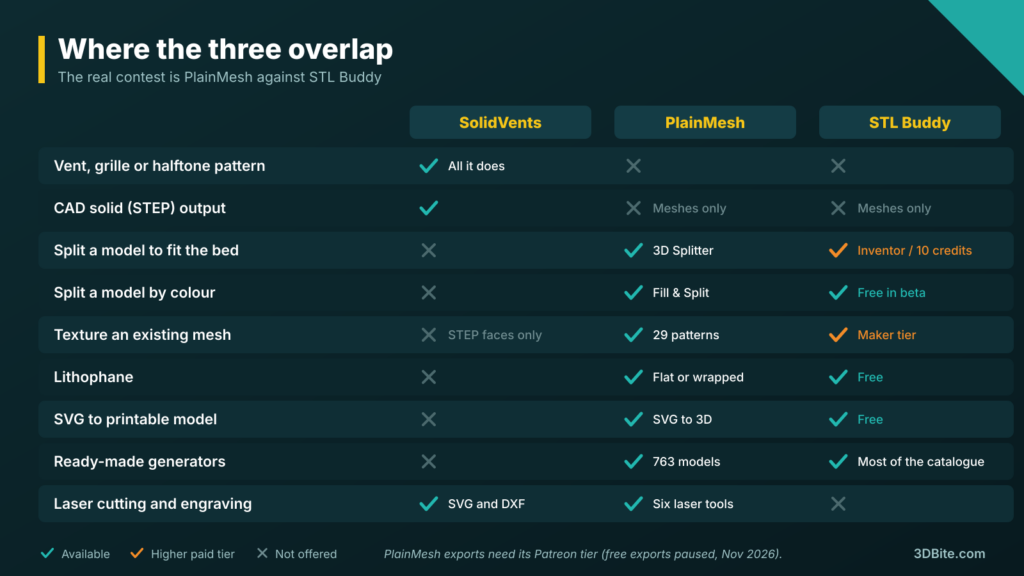
So SolidVents does not compete with the other two at all. The real contest is PlainMesh against STL Buddy, and it comes down to two jobs.
For colour splitting, the argument I made in the multi-part printing post still stands, and STL Buddy’s Color Splitter is free where PlainMesh charges. But the two pages describe different amounts of tool. PlainMesh documents painting, Smart Fill, re-cutting and two joint types. STL Buddy’s page says it turns painted 3MF colours into separate parts, warns that some models may not split, calls it a beta, and mentions no alignment features. If your painted 3MF splits cleanly in the free one, you have saved €10. If it does not, PlainMesh is the one with the tools to fix it by hand.
For bed-size splitting, both add alignment features. STL Buddy’s splitter defaults to a 256 mm bed outline, which is my A1’s plate, and takes STL or OBJ up to 100 MiB and a million triangles. PlainMesh publishes no size limits that I could find. Remember that Bambu Studio’s own Cut tool handles a straight cut or two for nothing.
Texture is the third area, and it splits by where you start. If you have a mesh, PlainMesh or STL Buddy will displace its surface. If you are designing the part yourself in CAD, SolidVents gives you far more control over a pattern than either. My texturing guide covers the slicer-only routes that cost nothing.
What it costs
| Tool | Free allowance | Cheapest way to do one job | A year of unlimited use |
|---|---|---|---|
| SolidVents | Three exports a day, all formats | Free | $90 subscription, or $99 as a one-off pass |
| PlainMesh | Preview only while free exports are paused | €10 for one month, then cancel | €120 (12 × €10) |
| STL Buddy | 24 free tools | $10 for 40 credits, enough for four Inventor downloads | $120 Tinkerer, $240 Maker, $384 Inventor (12 × the monthly price) |
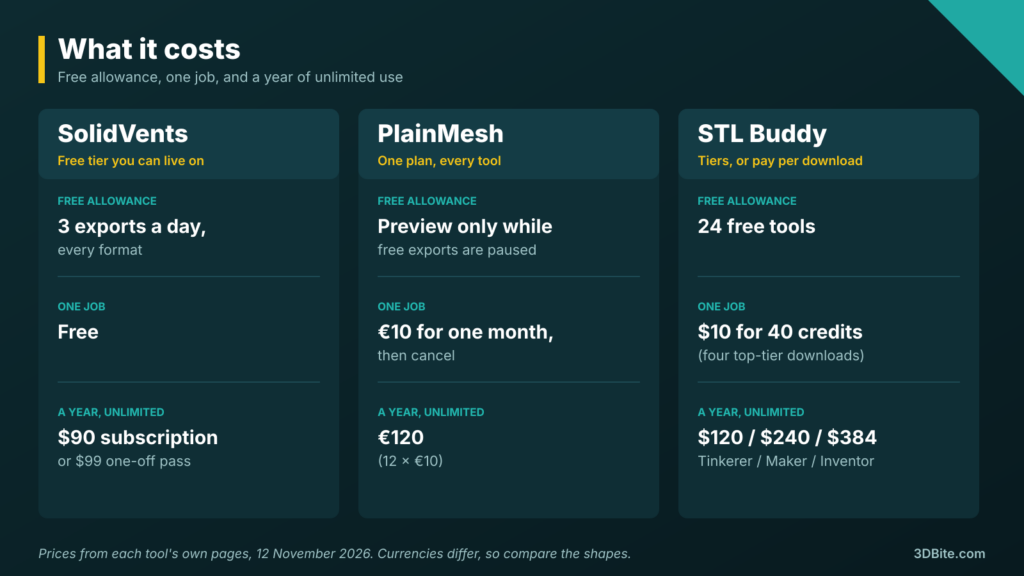
The currencies differ, so compare the shapes, not the last pound. SolidVents is the only one with a free tier you could use indefinitely. PlainMesh is the cheapest way to get every mesh tool at once. STL Buddy is the dearest if you want its splitter and cosplay tools on subscription, and the fairest if you only need one download, because credits do not renew.
The other STL Buddy
The stlbuddy.co site is a different proposition: an image-to-STL converter, a free STL viewer and some format converters. The converter takes a PNG or JPG up to 10 MB and makes a relief, not a full 3D object, and you must sign in to convert and download. The viewer takes files up to 50 MB with no account, and it has no measuring tool. I did not find prices on the pages I read. If a quick look at a mesh is all you want, the viewer is still the part I would use. For image-to-print work with real control, HueForge is a better fit.
Which one do you actually need?
| If you… | I would look at | Why |
|---|---|---|
| Design your own parts in CAD and want a vent, grille or halftone face | SolidVents | STEP output and gradient control; nothing else here does it, and three free exports a day covers most hobby use |
| Download models and need to split, texture, hollow or repair them | PlainMesh | All the mesh tools for one €10 fee, with files kept in the browser |
| Want to split one painted 3MF by colour and nothing else | STL Buddy’s Color Splitter first | It is free in beta. Fall back to PlainMesh if it fails or you need joints |
| Make personalised gifts or sell on Etsy | STL Buddy | The biggest generator catalogue, plus listing and pricing calculators |
| Are building one large cosplay or life-size piece | STL Buddy with a credit pack | $10 buys four top-tier downloads without a subscription |
| Own a laser cutter as well as a printer | PlainMesh, with SolidVents for patterns | Six laser tools on one side, SVG and DXF patterns on the other |
| Work with models you must not upload | PlainMesh, or SolidVents without cloud backup | Both say processing stays on your device. STL Buddy varies by tool |
| Do not use CAD and only print other people’s files | Not SolidVents | Without CAD you cannot turn its output into a printable part |
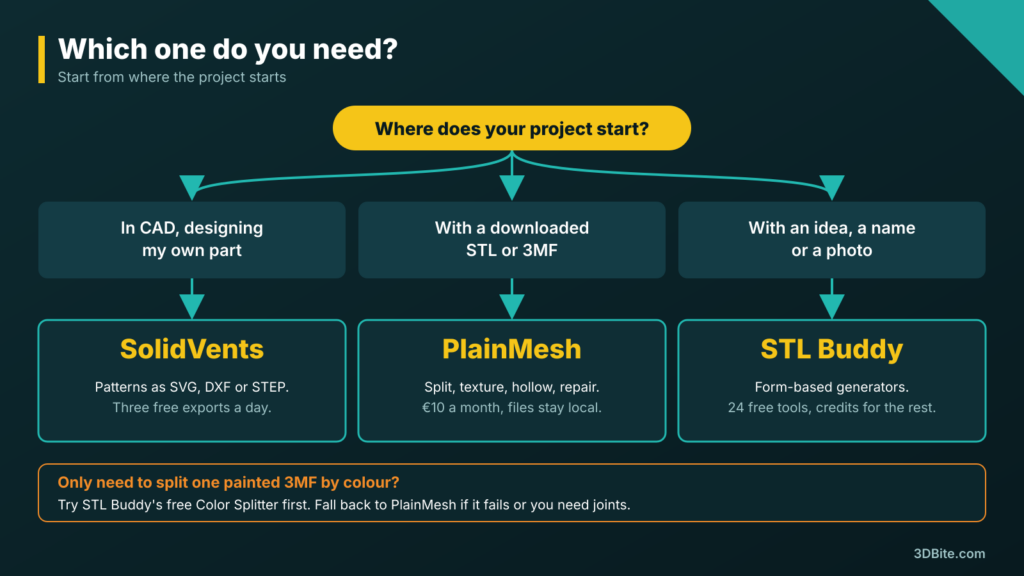
My own answer follows from how I print. I mostly work from downloaded models on the A1 and A2L, so PlainMesh is the one I would pay for, a month at a time, when a project needs it. SolidVents I would keep bookmarked on the free plan for the day I design an enclosure. STL Buddy I would use through its free tools and buy credits only for a specific build. I would not subscribe to all three, and I doubt many people need to.
Where the evidence is thin
- I have not tested output quality, speed or reliability on any of the three. Everything about what the tools do comes from their own pages.
- I found no independent hands-on reviews. SkipTheCAD’s STL Buddy listing is a directory entry on a site that carries affiliate links, and the one third-party article I found on SolidVents describes no testing.
- PlainMesh’s free allowance. The pricing page says free exports are paused; some tool pages still promise three a day. It may have changed by the time you read this.
- Whether the two STL Buddy sites are related. The operators named are different, but I could not read stlbuddy.co’s privacy page.
- File-size limits for PlainMesh, and commercial-use terms for STL Buddy downloads, neither of which I found stated.
- Prices. All three have changed pricing or allowances in 2026, so check before you pay.
Sources and further reading
- SolidVents: FAQ, plans and prices
- SolidVents: changelog
- SolidVents: About
- PlainMesh: pricing
- PlainMesh: About and tool list
- PlainMesh: Fill & Split
- PlainMesh: 3D Model Splitter
- PlainMesh: Texture Applicator
- PlainMesh blog: 3D splitter software compared
- PlainMesh: licence
- STL Buddy (stlbuddy.com): pricing
- STL Buddy (stlbuddy.com): privacy policy
- STL Buddy (stlbuddy.com): terms
- STL Buddy: Color Splitter
- STL Buddy: Model Splitter
- stlbuddy.co: image to STL
- stlbuddy.co: STL viewer
- SkipTheCAD: STL Buddy listing