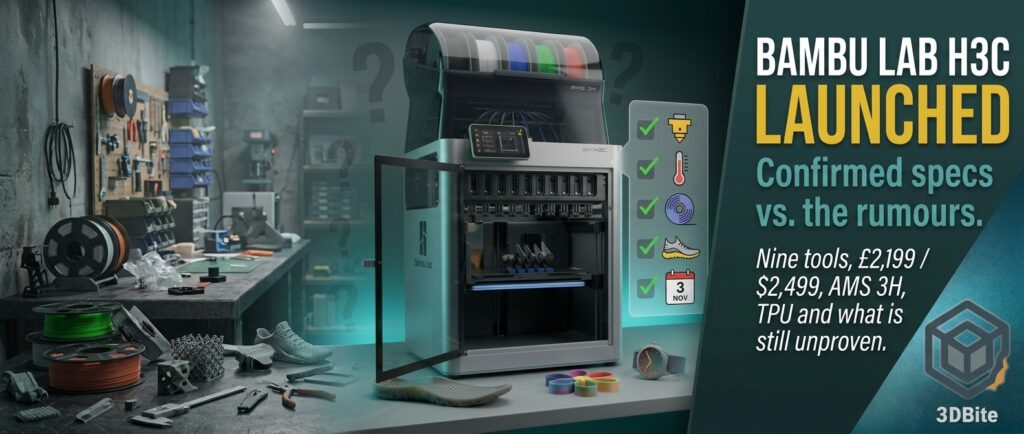
Published 3 November 2026, shortly after the 2 PM UK reveal. I have not touched an H3C. Everything below comes from Bambu’s own H3C pages and press release, the UK store listing, and early coverage, and I label which is which. I will update this post as independent testing arrives.
For two weeks the H3C has been a puzzle assembled from FCC filings, patent drawings, certification photos, teasers and forum arguments, which I tracked in the first rumours post, the teaser follow-up and the H3C and P3C roundup. As of this afternoon, it is a product with a price, a specification sheet and a store page. This post sets out what Bambu has now confirmed, scores it against what we had been guessing, and flags what remains marketing claim, unproven or simply not yet answered. It is long because there is a lot to cover, so use the headings.
The headline facts
| Item | Confirmed detail |
|---|---|
| Name and system | Bambu Lab H3C, built around “Swaptek”, a nine-tool switching system |
| Price, AMS Combo | £2,199 (UK store), $2,499 excluding tax but including shipping (press release), €2,499 including tax |
| Availability | On sale from 3 November. The UK store lists shipping from the UK warehouse within 1 to 3 business days of order processing |
| Tools | Nine PrintTools, each with its own filament path, heater, cutter and data and power connection |
| Build volume | 330 x 320 x 325 mm, enclosed |
| Tool change and material switch | “3.4 s tool change” and “6 s material switch” on Bambu’s page, from internal testing |
| Purge | “0.038 g low purge” per swap, in optimal internal tests |
| Speed | 1,400 mm/s toolhead, 25,000 mm/s² acceleration, 40 mm³/s maximum flow in Bambu’s ABS test |
| Temperatures | Nozzles to 350 °C, bed to 120 °C, actively heated chamber to 65 °C |
| Nozzles | Every nozzle, 0.2 to 0.8 mm, is fully hardened steel at HRC 55+. The extruder gear is hardened steel too |
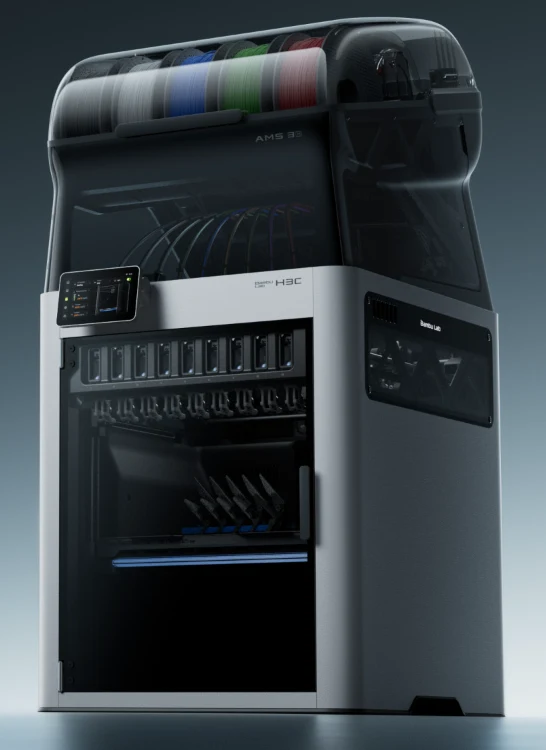
| Filament system | AMS 3H integrated on top: nine slots, sealed, two-slot 85 °C dryer, auto-loading |
| Soft filament | FlexFeed extruder takes 1.75 mm and 2.85 mm filament, with a dedicated 2.85 mm PrintTool and TPU 75A |
| Expandable | Optional CraftTools (blade cutting, drawing, debossing, foil transfer), Vision Encoder and BirdsEye camera |
| Weight and footprint | 36.28 kg including the AMS 3H, 493 x 571 mm base, 1,016 mm tall as a combo |
Pricing and what you actually buy
The only printer listing I could see is a bundle, the H3C Combo, which includes the AMS 3H. The UK store’s four options are below. Prices include UK VAT.
| UK bundle | Price | Extras |
|---|---|---|
| H3C Combo | £2,199 | Printer, AMS 3H, textured PEI plate, power cords, Bambu Bus cable, accessories box and nine PrintTools: eight 0.4 mm for 1.75 mm filament plus one 0.4 mm for 2.85 mm |
| H3C Combo with Filament Starter Pack (TPU and CMYKW) | £2,269 | Adds TPU 75A in black and the PLA Palette CMYKW set |
| H3C Combo with Filament Starter Pack (colourful TPU and CMYKW) | £2,269 | Same pack with a cyan TPU 75A |
| H3C Full Combo, Bambu Station L Frame Edition | £2,469 | Adds the Bambu Station L stand |
VoxelMatters says bundles with filament, the Bambu Station and the E1 Air Purifier go up to $3,049 in the US. Add-on prices on the UK page include a Crafting and Printing Complete Kit at £199 (list £241.98), a Multi-Size Hotends Kit for the H3C at £175 (list £209.93), build plates from £44.99, TPU 75A 2.85 mm at £24.74 when added to the printer (£44.99 on its own), the CMYKW Palette at £50.95 (list £84.95), and a one-year extended warranty at £199. The listing carries 30-day price protection, 30-day returns, a one-year warranty and lifetime support. I could not find a price for an individual replacement PrintTool, which matters because there are nine.
For context against the Black Friday sale: the H2C Combo is £1,569 and $1,899 until 1 December, so the H3C is about £630 or $600 more than the sale H2C, and £0 to £300 more than the H2C’s regular list price depending on region. The H3C is not discounted at launch.
Swaptek: how the tool changing works
This was the biggest open question in the pre-launch material, and Bambu now answers most of it. Swaptek replaces the load-and-unload approach of a single-nozzle printer with nine PrintTools that stay loaded. Each carries its own dedicated filament path and heater, so, to quote the concept, every material stays loaded, pre-heated and ready. The sequence as Bambu describes it is below.
- Active Pre-Heat looks ahead. It reads the upcoming G-code and starts warming the next nozzle while the current tool is still printing.
- The tool swap happens mechanically. Bambu’s page quotes 3.4 seconds for the tool change itself.
- A short priming sequence brings fresh filament to the model, and the total switch is quoted as 6 seconds with a purge of about 0.038 g.
- The rack retracts. The retractable rack lifts out of view during printing so you can see the chamber, and Bambu says it also keeps the filament tubes clear of each other.
Several caveats apply, and they are in Bambu’s own footnotes. The 6 second figure is “based on internal testing under optimal conditions with PLA Basic filament and filament saving purge mode”, and actual times vary with filament type and slicer settings. The 38 mg purge figure is likewise from internal optimal-condition testing and varies with print settings and filament. Bambu says full auto-calibration covers PrintTool docking, offset compensation for colour and material alignment, and bed levelling before every print.
Hotend swap or full toolhead swap?
I asked in the teaser post whether the H3C swaps hotends or entire toolheads. The new pages suggest a middle answer. A PrintTool contains the hotend, its own filament path and heater, a built-in filament cutter and the data and power connection, and the FAQ says the 1.75 mm and 2.85 mm PrintTools differ in their base, hotend and cutter assembly. The spec sheet lists the extruder gear and motor under the toolhead, which points to the FlexFeed extruder staying on the toolhead and picking up the PrintTools. That is my inference from the documents, because Bambu does not state it in one sentence. The unit reviewed by VoxelMatters had the nine PrintTools attached to nine magnetic docks during setup, which took under an hour.
It also settles the patent puzzle I wrote about in the first post. The August patents described nine docks plus one head, which suggested ten nozzles. The launch material says nine PrintTools in total, so one of the nine docks is empty while its tool is on the head. Whether the patents describe this exact design is still my speculation.
FlexFeed and soft TPU
The 2.85 mm TPU 75A clue that appeared on 27 October now makes sense. Soft TPU buckles before it reaches the nozzle, which limits how fast it can be extruded. FlexFeed handles both 1.75 mm and 2.85 mm filament, switching between them, using a cam-driven mechanism powered by a permanent-magnet synchronous motor to keep tension consistent. A thicker 2.85 mm strand resists buckling and allows higher volumetric flow, which is why TPU as soft as 75A is now possible. Practical details from the FAQ:
- The 1.75 mm and 2.85 mm PrintTools are not interchangeable in base, hotend or cutter, and you must match the hotend to the filament diameter.
- The 2.85 mm PrintTool ships pre-installed in slot 8, because slot 8 is a dryer slot and TPU absorbs moisture.
- For 2.85 mm filament you feed straight into the top inlet without routing it through a tube, though the tube still carries the toolhead cabling and must not be removed.
- That PrintTool is for 2.85 mm flexible filament only. Bambu Studio has two presets so far, Bambu TPU 75A (2.85 mm) and Generic TPU (2.85 mm), and more 2.85 mm materials are promised.
- The spec sheet lists 2.85 mm as supported by bypass feed only.
A discrepancy to note: Bambu’s H3C pages say TPU prints “up to 3x faster”, and the press release says the same, but the UK store’s feature list says “up to 5x the flow rate on flexible filament”, and VoxelMatters repeats five times. The footnote says the figure refers to maximum volumetric flow compared with the previous-generation machine measured under the same conditions. Until Bambu reconciles them, I would treat three times as the more conservative reading.
AMS 3H: nine slots, a dryer and a lot of detail
| AMS 3H detail | Confirmed |
|---|---|
| Slots | Nine, in a sealed PC/ABS housing that doubles as the printer’s top cover |
| Dryer | Two slots dry at a time, up to 85 °C (measured by the built-in sensor), with active moisture discharge |
| Drying while printing | Supported, but only with selected filaments that stay dimensionally stable at drying temperature |
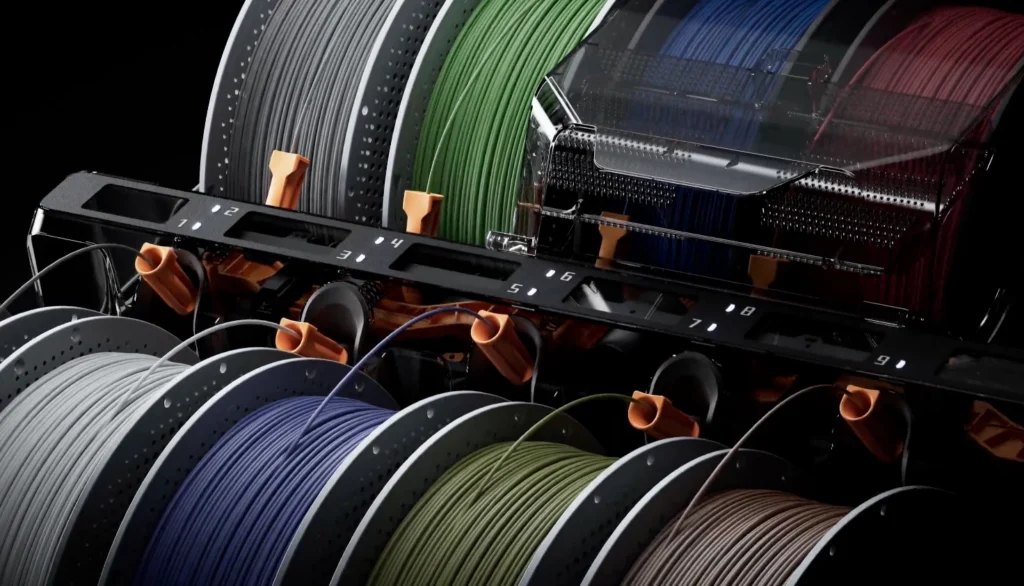
| Loading | Auto Filament Loader: drop a spool into any slot and it detects, routes and engages automatically across all nine paths |
| Bypass feed | Slots 1, 3, 5, 6, 7, 8 and 9. Slots 2 and 4 have a circuit-board cover that blocks the port |
| Spool size | Width 50 to 68 mm, diameter 197 to 202 mm |
| RFID | Supported |
| Weight and size | 9 kg, 480 x 562 x 460 mm |
| Power | 200 W maximum, 70 W steady-state |
| Expansion | Up to four existing AMS units connect through an optional Buffer on PrintTool 1, enabling up to 24 colours |
Two things stand out. First, the two-slot drying limit is a deliberate trade, and Bambu’s FAQ explains it in terms of safety, cost and everyday needs: long high-temperature operation across all nine slots would raise power draw and heat build-up. If you work with several hygroscopic materials, you will need to plan which two spools get the dryer. Second, the extra 24-colour route uses external AMS units fed through a single PrintTool, so those extra colours go through one tool rather than getting nine independent paths.
The leaked AMS 3P guide I covered in the roundup described no bypass feed on slots 2 and 6. The H3C’s own AMS 3H has no bypass on slots 2 and 4, so those are different units with different layouts, which is a useful reminder of how little a leaked quick-start guide tells you about a different product.
Print performance and the hardened-nozzle answer
The toolhead and X-axis assembly are quoted as 40% lighter than the H2D’s, which is how Bambu justifies 1,400 mm/s travel and 25,000 mm/s² acceleration without added ringing. Bambu’s maximum-flow figure, 40 mm³/s, comes with its test conditions in the spec sheet: a 250 mm round model with a single outer wall, Bambu ABS at 280 °C.
The HRC 55+ teaser I explained in the HRC 55+ post now has an unambiguous answer. Bambu’s FAQ says every H3C nozzle, from 0.2 mm through 0.8 mm, is made of fully hardened steel at HRC 55+, built to withstand abrasive filaments such as carbon fibre and glass fibre. “All of them” meant all of them. The spec sheet also lists a hardened steel extruder gear, which addresses the gear wear I warned about in the abrasive filaments guide. What Bambu has not published is the steel type or what the 55 is measured on, or whether tungsten carbide will follow.
| Thermal and cooling | Detail |
|---|---|
| Chamber | Active dual-zone heating up to 65 °C |
| Cooling | “Four layers”: a CFD-optimised part-cooling fan with dual auxiliary fans, a dedicated PrintTool fan, and a chamber fan. The spec sheet lists closed-loop control on part, hotend, board, chamber circulation, auxiliary and exhaust fans |
| Operating range | 10 to 30 °C ambient |
| Filtration | The spec sheet lists an H11 HEPA filter and granulated coconut-shell activated carbon |
The supported materials list is long and includes PLA, PETG, PCTG, TPU, EVA, PE, PP, PHA, PVA, BVOH and support filaments, carbon- and glass-fibre PLA and PETG, and ABS, ASA, HIPS, PA, PAHT, PC, PET, PPA and PPS with fibre-filled variants. Supported plates are the included Textured PEI, Cool Plate SuperTack and Engineering Plate on a flexible steel plate. I saw no mention of induction heating, which some people had hoped would carry over from the H2C. The pages say each PrintTool has its own heater and nothing more, so I would not assume it.
Mixed nozzle sizes and colour mixing
The most interesting capability is not the speed of a swap but what you can do with it. Because each PrintTool is a separate hotend, one print can use a 0.2 mm nozzle for fine detail, a 0.4 mm nozzle for bulk and a dedicated 0.4 mm 2.85 mm tool for TPU. Bambu says a new mixed-diameter toolpath planning algorithm in Bambu Studio lets each nozzle print at a layer height suited to it. Extra hotends in other diameters are sold separately.
Colour mixing uses a CMYKW set. Bambu’s PLA Palette pairs four opaque bases, cyan, magenta, yellow and white, with a translucent black, and Bambu says the opaque bases hold under 1% light transmission at a 2 mm wall. The claim is that five base filaments can approach a full colour wheel, and Bambu’s own footnote says it requires the CMYKW Palette to achieve the intended result. VoxelMatters notes that mixing is easier than ever but still takes time and effort to test properly.
More than 3D printing
Swaptek is also a general tool interface. Optional CutTool, DrawTool and DebossTool mount the same way and switch automatically, with foil transfer listed too. The spec sheet says the CraftTool system supports cutting, drawing “and more coming”. The crafting tools are sold separately, and the FAQ says you can use cutting and drawing without the optional BirdsEye camera by taking alignment photos through Bambu Handy, though the camera gives a smoother surface-processing workflow. That ties neatly into the multi-tool printers post, with the difference that this is a blade and pen, not a laser.
Software, monitoring and calibration
- Full-auto calibration of docking, offsets and bed levelling before every print.
- AI monitoring that checks the chamber against your slicer setup and watches for spaghetti, purge-bin jams and clogs. Bambu says BirdsEye-enhanced monitoring is planned for the first half of 2027 and is subject to change, so the full “array of vision systems” is not all here today.
- All-new HMS with MiniWiki that ranks likely causes and walks you through fixes on the printer’s own screen, covering the most common codes, with a link out to the full wiki for rarer ones.
- Optional Vision Encoder for recalibration to under 50 μm across the build volume as parts wear.
- Cameras: a built-in 1080p live view camera and a 1080p toolhead camera, with the optional BirdsEye at 3264 x 2448.
- Sensors: door, filament run-out, nozzle clumping and filament odometry, plus power loss recovery.
The practical stuff owners will care about
| Topic | Detail |
|---|---|
| Space | Bambu says to leave 593 x 1056 x 1306 mm: 385 mm at the front, 50 mm each side, 100 mm at the rear and 290 mm above for the AMS lid. On the Station L allow 1,900 mm of height |
| Weight | 36.28 kg with the AMS 3H, so it is a two-person lift |
| Power | Maximum 2,250 W at 220 V (high-voltage version) or 1,850 W at 110 V. Steady-state is 240 W printing PLA and 540 W printing PC. Low Power Mode caps it at 1,050 W for limited circuits. My own arithmetic puts the peak at roughly 10 A at 230 V during the 3 to 5 minute heat-up, so check your circuit |
| Connectivity | Wi-Fi 6 only. The spec sheet lists no Ethernet, no network kill switch, no removable network module and no 802.1X |
| Slicer | Bambu Studio. Third-party slicers that export standard G-code, such as PrusaSlicer, SuperSlicer and Cura, work with some advanced features missing |
| Controller | 5-inch 854 x 480 touchscreen, 64 GB eMMC plus a USB port, a quad-core ARM processor with NPU, and Cortex-M4 and M7 motion controllers |
| Cybersecurity | The UK listing states compliance with EU RED Article 3.3(d)(e) and ETSI EN 303 645 |
One item for the self-hosting crowd: I could not find anything about LAN mode or Developer Mode on the H3C, which matters if you run tools such as Bambuddy, as I discussed in the Bambuddy decision post. The lack of Ethernet and a kill switch will also matter to anyone with strict network policies. I would check both before buying for an office.
One more oddity: Bambu’s press release says the H3C sits in a footprint “no larger than a single-spool A-Series printer”, yet the spec sheet shows a 36 kg machine needing over a metre of depth with the door open. Both can be true if the claim means the machine’s base, but I would measure your space before trusting either.
The scorecard: rumours against reality
This is the part I promised in the roundup. I have used the same grading as before, so you can see how each pre-launch claim fared.
| Pre-launch claim | Earlier status | Result |
|---|---|---|
| Nine tools | Official, Documented | Confirmed. Nine PrintTools in nine magnetic docks |
| Ten nozzles, from the patents | Speculation | Not borne out. Nine tools in total |
| A rack that lifts out of the way | Official (second teaser) | Confirmed as the Retractable Rack |
| 330 x 320 x 325 mm build volume | Reported, one source | Confirmed on the spec sheet |
| Every tool hardened, HRC 55+ | Official teaser | Confirmed. Every nozzle 0.2 to 0.8 mm, plus a hardened extruder gear |
| A 65 °C heated chamber | Unverified, from a fan site | Confirmed as active heating to 65 °C |
| 350 °C nozzles | Unknown | Confirmed |
| AMS on top of the printer | Plausible inference | Confirmed. The AMS 3H is the top cover |
| AMS 3H takes mains power, about 200 W | Documented | Confirmed. 200 W maximum, with an 85 °C dryer |
| AMS 3H is a two-bay unit | One commentator’s guess | Wrong. It holds nine spools and dries two |
| 2.85 mm TPU 75A, H3C only | Official store listing | Confirmed, with FlexFeed and a dedicated 2.85 mm PrintTool |
| Hotend swap or full toolhead swap | Open question | Partly answered. PrintTools carry the hotend, path, heater and cutter, and the extruder appears to stay on the toolhead |
| Vortek retired | One outlet’s opinion | Bambu says the H2C will not be discontinued and serves a different user, with automatic pairing of multiple filaments to multiple nozzle diameters |
| Induction heating carried over | A hope | Not mentioned in the material I read |
| Price $3,000 to $3,500 (PrintNexus) | Guess | Too high. The AMS Combo is $2,499 |
| Price $2,299 for the Combo (Anton Månsson) | Guess | Close but low. The Combo is $2,499 and £2,199 |
| Priced above the H2C | Common expectation | Correct against the H2C’s list price of $2,199 |
| The P3C appears at launch | Speculation | I found no mention in Bambu’s launch material |
New things nobody predicted: the Station L stand as a bundle, the CraftTool range (cut, draw, deboss, foil), the optional Vision Encoder, the mixed-diameter toolpath planner, the 24-colour external AMS route through a Buffer, the 6-second material switch and a built-in filter listed on the spec sheet. Also, no Ethernet.
What early commentary says
Independent testing is thin on launch day. The one hands-on I found is VoxelMatters, whose writer says up front that he is a journalist who tests dozens of printers rather than a full-time maker, and that time was limited. The unit also needed whitelisting before it worked in Bambu Studio and Handy outside mainland China, because it was not yet on sale. Within those limits, the findings are:
- Setup was easy. Attaching the nine PrintTools to their docks followed on-screen instructions and took under an hour including calibrations.
- Standard multicolour printing was straightforward. The preloaded multicolour boat printed precisely. A large four-colour snow owl, 228 mm tall, ran for more than 30 hours without a problem.
- Two problems, neither blamed on the machine. Water-soluble support filament that had not been dried softened and jammed in the AMS and left a piece in the hotend, which led to opening a toolhead by removing three small screws. A tangle with non-Bambu filament forced a cut, leaving a long segment in the extruder that took time to clear, because releasing the PTFE tube is less intuitive than on other printers.
- TPU was mixed. A small flat mesh layer for a camera-gimbal case stalled several times and jammed in the extruder, but Bambu’s multi-flex shoe model ran for roughly 70 to 80 hours with PLA and TPU without interruption. The review’s summary says 70 hours and the body says almost 80.
- The conclusion: the machine can take time to master, success depends heavily on well-designed files, and the reviewer sees MakerWorld verified files as a major asset. The system itself is described as rock solid.
3DPrint.com, which had not reviewed the machine, called it a very complete machine at a very competitive price, an in-office printer that places Bambu above Snapmaker and positions it for business users, while also warning that it is clearly a complexity trap because Bambu is using software and sensors to increase complexity in switching and materials. Both views are consistent: the hardware is ambitious, the setup is automated, and the more you use mixed nozzles, soft TPU and engineering materials, the more places something can go wrong.
Before launch, the loudest concerns on forums were price, frustration among recent H2C buyers and serviceability, specifically how the swap system would be repaired and how well the tools would hold alignment over thousands of swaps. Launch day answers some of that, since the FAQ and the review both stress that tools can be opened and cleared, but nobody has yet shown long-term reliability or what a replacement PrintTool costs.
How it compares
| Machine | Tools | Approach | Price |
|---|---|---|---|
| Bambu Lab H3C | Nine | Retractable front rack, PrintTools with own heaters, integrated 9-slot AMS | $2,499, £2,199, €2,499 Combo |
| Bambu Lab H2C | Six induction hotends plus one fixed | Vortek hotend changer. Bambu says it stays on sale | $2,199 list, $1,899 in the sale |
| Prusa Core One with INDX | Four or eight | One smart toolhead, tools parked at the front. About 12 to 14 seconds per change, per earlier coverage | $749 (4 tools) or $999 (8 tools) kit, plus the printer |
| Snapmaker U1 | Four | Independent toolheads | Lower, not confirmed here |
| Flashforge Creator 5 | Four | Independent toolheads | From $649 |
| Creality K3 | Four | Nozzle changer | $849 |
Comparing tool-change times between these machines is tricky, because Bambu’s 3.4 seconds measures the mechanical swap while its 6 seconds measures a full material switch including pre-heat and priming, and other manufacturers define theirs differently. I would wait for an independent stopwatch test before drawing conclusions. Bambu’s argument is that the H3C is not just a faster swapper but a complete system: integrated drying and storage, TPU, high temperatures, crafting tools and a 330 x 320 x 325 mm bed in one enclosed machine.
Marketing claims to read carefully
| Claim | What Bambu’s own footnote says |
|---|---|
| 6 second material switch | Internal testing under optimal conditions with PLA Basic and filament-saving purge mode. Varies by filament and slicer settings |
| 38 mg purge | Internal optimal conditions. Varies with settings and filament |
| TPU up to 3x faster (or 5x) | Maximum volumetric flow compared with the previous-generation machine in internal testing. Pages disagree on the multiple |
| Without jams | Improved feeding reliability in internal testing. Not a guarantee of jam-free operation |
| 85 °C dryer | Measured by the built-in sensor. Other points may read differently |
| Drying while printing | Only with selected filaments that stay dimensionally stable when dried |
| 40% lighter head | Compared with the H2D |
| No sag, no melting | Relative cooling improvement in testing. Not a guarantee under all conditions |
| Full array of vision systems | Includes the optional BirdsEye. Enhanced monitoring planned for the first half of 2027 |
| Colour mixing | Needs the CMYKW Palette filament |
| Mixed nozzle sizes | Needs extra hotends in other diameters, sold separately |
| 24 colours | Needs previous-generation AMS units and an optional Buffer, sold separately |
Who should buy, and who should wait
| You are… | My read |
|---|---|
| Printing mostly single-colour PLA and PETG, like me on the A1 and A2L | This is not for you. It is a different class of machine and price |
| Someone who prints a lot of multicolour and is tired of purge waste | Exactly the target. The 38 mg claim is the number to verify |
| A TPU or footwear maker | The most compelling case, with the 2.85 mm path. But wait for more independent TPU testing beyond Bambu’s own model |
| Printing engineering materials | 350 °C hardened nozzles, 65 °C chamber and an 85 °C dryer cover the basics. Test your specific material list against the spec sheet |
| An H2C owner | Bambu says the H2C is not discontinued. Its distinctive offer is automatic pairing of filaments with nozzle diameters |
| Choosing between an H2C and an H3C today | The H3C costs about £630 or $600 more than the sale H2C, and is a newer system. That is a real premium to justify |
| A small business or print farm | Check circuit capacity, the 36 kg weight and space, no Ethernet, and the cost of spare PrintTools |
| Buying for a hobbyist household | Be honest about complexity. Several parts of the review involved fixing jams |
A word on timing. The Black Friday sale runs to 1 December, but the H3C is not part of it, and the store’s 30-day price protection excludes promotions and flash sales. If you are wondering whether to wait for a deal, nobody knows, and I would not plan around it.
What is still unanswered
- Independent speed tests. Real tool-change times, real purge per print and real print-time savings against an AMS machine.
- Reliability. Alignment drift, wear on the docks and connectors, and how often PrintTools need servicing.
- Costs. The price of a replacement PrintTool, the extra-size hotends and the Buffer for external AMS units.
- The steel and the 55. What the nozzles are made of, and how HRC 55+ compares with Bambu’s quoted figures for its other hardened nozzles.
- Software. OrcaSlicer support for nine tools and mixed diameters, LAN and Developer Mode availability, and Bambuddy compatibility.
- TPU beyond Bambu’s own models. How well third-party files and third-party 2.85 mm filament behave.
- The P3C and AMS 3P. Not mentioned in the launch material I read, so the seven-tool printer remains unannounced as far as I can tell.
My verdict, for now
I think this is the launch the leaks deserved. Nearly everything the better-sourced rumours said turned out to be true, the price landed in the middle of the guesses rather than at the scary end, and the design answers a problem Bambu has had for years: TPU, hygroscopic materials and wasteful colour changes all handled by the machine rather than by the owner. What I cannot yet tell you is whether the 6-second and 38 mg numbers survive contact with real prints, whether nine tools stay aligned after a year of use, or whether the complexity that Bambu has packed in stays hidden or leaks out when things go wrong. The one hands-on suggests it is very approachable until a filament jams, and then you are opening a toolhead. That is a fair trade for a $2,499 machine, but it is a trade. I will write the follow-up once there is independent testing worth reading.
Sources and further reading
- Bambu Lab: H3C overview, specifications and FAQ
- Bambu Lab UK Store: H3C listing, with bundles, add-ons and the full FAQ
- Bambu Lab press release: Tool changer. Game changer.
- VoxelMatters Reviews: Bambu Lab H3C, this is the way
- 3DPrint.com: Bambu Lab releases the $2,499 H3C
- PrintNexus: H3C and P3C release date, photos and pricing (pre-launch)
- Makers101: Bambu Lab TPU 75A, 2.85 mm and H3C only (pre-launch)
- Anton Månsson: Bambu Lab’s third generation and price bets (pre-launch)
- Tom’s Hardware: Bambu Lab teases its H3C tool changer (pre-launch)
- Bambu Lab Community Forum: HRC 55+. All of them