I am posting this purely because I find it interesting. It is not directly relevant to my A1 or Kobra X workflow. It does not affect anything I print on a day-to-day basis. It is just a brilliant piece of maker ingenuity that deserves a moment of appreciation — the kind of thing that reminds you why the hardware hacking community exists and why it keeps producing things that make you smile.
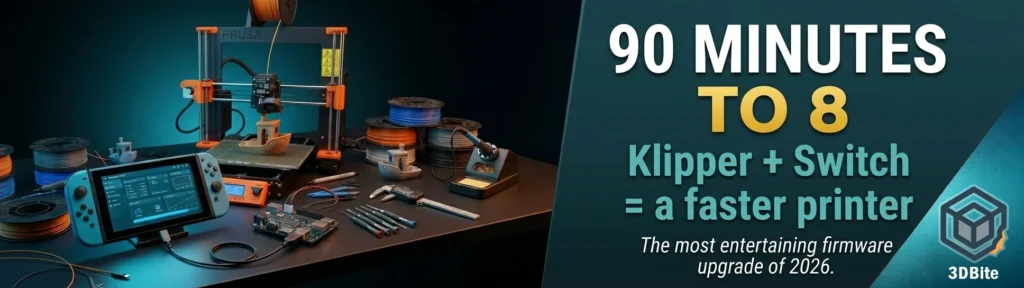
A YouTuber called Cocoanix installed Linux on a jailbroken Nintendo Switch, ran Klipper firmware on it, connected it to an ageing Prusa MK3S, and watched a 3DBenchy print that used to take 90 minutes complete in 8 minutes and 41 seconds. That is a roughly ten-fold improvement. On a printer that was made faster not by replacing any of its mechanical parts, but by giving it a better brain.
The actual story: it is about Klipper, not the Switch
The Nintendo Switch is the hook — and an excellent one, because nobody clicks past “Nintendo Switch speeds up 3D printer” without wanting to know more. It might sound like an odd choice, and that’s because it is. There’s no special magic inside a Nintendo Switch that makes 3D printers faster — it’s just that the handheld console was a useful platform on which to run Klipper. Even Cocoanix is upfront about this: “For most people, a Raspberry Pi is a better choice.” The Switch is amusing, practical in an unexpected way, and great for a video thumbnail. The real story is what Klipper does and why it produces such a dramatic result on older hardware.
The Prusa MK3S ships with Marlin firmware running on the printer’s own 8-bit microcontroller. Marlin is capable and well-established, but it has a fundamental constraint: the microcontroller that runs it is doing all the work. It processes G-code, plans movements, calculates acceleration profiles, manages sensors, and drives the motors — all on hardware that was designed to be inexpensive and embedded in the printer rather than computationally powerful. Prusa shipped the i3 MK3S with a controller running Marlin firmware. That controller, with Marlin, takes G-code created by the 3D printing slicer and uses it to tell the motors how to move. It is all very straightforward. It is also subpar, because it doesn’t really take into account the real-world physics of 3D printing.
Cocoanix describes Marlin as “a bit like asking a calculator to run a spreadsheet.” The metaphor is accurate. The calculator can do it. It just cannot do it quickly, and the quality of the output is limited by the calculation speed available.
What Klipper actually does differently
Klipper splits the firmware job between two devices. The printer’s existing microcontroller — the MK3S’s original board in this case — handles only the low-level tasks: actually driving the motors, reading sensor values, and executing movement commands in real time. All the complex calculation work — motion planning, G-code interpretation, input shaping, pressure advance, acceleration profiling — moves to a separate, more powerful computer. In this case that computer is a Nintendo Switch running Ubuntu Linux. Usually it would be a Raspberry Pi.
Thanks to the power of the Switch and Klipper, with the Prusa MK3S, the bottleneck stops being processing power or advanced features, and is instead the 3D printer’s hotend and extruder. Running the new Input Shaper, the TechTuber manages to push the MK3S to its absolute speed limit: 400mm/s at 17,000mm/s² of acceleration. That is a remarkable figure from a printer that was printing at a small fraction of that speed under Marlin. The MK3S’s mechanical limits — what the frame, motors, and motion system can physically sustain — are now the constraint, not the firmware’s ability to calculate fast enough to keep up.
Two specific features make the most practical difference to print quality at speed: input shaping and pressure advance. Input shaping tunes the relationship between motors and movement to prevent resonance, significantly reducing ghosting and ringing artifacts. Pressure advance tunes the relationship between extrusion motor movement, filament extrusion at the nozzle, and movement to reduce bulging on corners and edges. Both of those, and a lot more, are foundational features of Klipper firmware. These are the techniques that Bambu Lab’s proprietary firmware implements on the A1 and P1S — it is why those machines can print at high speed with acceptable quality. Klipper brings the same capability to any printer with a compatible controller board and a companion computer running alongside it.
Why the Switch specifically
The Nintendo Switch’s SoC is an Nvidia Tegra X1 — a quad-core ARM Cortex-A57 processor with an integrated Maxwell GPU, designed for a handheld gaming device but capable of running a full Linux distribution. People often say disparagingly that the Switch was just an outdated smartphone/tablet SoC shoehorned into a gaming handheld, and while that’s not exactly the case, there’s enough truth to it that it was remarkably straightforward for developers to get other OSes running on it. The jailbreak community has been running custom firmware and alternative operating systems on the Switch for years. Linux on Switch is well-documented. Getting Klipper running on Ubuntu on a jailbroken Switch is, once you have Linux working, essentially the same process as getting Klipper running on any other Linux system.
The Switch has one practical advantage that a Raspberry Pi does not: a built-in touchscreen display. The touch screen Switch is a great add-on for the Prusa MK3S. Klipper’s web interfaces — Mainsail and Fluidd — are browser-based. On a Raspberry Pi you would typically access them from a phone or laptop. On a Switch, the touchscreen becomes a dedicated printer control panel sitting beside the printer. That is actually useful rather than just amusing. The print management interface running on the Switch’s display is a more elegant setup than a separate phone or tablet in many workshop configurations.
The jailbreak requirement is the significant practical caveat. It goes without saying that it needs to be jailbroken via exploit or modchip to do this. Cocoanix does not cover the jailbreak process in the video — Nintendo is notoriously litigious — but documentation exists in the homebrew community for those who want to follow the same path. This is not a weekend project for anyone unfamiliar with console modding, and a Switch used this way is a Switch that cannot easily return to normal gaming use.
The 90-minute to 8-minute result in context
The headline number — 90 minutes to 8 minutes and 41 seconds — is a 3DBenchy Speed Benchy result. The Speed Benchy challenge has specific rules and is specifically a test of maximum print speed rather than print quality. It is the drag racing of FDM benchmarks. That completed in just 8 minutes and 41 seconds following the standard rules, and it looks awful. But if I’m being honest, almost all sub-10-minute Speed Benchy prints look awful and Marcel’s result was pretty respectable. The visual quality at maximum speed on an MK3S with a stock hotend and extruder is not good. The hotend cannot melt filament fast enough to keep up with the motion system at the absolute limit — that is the constraint Klipper surfaced by removing the firmware bottleneck.
The more practically meaningful result is what Klipper does to normal print speeds with quality settings. At sensible speeds — not maximum drag-race mode — the combination of input shaping, pressure advance, and a more powerful motion planner produces cleaner prints with less ringing and ghosting than Marlin on the same hardware. Cocoanix boasts about not just the increased performance but quality improvements — less ringing and ghosting will be present in the output. For a printer where the owner is frustrated with quality artefacts at speed rather than just with raw print time, this is the more relevant improvement.
Why this does not apply to modern Bambu printers — but the principle does
The MK3S is of a certain vintage now, and while contemporary designs addressing the same market may suffer from similar processing bottlenecks, adding an SBC or Switch to a modern 3D printer may not be so desirable. This is the right framing. The Bambu A1, P1S, X2D, and the Anycubic Kobra X all ship with ARM-based processors significantly more powerful than the 8-bit microcontrollers in older Marlin-based printers. The A1 already runs input shaping and advanced motion planning natively. The bottleneck that Klipper on a Switch addresses on the MK3S does not exist in the same form on modern current-generation hardware.
But the principle is the same one that every modern printer applies. The reason the A1 can print at 500mm/s with acceptable quality is the same reason the Switch-powered MK3S can reach 400mm/s: motion planning sophisticated enough to account for real-world physics, input shaping to cancel resonance, and pressure advance to manage extrusion. Bambu implements these in proprietary firmware on their own hardware. Klipper implements them in open-source firmware on any hardware with a compatible controller and a companion computer. The techniques are identical. The implementation paths differ.
For anyone with an older Marlin-based printer sitting in a corner being used occasionally because it is too slow and the quality is frustrating — this story is directly relevant. A Raspberry Pi costs around £30–£40. Klipper is free. The improvement documented here is not specific to the Switch — it is what Klipper does to older hardware regardless of what computer runs it. The Switch is the entertaning part. The Raspberry Pi is the practical part. The result is the same either way.
Community notes worth knowing
The Hackaday comments section for this story is unusually practical and worth reading if you are considering a Klipper installation on an MK3S specifically. One commenter flags a specific requirement that Cocoanix does not cover in the video: if you are inspired to run Klipper on the Prusa MK3S, you MUST flash the USB chip firmware to fix an issue where Klipper gets randomly disconnected in the middle of prints. This is the kind of practical detail that separates a YouTube demonstration from a reliable daily workflow. The USB disconnect bug is real and documented, and the fix is available but requires an additional step beyond the standard Klipper installation.
The same commenter also points out the next logical upgrade once Klipper removes the firmware bottleneck: now that the motion is so fast, the hotend’s filament melting power is the limit for speed. A CHT nozzle eases that bottleneck by like 50%. This is exactly what Cocoanix found in the Speed Benchy test. Klipper surfaces the next bottleneck by solving the previous one. That is the nature of performance optimisation — each improvement reveals the next limit.
The actual watch
The original video by Cocoanix is well made and worth watching in full if any of this has sparked interest. The channel name on YouTube is “Cocoanix 3D Printing” and this video has already been picked up by Hackaday, Tom’s Hardware, PC Gamer, and Hackster.io — which is an unusual spread of coverage for a maker project and reflects how broadly interesting the Nintendo angle made a story that was already technically compelling.
Sometimes the best thing about this hobby is not the prints. It is the people who look at a jailbroken gaming handheld and a frustrated printer and decide to connect the two. This is one of those moments.