A print runs perfectly for two hours and then, with no settings changed and no obvious cause, the extruder starts clicking and nothing comes out. This is one of the most common and most confusing FDM failures, precisely because nothing appears to have gone wrong — the same settings that worked fine at the start of the print have stopped working partway through. The hot weather post on this site touched on this as a seasonal problem, but heat creep is a year-round mechanical reality that deserves its own dedicated explanation, because understanding exactly what is happening inside the hotend turns a frustrating mystery into a solvable, predictable problem.
The hotend has two zones, and they need to stay separate
Every FDM hotend is built around a deliberate temperature contradiction. At the bottom, the melt zone needs to be hot — 200°C or more, depending on material — to properly liquefy the filament for extrusion. A short distance above that, the filament needs to still be solid, because the extruder gear can only grip and push solid filament reliably. Soft, partially-melted filament has no rigidity for the gear to push against.
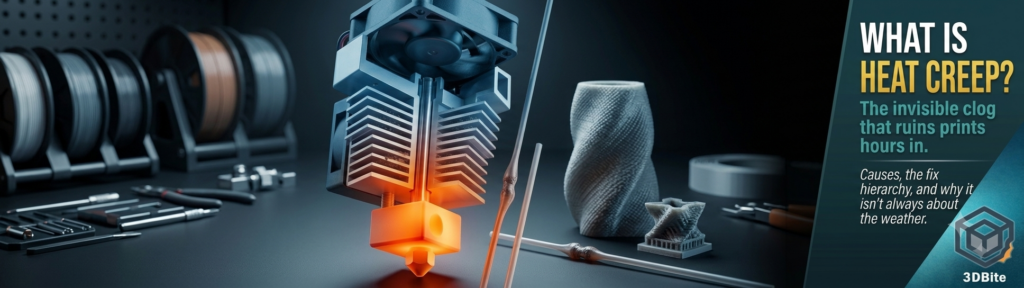
The component that manages this transition is the heat break — a thin-walled tube, usually stainless steel or titanium, that connects the heater block below to the heatsink above. Its job is to conduct as little heat upward as possible while still providing a path for filament to travel through. Above the heat break sits the heatsink, a finned metal block with a dedicated cooling fan blowing across it continuously, whose job is to actively remove any heat that does creep upward through the heat break before it reaches a level where the filament starts to soften. The cold side of the heat break — the section just below the heatsink — needs to stay below the filament’s glass transition temperature. For PLA, that is roughly 55-60°C. Everything about heat creep comes down to whether that cold zone stays below that number or not.
What actually happens when it fails
When the cold zone temperature creeps above the glass transition point, the filament sitting in that section begins to soften. Softened filament has two problems at once: it has higher friction against the heat break’s walls than solid filament does, and it expands slightly in diameter as it warms, which means it starts to bind against the narrow bore of the heat break rather than sliding through freely. The extruder motor, still trying to push filament forward at the rate the print requires, cannot overcome that combined friction and swelling. It either clicks as the stepper motor skips steps it cannot physically complete, or it grinds a flat divot into the side of the filament as the drive gear spins uselessly against material it can no longer grip.
The diagnostic signature that distinguishes heat creep from a genuine clog is worth knowing precisely, because the fix for each is completely different. A heat creep jam recovers if you let the hotend cool fully to room temperature — the softened filament resolidifies, shrinks back down slightly, and can usually be withdrawn cleanly once cool. A genuine clog, caused by actual debris or carbonised residue rather than a thermal problem, does not clear itself simply by cooling down. If unloading and reloading filament after a cool-down resolves the issue and the print continues normally, that is heat creep. If the same blockage persists after a full cool-down and reload, the problem is a physical obstruction rather than a thermal one, and the cold pull technique covered in the cold pull guide is the appropriate next step rather than anything covered here.
Why it happens gradually rather than immediately
This is the detail that makes heat creep feel mysterious the first time you encounter it. A print can run perfectly clean for the first thirty minutes, an hour, sometimes several hours, before the failure appears. The cooling fan on the heatsink is working continuously to remove heat as it accumulates, and for a while it keeps pace. But heat is being generated continuously by the hotend running at printing temperature, and if the fan’s removal rate is even slightly below the accumulation rate, the cold zone temperature climbs gradually rather than instantly. This is a thermal saturation problem rather than a threshold problem — the failure appears only once the accumulated heat has finally pushed the cold zone above the critical temperature, which can take a long time on a marginal setup and happen much faster on one with a genuine deficiency.
The causes, in order of how often they are actually the culprit
Dust and debris in the heatsink fan
This is consistently the most common root cause and the easiest to miss because the fan appears to be running normally at a glance. A hotend heatsink fan with dust accumulated in its bearings can drop to a fraction of its rated speed while still visibly spinning — one documented case found dust buildup had reduced fan speed to roughly 50% of standard, invisible without direct measurement, and the reduced airflow was directly responsible for recurring heat creep failures that seemed to appear at random. Compressed air blown through the fan and heatsink fins, with the printer off, clears this in under a minute. If heat creep issues are recurring on a machine that has been running for months without this specific check, this is the first thing to rule out — before adjusting any settings.
Print temperature set higher than necessary
Every degree above the minimum temperature that still produces good layer adhesion is heat the cooling system has to remove without any corresponding benefit to print quality. The sweet spot is the lowest temperature that still produces clean extrusion and good layer bonding for the specific filament, not the highest temperature the material can technically tolerate. Running PLA at 220°C when 205°C would print equally well is adding unnecessary thermal load to the cooling system for no quality gain, and reducing it is one of the simplest and most immediately effective adjustments.
Ambient temperature
Covered in detail in the hot weather post, this is the same mechanism at a system level rather than a component level: the heatsink fan is only ever as effective as the temperature of the air it has available to blow. At 20°C ambient, the fan removes heat efficiently. At 32°C ambient, the same fan working exactly as designed is starting from a warmer baseline and has less capacity in reserve before the cold zone crosses the critical threshold. Ventilating the room and running a fan across the printer — not just the machine’s own cooling fans, but a room fan improving overall air circulation — genuinely helps on marginal days.
All-metal hotends without a PTFE liner
This is a genuinely important distinction that trips up a lot of people upgrading their hotend for higher-temperature materials. A standard PTFE-lined heat break has a slick internal tube that guides the filament almost all the way to the nozzle with very low friction, which helps prevent heat creep at lower temperatures even if the cold zone runs a little warm. An all-metal hotend removes that liner entirely, which allows printing at temperatures above roughly 240°C where PTFE itself would degrade — necessary for nylon, polycarbonate, and other high-temperature engineering materials. But without the low-friction liner, filament in an all-metal heat break contacts bare metal directly, with meaningfully higher friction. This means all-metal hotends are, somewhat counterintuitively, more prone to heat creep with PLA specifically than a standard PTFE-lined hotend is, precisely because they were designed to solve a different problem. If you have upgraded to an all-metal hotend for high-temperature capability and started experiencing heat creep on PLA prints that never had the issue before, this is very likely why, and it needs slightly more conservative cooling and retraction settings on PLA than a stock PTFE-lined hotend requires.
Retraction distance too long
Long retraction distances pull filament that has already been sitting in the warm zone back further up into the cooler section of the heat break, where it can then sit and soften before the next extrusion move pushes it back down. Reducing retraction distance — typically to 1-2mm on a direct-drive system rather than longer distances more appropriate to Bowden setups — reduces how far into the heat break the filament travels on each retraction, and correspondingly reduces the opportunity for heat creep to develop from this specific mechanism.
Poor thermal contact between heat break and heatsink
A loose or improperly seated heat break has reduced surface contact with the heatsink, which means heat generated at the hot side has a poorer path to actually reach the cooling fins where it can be removed. Standard CPU thermal paste is explicitly the wrong product to use for this if you are trying to improve the thermal joint — it degrades above 200°C and off-gasses at hotend operating temperatures. Boron nitride thermal paste, rated to roughly 850°C, is the correct product for this application, applied to the heat break threads before assembly. This is a one-time fix that takes about five minutes and can drop the cold-side temperature by 5-10°C — often enough on its own to eliminate marginal heat creep that was sitting right at the edge of the problem threshold.
The fix hierarchy: cheapest and most likely to work first
Clean the heatsink fan and fins with compressed air. This costs nothing, takes a minute, and resolves the most common single cause outright. Do this before anything else on the list.
Reduce print temperature to the lowest setting that still produces good layer adhesion for the specific filament. A 5-10°C reduction is a meaningful cut to the thermal load the cooling system has to manage, and it costs nothing to test.
Reduce retraction distance if the extruder is direct drive and retraction is set higher than 1-2mm. Long retraction on a direct-drive setup is rarely necessary and directly contributes to the mechanism above.
Improve room ventilation on affected days, per the hot weather post, if ambient temperature is a contributing factor rather than the sole cause.
Check and tighten all hotend assembly screws, and if the heat break has never had thermal paste applied to its threaded connection, disassemble carefully (with the hotend cool) and apply boron nitride paste before reassembly.
Consider a larger nozzle if heat creep is a recurring problem specifically on fine-detail prints at slow speed — a larger bore, as covered in the nozzle size guide, allows filament to flow more easily and reduces the pressure buildup that contributes to binding in a marginal heat break.
If none of the above resolves persistent heat creep and the machine is running an all-metal hotend specifically for high-temperature material capability that you do not actually need for most of your printing, consider whether a standard PTFE-lined hotend better suits your actual material mix. The E3D ObXidian and similar high-flow hotends, discussed in the nozzle size guide, are designed with this thermal management balance already optimised, which is one of the reasons they perform well across a wide range of materials without the trade-off that a basic all-metal conversion introduces.
Why the A1 and A2L are reasonably well positioned
Both machines use a standard PTFE-lined hotend design out of the box rather than an all-metal configuration, which means the heat creep risk on stock settings with stock filament is lower than it would be on a machine that has been converted to all-metal for high-temperature capability. The open-frame architecture — the same one that makes hot weather more of a factor as covered in the hot weather post — has access to ambient room air directly rather than fighting against a heated enclosure, which is a genuine advantage for heat creep management specifically with PLA. The main variables within your control on either machine remain the same regardless: keep the heatsink fan clean, do not run temperatures higher than necessary, and be aware that a warm room is working against the same cooling system that is managing this problem on your behalf every single print.