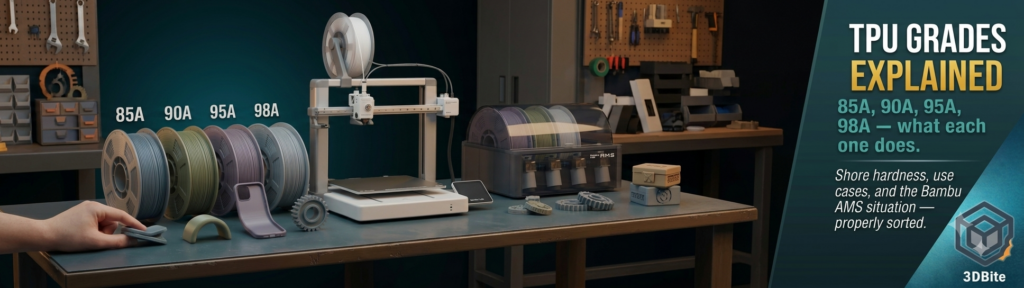
TPU is the material that looks simple until you try to buy it. The spool says TPU. Another says TPU 95A. A third says TPE. A fourth says 85A Shore. A fifth is listed as flexible filament without a number at all. The number matters more than anything else on the packaging, because what you can print with it, how you print it, and what the finished part actually does are all functions of that Shore hardness rating. This post explains what the rating means, what each grade is good for, and the specific considerations for Bambu machines where the usual advice does not fully apply.
What Shore hardness actually measures
Shore hardness is a standardised measurement of how much a material resists being indented by a fixed needle under a fixed load. The test is defined by ASTM D2240 and produces a dimensionless number — the deeper the needle penetrates, the lower the number and the softer the material. The A scale covers elastic materials from very soft rubbers up to firm elastomers. Lower number equals softer material; higher number equals firmer one.
Some reference points to make the scale feel concrete rather than abstract. A rubber band is around 25A. A pencil eraser is approximately 40A. A shoe sole ranges from 50A to 80A. A car tyre tread sits around 70A. The TPU filaments available for desktop FDM printing occupy a narrow window between roughly 85A and 98A — they are all on the firm end of the rubber scale, which is why none of them feel like silicone or latex even at the softest grades.
One important note on the D scale, which appears occasionally on filament packaging alongside or instead of the A scale. Shore D measures harder materials where the A needle would not penetrate meaningfully. The two scales overlap — approximately 100A is roughly 50D — so a filament rated at 68D is firmer than a 95A and in the near-rigid territory that Bambu’s own TPU for AMS occupies. When a listing gives a D rating, convert in your head: it is stiffer than anything in the standard flexible range.
TPU versus TPE: the naming confusion
Thermoplastic Polyurethane (TPU) is a specific polymer type. Thermoplastic Elastomer (TPE) is a broader material family that TPU belongs to, alongside thermoplastic rubber (TPR), SEBS-based elastomers, and several others. All TPU is TPE. Not all TPE is TPU. In the filament market, “TPE” often means a softer, cheaper SEBS-based formulation rather than a polyurethane-based one. TPU tends to have better abrasion resistance, better chemical resistance, and better mechanical properties at elevated temperatures. A filament listed as TPE without further specification is worth checking further before purchasing — the material properties may be quite different from a named TPU grade.
If a listing just says “flexible filament” without a Shore rating or a polymer name, treat it as an unknown quantity. The hardness determines everything about how it prints and how the finished part behaves, and buying without that number is buying without the most important piece of information on the packaging.
The grades: 85A, 90A, 95A, 98A
85A — genuinely soft, genuinely difficult
85A TPU is soft enough that you can squash it noticeably between two fingers without much effort — closer to a thick silicone than a rubber band. Parts printed in 85A bend easily with hand pressure, compress significantly under load, and return to their original shape. This grade is the right choice for applications that specifically need that soft, compliant character: medical-adjacent wearables that need to conform to body contours, vibration-damping mounts that need to absorb shock through compression, gaskets for irregular surfaces where the material must squash and seal rather than press and hold, and custom grips where the softness is the functional property.
The printing reality at 85A is that it is genuinely demanding. The filament is soft enough that it can buckle under the extruder gear pressure before it reaches the nozzle — what the community calls “bird-nesting” in the extruder, where the filament coils on itself in the space between the gear and the hotend rather than feeding through it. Direct drive is not just preferred at 85A; it is the only realistic configuration. A Bowden tube of any significant length gives the flexible filament enough unsupported path to kink and jam before it reaches the hotend. Even with direct drive, speeds need to come right down — 15 to 25mm/s is the documented range where 85A feeds consistently — and retraction should be minimal to zero, since retraction pulls the soft filament backward into a position where it can buckle.
90A — the step softer that most applications actually want
90A has noticeable give without the extreme handling difficulty of 85A. It is the grade that most often describes what users actually picture when they think “flexible filament” — firm enough to hold its shape, soft enough that thin-walled parts bend under moderate hand pressure. This is the correct grade for phone cases where softness is the design intent, soft-touch grips on tools and handles, flexible cable management clips, wearable prints that go on a wrist or strap to a body, and repeatedly-flexed living hinges where 95A would eventually fatigue and crack.
The printing challenges of 90A are reduced from 85A but still real. Direct drive is strongly preferred — some well-tuned direct-drive machines handle 90A reliably, though it requires slower speeds (25-35mm/s) and careful retraction settings. A short Bowden setup — 50mm or less — may work on some hardware at 90A, but longer Bowden paths are not recommended. The filament’s softness still means it will buckle given enough unsupported path length.
95A — the industry standard, and the right starting point for almost everyone
95A is what a listing that just says “TPU” almost certainly is. It is the industry default because it balances genuine flexibility with printability in a way that no softer grade matches. A skateboard wheel or the sole of a boot is roughly 95A — flexible and rubber-like when you bend a thin wall, but firm enough that a solid block of it does not compress significantly under hand pressure. The flexibility in a 95A print comes from the geometry as much as the material: thin walls and Gyroid infill produce a soft, compressible result from 95A; thick walls and high infill produce something that feels like a hard rubber block.
The slicer settings insight is worth naming explicitly because it changes the purchasing calculus. A 95A spool with two perimeters, 10% Gyroid infill, and no top or bottom solid layers can produce a result that feels surprisingly soft — genuinely comparable to what 85A or 90A produces at higher wall counts. You cannot make a single-wall 85A part feel firm with settings. You can make a single-wall 95A part feel noticeably softer than the Shore number suggests, by removing the structural geometry that the infill and walls contribute. The firmness of a 95A print is heavily design-dependent in a way that the raw Shore number does not communicate.
95A prints on a direct-drive machine at moderate speeds — 30 to 45mm/s is the practical sweet spot — with limited retraction. The filament is firm enough that it does not buckle under normal extruder pressure, which is why 95A is the grade where printability stops being the overriding concern and design intent starts being the relevant question. A well-configured direct-drive machine running 95A TPU should not give significantly more trouble than a standard PLA print in terms of feeding and consistency.
98A and above — near-rigid, very forgiving to print
98A feels close to a car tyre tread — you know it is rubber when you squeeze it firmly, but it does not deform noticeably under normal handling. Parts printed in 98A have a characteristic rubbery feel that resists scratching and impact, but they do not bend or compress in the way that lower Shore grades do. This grade earns its place in specific applications: protective housings for electronics where impact resistance matters more than flexibility, parts that need to absorb shock without deforming, gears and wheels for mechanical mechanisms where the slight compliance of TPU reduces noise and impact without the dimensional instability of softer grades, and outdoor parts that need to resist UV and temperature cycling better than PLA.
The printing advantage of 98A is considerable. It behaves much more like a rigid filament than a flexible one in the extruder — the firmness means it feeds cleanly at higher speeds, accepts more normal retraction settings, and works on Bowden setups that would jam with 90A or 85A. If your application genuinely needs 98A’s properties, the printing is not the challenge.
The Bambu machine situation: what the AMS does and does not change
The A1’s direct-drive extruder is the right architecture for TPU, and the A2L’s is the same. Both machines can print 95A reliably when fed from the external spool holder rather than through the AMS Lite. The external spool holder provides a short, direct path from the spool to the toolhead with minimal unsupported filament — exactly the configuration that flexible filament needs.
The AMS Lite is a different situation. The AMS path is long — from the AMS unit, through the buffer, through an extended PTFE tube, to the toolhead. For standard 95A TPU, this path is too long and too indirect for reliable feeding. Flexible filament that compresses in the extruder is pushed back into that extended path rather than feeding forward, and the result is jams, failed loads, and extrusion inconsistency. The guidance across the community is consistent: do not load standard TPU into the AMS Lite on the A1. Feed it directly.
Bambu’s own TPU filament is a specific exception. It is formulated at a firmer grade — approximately Shore 68D, which is harder than 98A and closer to a semi-rigid material — specifically to feed through the AMS path reliably. The result is that Bambu’s TPU can participate in multi-material AMS workflows, automated loading, and RFID profile recognition in ways that standard TPU cannot. The trade-off is that Bambu’s AMS-compatible TPU is the least flexible TPU available for desktop printing — it is better described as a “flex-resistant impact material” than as flexible filament in the sense that 85A or 90A represents. For multi-colour prints where a flexible accent or living hinge is needed alongside rigid colours, it is the correct choice. For applications that specifically need soft compliance, it is not the right material regardless of the AMS convenience.
Printing TPU: settings that actually matter
Drying is the first step and the one most often skipped. TPU absorbs moisture quickly — faster than PETG and comparable to nylon in its sensitivity to humidity. Wet TPU produces stringing, bubbling, surface roughness, and inconsistent extrusion that is easy to mistake for a settings problem. Dry at 50-60°C for four to six hours before the first print and use a drybox during long print runs. If the filament has been sitting in the open or in the AMS for more than a few days, dry it before printing.
Retraction settings are the second area where TPU diverges from rigid filament guidance. Retraction pulls filament backward in the extruder; for flexible filament, that backward pull can cause the filament to compress between the gear and the hotend rather than actually retracting. Start with retraction disabled or at 0.5mm maximum, and increase only if stringing is problematic enough to justify the jamming risk. Some 95A TPU prints well with moderate retraction; some needs essentially none. Test on a small calibration piece rather than a long print before committing to a retraction value.
Speed is the third dial. Flexible filament at speed produces more stringing and less consistent extrusion than the same material at moderate speed, because the melt zone cannot respond fast enough to the extruder’s demands at high flow rates. 30 to 45mm/s for 95A is the practical range on most direct-drive machines. 15 to 25mm/s for 85A and 90A. Going faster is possible with some high-flow hotend setups, but the reliability ceiling for standard machines on flexible filament is lower than for rigid materials and the quality floor drops faster when you approach it.
Infill pattern matters for the final part’s flexibility more than for any other material category. Gyroid or Cross-3D infill patterns allow the part to flex in all directions without the infill creating rigid internal structure. Grid, triangles, and honeycomb patterns create internal geometry that resists compression in specific axes, making the part feel stiffer than the Shore hardness implies. For anything where flexibility is the design goal, Gyroid is the correct infill pattern regardless of grade.
Which grade for which job: the decision table
| Application | Grade | Why |
|---|---|---|
| Gaskets, seals for irregular surfaces | 85A–90A | Needs to compress and conform under light clamping force |
| Medical wearables, body-conforming parts | 85A–90A | Softness reduces pressure points on skin over time |
| Vibration damping mounts | 85A–90A | Energy absorption through compression — firm grades transmit vibration rather than absorbing it |
| Phone cases, soft-touch enclosures | 90A–95A | Visible flex and grip on drop impact without structural failure |
| TPU heat transfer designs (t-shirt printing) | 95A | Irons onto fabric cleanly, flexible enough to survive washing |
| Flexible living hinges | 90A–95A | Survives repeated bend cycles without fatiguing — PLA hinges crack, TPU hinges do not |
| Cable management clips and organisers | 95A | Snaps onto cables and surfaces without cracking; easy to reposition |
| RC car tyres, drone bumpers | 95A | Grip on surfaces, impact absorption, returns to shape after deformation |
| Protective electronics housings | 95A–98A | Impact resistance and scratch resistance without excessive flex that loosens the fit |
| Mechanical gears and wheels requiring low noise | 98A | Slight compliance reduces impact noise; still dimensionally stable enough for mechanical function |
| AMS multi-colour workflow with flexible sections | Bambu TPU (≈68D) | Only grade that feeds reliably through the AMS path on A1 and A2L |
Where to start if you have not printed TPU before
95A from a reputable brand is the correct first purchase. eSUN TPU 95A, Sainsmart Flexible TPU 95A, and Bambu’s own TPU are all well-documented starting points with established community settings. Dry the spool before the first print. Load it from the external spool holder on the A1, not through the AMS. Set speed to 35mm/s, retraction to 0.5mm or off, and infill to Gyroid at 15-20% for a test piece. Print a small calibration model — a flexible cube or a simple hinge — before the intended project.
The settings that work for that first print are the baseline. Only after that baseline is established is it worth adjusting toward faster speeds, trying softer grades, or experimenting with lower wall counts for more compliant results. The principle from every community resource on this material is the same: start at 95A, get it working, then move toward softer grades with the confidence of knowing your machine’s specific behaviour with flexible filament. The reverse — starting with 85A and troubleshooting jams — is the slower and more frustrating path.