Bambu Studio updates arrive regularly and most coverage of them follows the same pattern: paste the changelog, maybe add a subheading or two, publish. It is not very useful if you are trying to work out whether the update is worth installing today or whether it contains anything that will actually change how you print. This post is an attempt to do something more useful — to look at what 2.6.1 Beta actually adds, what the community is saying about it, and which changes are worth your attention if you are a regular A1 user with an AMS.
The headline feature is the Filament Manager, and I will say upfront that it is the one I have been waiting for. If you have ever started a long print and spent the first ten minutes wondering whether the spool you loaded has enough left to finish the job, you will understand immediately why this matters. But there is more to this update than filament tracking, and some of it is genuinely interesting even if it is not front-page news.
First: what version are we talking about?
Bambu Studio 2.6.1.55 is a public beta, released in April 2026 and built on the 2.6.0 public release that shipped shortly before it. Beta releases in Bambu’s cadence are not unstable experiments — they are feature-complete releases that Bambu is inviting users to test before they push them to the wider general release channel. If you are on an older stable version and want any of the features described here, you can download the beta directly from the Bambu Studio GitHub releases page. It installs alongside your existing version without replacing it.
Bambu Studio V2.6.1 Beta is built on V2.6.0 Public Release, with the Filament Manager introduced as a key new feature, along with several improvements and bug fixes. Let us go through what that actually means in practice.
The Filament Manager: finally
This is the feature that earned the most community attention and the one that addresses a frustration that has been logged on the Bambu forum repeatedly over the past two years. The ask was always the same: give us a way to track how much filament is left on each spool, so we can plan prints without having to weigh spools or make educated guesses based on a rough visual estimate of how full the roll looks.
The community had been requesting something like this for a long time. Our extruders know exactly how much filament they have pulled through, and the RFID tags have serial numbers. Why not keep track of the exact amount of filament remaining? Not just the rough guess by timing the RFID chip rotations. That request sat in the suggestion threads for long enough that it started to look like it might never arrive. In 2.6.1, it has.
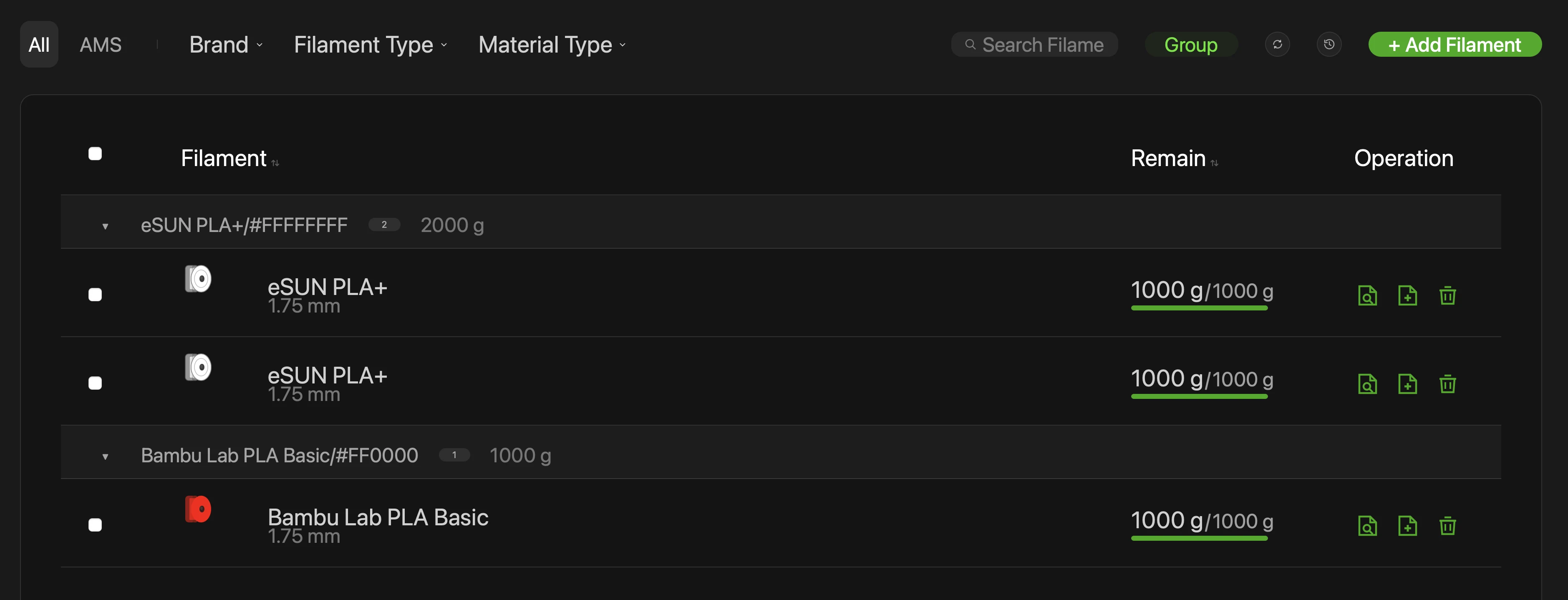
The Filament Manager is designed to manage users’ filament information and usage status. The current version supports viewing, editing, and deleting filaments, with support for search, grouping, and filtering. It can automatically read filament information from AMS, or accept it entered manually.
The practical workflow is straightforward. When you load a spool into the AMS, the Filament Manager reads the filament information automatically if the spool has an RFID tag — as all Bambu Lab spools do. As prints consume filament, the system deducts the used amount from the spool’s recorded total and updates the remaining quantity in the manager. You can also enter filament data manually for third-party spools that do not carry RFID tags, setting the starting weight and letting the system track from there.
The data is stored in Bambu Cloud and synchronised between Bambu Studio and Bambu Handy. This means the remaining amount you see in Bambu Studio on your desktop is the same figure shown in the Bambu Handy app on your phone — useful for checking spool status remotely before starting a job. The one condition to note: filament modifications and remaining amount sync in the Filament Manager are currently only supported when the device is connected to the internet. Offline operation does not update the remaining quantities in real time. For most home users this is not a meaningful limitation, but worth knowing if you run the printer in a network-isolated setup.
Why does this matter specifically? For anyone with a growing collection of partially-used spools — and as I covered in the filament colours post, that is most active users — the question of whether a spool has enough material left for the next job is a constant background concern. Right now the workaround is either weighing the spool on a kitchen scale and subtracting the empty spool weight, or using a rough visual estimate of the roll thickness, or simply starting the print and hoping. The Filament Manager removes that uncertainty and replaces it with a tracked number. It is not glamorous. It is very useful.
The search, grouping, and filtering capability in the manager is worth noting for anyone with a large inventory. Being able to filter by material type, colour, or remaining amount makes it possible to find the right spool quickly across a collection of 20, 30, or 40+ spools without opening every drawer. It is the kind of feature that scales with your collection — increasingly useful as the number of spools grows.
H2C slicer support: significant if you have the machine
A meaningful portion of the 2.6.1 changelog is dedicated to the Bambu Lab H2C — the dual nozzle large-format machine released alongside the X2D earlier in 2026. If you do not own an H2C, these changes are not relevant to your daily workflow, but they are worth noting as context for where Bambu’s development effort is currently focused.
The right extruder of Bambu Lab H2C supports up to 6 nozzles. Its slicing workflow is generally aligned with Bambu Lab H2D, with the following adaptations and optimisations for H2C-specific features. Supports hybrid mode slicing with both high-flow and standard nozzles. Purge mode options allow switching between standard mode and purge saving mode for flushing. In addition to mapping AMS slots, the right extruder supports printing specific filament with designated nozzles. The device page now shows detailed nozzle information and supports reading all nozzle data automatically.
The Filament Track Switcher improvement also has a meaningful practical effect for H2C users. To improve printing efficiency, the retraction target for printers equipped with a Filament Track Switcher has been changed from the AMS to the Filament Track Switcher itself, reducing the retraction distance and saving time during filament loading and unloading. This is exactly the kind of architecture-level efficiency improvement that is invisible in a changelog but meaningful over the course of hundreds of colour changes on a complex print.
H2D Pro: filter mode and air purification
Several improvements in 2.6.1 are specifically for the H2D Pro and require this version as a minimum. If you are on an H2D Pro, these are worth knowing about. If you are not, they explain why Bambu Studio version requirements sometimes jump ahead of what the general user base expects — the slicer version gates certain firmware capabilities.
A filtering option with cooling mode for the adaptive air circulation system has been added. This option can be enabled via the slicer or the printer UI, and is mainly used to filter the air when exhausting the air for low-temperature filaments. Requires Bambu Studio version 2.6.1.55 or above. Added foreign object detection beneath the heatbed. Requires Bambu Studio version 2.6.1.55 or above. Added a Purify Air at Print End option — this will purify the air for 3 minutes after the print is completed. Requires Bambu Studio version 2.6.1.55 or above.
The air purification option is a thoughtful addition. Running the filtration system for three minutes after a print completes addresses the residual VOCs and particulates that are produced as the hotend cools down after printing — a period that is often overlooked in discussions of 3D printer air quality because the active printing phase gets all the attention. For anyone printing in an enclosed space, this is a genuine quality-of-life improvement.
Bug fixes worth knowing about
The bug fixes in 2.6.1 are mostly narrow in scope but a few are worth calling out for the A1 and general X/P series user.
Fixed an issue where slicing could fail for some third-party filaments on X Series and P Series printers when using high-flow presets. This was an irritating edge-case failure that produced a slicing error without a clear indication of the cause — not a crash, just a refusal to complete. If you run third-party filaments on an X1C or P1S and have hit unexplained slicing failures, this fix may resolve them.
Several compatibility preset issues for the A1 Mini, P2S, X1E, and H2D were addressed in this release, covering both filament presets and process presets that were producing incorrect or incompatible settings in certain configurations. These are the kind of fixes that do not generate excitement but prevent subtle quality issues that can be hard to diagnose when they originate in a preset rather than a user setting.
What the community is actually saying
The forum thread for the 2.6.1 beta is fresh — it was posted within the last day or two at time of writing — so the community feedback is still accumulating. The early response to the Filament Manager has been broadly positive, with users who have been requesting this feature for months noting the arrival with something approaching relief rather than excitement. It is the kind of feature that people stop asking for once it exists rather than actively celebrate.
There is a standing frustration in the community around how Bambu’s AMS estimates filament remaining on non-Bambu spools — the existing estimate uses RFID rotation counting for Bambu spools and effectively nothing reliable for third-party spools. Bambu Lab spools track remaining filament by deducting the amount of filament extruded and purged after every print from the starting length, which gives a reasonable but imperfect estimate. The Filament Manager’s manual entry capability for third-party spools addresses this at the software level by letting you set a known starting weight and track from there — the printer knows how much it has consumed, and the manager does the subtraction. It is not the hardware-level automatic tracking that some community members have requested, but it is a meaningful improvement over the previous situation of having no tracking at all for non-RFID spools.
One critical voice on the forum noted that a power limit change introduced in 2.6.0 appeared to restrict certain operations that were previously accessible — suggesting some gcode is now being generated with the expectation of firmware that has not yet been released publicly. This is a known pattern in Bambu’s release cadence: slicer updates occasionally gate features behind firmware versions that ship slightly later. It is not a major issue, but it explains occasional forum posts reporting unexpected behaviour after a slicer update when the corresponding firmware has not yet arrived.
Should you install the beta?
Bambu’s public betas are generally stable. They go through internal testing before public release, and the “beta” label in Bambu’s context means “we want community validation before we push this to everyone” rather than “this is experimental and may break your printer.” The vast majority of users who install Bambu betas do not encounter meaningful issues.
For the Filament Manager alone — if you print regularly and have ever had the experience of a print failing partway through because the spool ran out — installing 2.6.1 is worth doing. The feature addresses a gap that has been present since the beginning of the AMS workflow and the implementation, from the changelog description, is practical rather than token.
If you are an A1 or P1S user primarily and none of the H2C or H2D Pro features apply to your setup, the calculus is simpler: Filament Manager is useful, the bug fixes are welcome, and the rest of the update is infrastructure. There is no reason not to update. Download from the Bambu Studio GitHub releases page, install, and let the Filament Manager read your loaded spools on first launch.
If you run a modified or LAN-only setup without cloud connectivity, the Filament Manager’s cloud dependency for remaining amount sync is worth knowing about before you update. The rest of the slicer functions normally without internet access — it is specifically the filament tracking sync between Studio and Handy that requires the cloud connection.
The broader picture
Looking at 2.6.1 in the context of Bambu’s recent release cadence, a pattern is visible. The 2.5.x series added colour mixing and X2D support. The 2.6.0 release was a hotfix for a specific P2S thermal issue. The 2.6.1 beta is the first feature-forward release in this cycle, and its headline feature is workflow management rather than new print capability. The Filament Manager is infrastructure — it makes the experience of managing an active print collection better without changing anything about how prints are made.
That is not a criticism. Infrastructure improvements in a maturing ecosystem are the right thing to be adding at this stage. The print quality ceiling on Bambu machines is already high. The friction in daily use increasingly comes from management tasks — tracking filament, monitoring print health, coordinating between the slicer and the app — rather than from limitations in the printing itself. Updates that address that friction are more useful to most active users than another speed increase or a new support algorithm.
The Filament Manager is not the feature that will appear in a highlight reel. But it is the feature that will quietly improve a small decision that every active printer owner makes multiple times a week. That is worth more than its changelog entry suggests.