
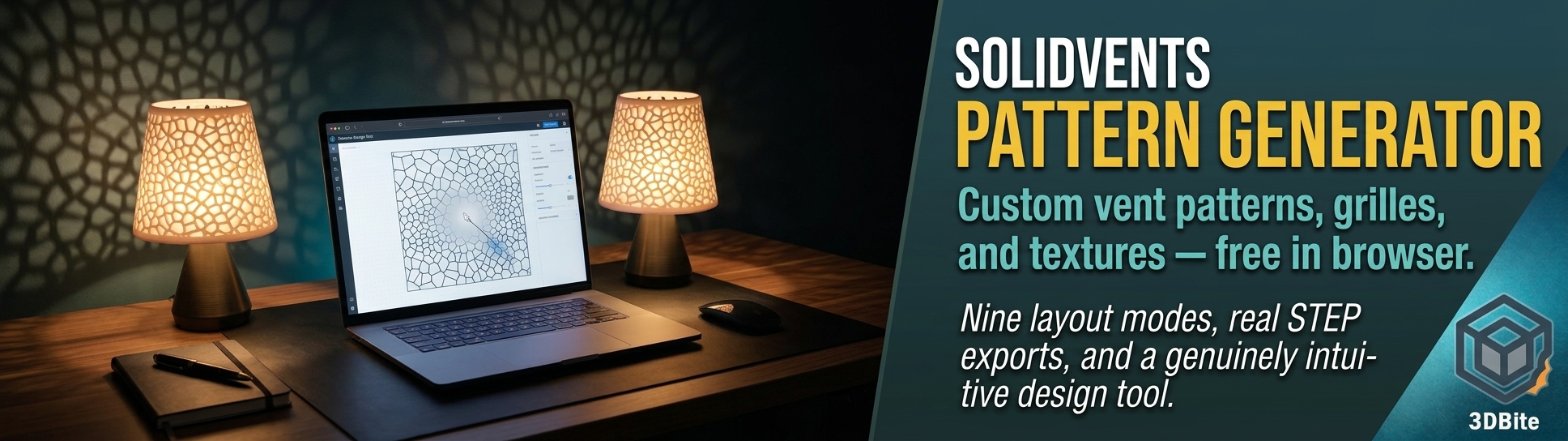
The exposed-infill technique covered in the texturing post uses whatever pattern happens to be sitting in the slicer’s infill library — Gyroid, Grid, Honeycomb, whatever geometric shape the slicer ships with. That works, but it is genuinely limiting if you want a specific pattern with a specific density gradient, a speaker grille that tapers from open to closed across its face, or a Voronoi cell lattice that follows a particular boundary shape rather than whatever the slicer’s built-in algorithm produces. SolidVents is a free, browser-based tool built specifically for this problem, and it is a genuinely well-built piece of software worth knowing about if pattern-based surfacing is something you want more control over than the slicer alone offers.
What it actually is
SolidVents is a parametric pattern generator built by an independent designer, Yoshi Chen, working with a frontend developer — a small, focused project rather than a large software company’s product. It runs entirely in the browser, requires no install and no account for the free tier, and its entire purpose is generating vector patterns — grilles, ventilation holes, halftone textures, decorative arrays — that export cleanly into formats other software can actually use. For 3D printing specifically, that means exporting a genuine STEP solid rather than just a flat SVG, which you can then extrude, wrap around a curved surface, or boolean into an existing model directly inside Fusion 360, Bambu Studio’s CAD-adjacent workflow, or whatever CAD package you use.
The core interaction model is what makes it genuinely pleasant to use rather than just functional. The canvas itself is the control panel — you drop a point, line, or curve directly onto the canvas and it becomes a gradient source. Size, spacing, angle, and rotation of every hole or element in the pattern all follow that controller, and dragging it redraws the whole pattern live under your cursor. This is a meaningfully more intuitive way to control a parametric pattern than the numeric sliders most CAD pattern tools rely on — you are directly manipulating the gradient source visually rather than typing numbers into fields and waiting for a preview to catch up.
Nine layout modes, one shared control system
This is the detail that separates SolidVents from a simple hole-array generator. It supports nine distinct layout modes — random scatter, grid, path-following, spiral, concentric, Fibonacci, cross-hatch, Voronoi stone-crack patterns, and a genuinely unusual Flow Lines mode — and critically, every mode reads the same boundary shape and the same gradient controllers you have already set up. Switching between layouts is a single click rather than starting the design over, because the underlying parametric logic is shared across all nine.
Flow Lines mode deserves a specific mention because it is doing something genuinely different from the other eight. Rather than generating a field of individual holes, it turns every hole into one continuous line of varying width, with the same gradient controllers remapping to different properties — size now drives line width, spacing drives density, angle drives how the lines bend. This is where moiré ripple effects, contour-map-style patterns, and the wavy album-cover-style textures come from, and it is a genuinely distinctive capability that most competing pattern tools do not offer at all.
The halftone-from-photo feature
This connects directly to the texturing techniques covered in the earlier post — specifically the photo-to-displacement method for replicating real materials. SolidVents does something related but distinct: upload any image, and its brightness values drive the pattern directly. Dark areas of the source image open into larger holes; light areas close down toward solid. The same brightness map can simultaneously drive hole spacing, rotation, or even morph the hole shape itself across the image. Because this is genuinely parametric rather than an AI-based image conversion, every individual value in the resulting pattern stays fully editable afterward — you are not locked into whatever the algorithm produced on the first pass, unlike the automated relief-texture generators mentioned in the texturing post that tend to produce a fixed result you either accept or regenerate from scratch.
Export formats: the part that actually matters for printing
Most browser-based pattern generators stop at SVG, which is fine for laser cutting or graphic design but leaves a genuine gap for anyone wanting to apply a pattern to a curved or three-dimensional surface for printing. SolidVents exports three formats from the same design: SVG for Illustrator, Figma, and laser cutting; DXF for AutoCAD and CNC sheet-metal work; and — the one that matters most here — a genuine STEP solid file that opens natively in Fusion 360, SolidWorks, CATIA, Inventor, or Rhino. That STEP export is a real 3D solid rather than a flat pattern that needs tracing or reconstructing once it lands in CAD, which removes an entire manual modelling step from the workflow described in the exposed-infill section of the texturing post.
For a dense pattern with a very large hole count, importing the whole thing as a single CAD solid can genuinely bog down a workstation. SolidVents addresses this directly with an “STP Split” option that divides a dense pattern into several smaller blocks before export, keeping the CAD software responsive rather than choking on tens of thousands of individual features in one solid body.
Where 3D printing specifically fits among its use cases
The site’s own use-case gallery is genuinely broad — automotive grilles, footwear tread patterns, product design vents, architectural facade screens, laser cutting templates — and 3D printing sits explicitly among them, described directly on the site as: export a STEP solid, extrude or wrap it in your CAD of choice, then slice and print. This is exactly the workflow that suits a lampshade with a Voronoi cell lattice, a speaker grille for a printed enclosure project, or a decorative panel with a custom density gradient rather than whatever geometric infill pattern the slicer happens to offer natively.
The Reddit launch thread reception, quoted directly on SolidVents’ own site, gives a genuine sense of how the 3D printing community specifically responded to it. One commenter, currently printing shoe soles, called it the answer to a problem they had been having a terrible time solving in CAD directly. Another flagged it as ideal for a 120mm fan case project — the kind of functional ventilation pattern that this exact tool is purpose-built for. A third suggested it would make an excellent FreeCAD extension, which speaks to how naturally the tool’s output fits into an existing parametric CAD workflow rather than existing as a standalone gimmick.
Pricing: genuinely free, with a sensible paid tier
Every layout mode, every gradient control, custom shape tools, and all three export formats are available free, with a limit of three exports per day that resets at midnight UTC. For most one-off design tasks — designing a single grille pattern, working out a texture for one specific project — the free tier’s three exports a day is entirely adequate. The Pro tier at $49 per year removes the export limit entirely and unlocks shape morphing, the STP Split feature for dense patterns, a cloud repository for saving and syncing designs across devices, and access to a marketplace of additional presets. For anyone using this regularly across multiple projects, £40 a year is a reasonable price for a genuinely capable piece of software built by a small independent team rather than a large company charging subscription rates for a fraction of the capability.
A practical note on getting the STEP file into your slicer
Neither Bambu Studio nor OrcaSlicer opens STEP files directly — both are mesh-based slicers expecting STL, 3MF, or OBJ geometry rather than the parametric solid format that STEP represents. The workflow is: design the pattern in SolidVents, export as STEP, open that STEP file in a CAD package (Fusion 360’s free tier handles this comfortably), boolean or wrap the pattern onto your model there, export the result as an STL or 3MF, and then bring that into Bambu Studio as normal. It is an extra step compared to picking Gyroid from the slicer’s infill dropdown, but for a genuinely custom pattern with the kind of density gradient or boundary-following behaviour SolidVents produces, that extra CAD step is where the real design work actually happens — the slicer was never going to do that part regardless of which pattern generator fed it.
Worth trying
For anyone who has found the exposed-infill technique from the texturing post appealing but limited by the slicer’s own built-in pattern library, SolidVents is worth genuinely trying rather than filing away as a bookmark. The free tier costs nothing and requires no installation, the interaction model is intuitive enough to get a usable result within the first few minutes, and the STEP export means the output slots directly into whatever CAD workflow already feeds your printer. This is one of those tools that quietly closes a specific, real gap in the 3D printing design toolkit rather than promising something more sweeping than it delivers — and the Reddit reception it got at launch suggests plenty of other people in this exact hobby had been waiting for something like it without quite knowing the gap had a name.
SolidVents is at solidvents.com, with a tutorial, pattern library, and full FAQ available directly on the site.

The STEP export is the actual unlock, not the canvas. SVG is enough for a laser, but a density-gradient grille on a curved enclosure is a boolean in Fusion, not a slicer infill pick — Bambu and Orca will never open STEP, so that extra CAD hop is real. I keep hitting this on speaker grilles and lampshades: exposed gyroid looks fine until you need a specific boundary and a taper from open to closed. Flow Lines is the mode I did not expect to want; remapping size to width and spacing to density is closer to a contour map than a hole array, and it is the one thing I cannot fake with a slicer library. On dense Voronoi panels, STP Split is not optional if Fusion is going to stay responsive. For printable parts I generate as STLs (luphra.com), this is the missing step between a prompt-built body and a vent/texture that is actually designed rather than whatever infill the slicer had on hand.